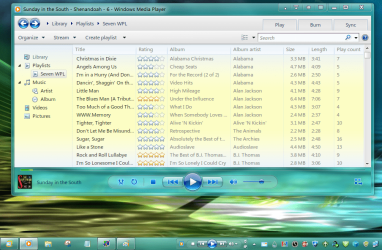
Windows 7 Forums


Windows 7: Change background in WMP 12 in "Playing Now" mode

23 Apr 2011   #1
Cov

Windos 7 x64
Europe
 
 
Change background in WMP 12 in "Playing Now" mode

Hi,

sometimes small things can be a big challenge.
I'm looking to change the background of Windows Media Player 12 in NOW PLAYING mode into pitch black.
Have searched high and low, but meh ...

any ideas please?

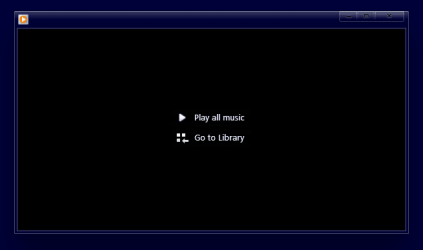
Attached Thumbnails
Change background in WMP 12 in "Playing Now" mode-wmp-12.png  
My System SpecsSystem Spec

23 Apr 2011   #2

Windows 7 Professional 32-bit (6.1, Build 7600)
A l a b a m a


Quote   Quote: Originally Posted by Cov View Post
Hi,

sometimes small things can be a big challenge.
I'm looking to change the background of Windows Media Player 12 in NOW PLAYING mode into pitch black.
Have searched high and low, but meh ...

any ideas please?
What are you using to edit WMP? In the past, I have changed a lot of elements in WMP but have reverted back to the original with just some minor changes. I did leave the change I made for the Taskbar toolbar. After registering the dll for that, the Taskbar toolbar was a black image and clashed with my taskbar. Personally, I like the WMP 11 look better but after getting it to work, CPU tended to run a little higher.

Change background in WMP 12 in "Playing Now" mode-untitled.png

I have tossed all my notes I had at one time on what each element that I changed was. Looking at wmploc.dll with Resoruce Hacker, 257 > 5321 looks similar.
My System SpecsSystem Spec
23 Apr 2011   #3

Windows 7 Ultimate x64 (main), Windows 8 Consumer Preview x64


Found this on deviantART.

change the wmp background by ~yacine29 on deviantART

I haven't tried it myself though. For the pitch black background, you can probably just make one at paint.
My System SpecsSystem Spec
.


23 Apr 2011   #4

Windows 7 Professional 32-bit (6.1, Build 7600)
A l a b a m a


Quote   Quote: Originally Posted by ziklz View Post
Found this on deviantART.

change the wmp background by ~yacine29 on deviantART

I haven't tried it myself though. For the pitch black background, you can probably just make one at paint.
Ah, so it was the 5321. The link mentions it as being .jpg. Way back when tinikering with this stuff, I could have sworn the image was .png. More than likely, it wouldn't matter either way though.
My System SpecsSystem Spec
24 Apr 2011   #5
Cov

Windos 7 x64
Europe


Quote   Quote: Originally Posted by ziklz View Post
Found this on deviantART ...
Thank you very much !!
That's exactly what I was looking for


Change WMP Background

1. take control over wmploc.dll
2. open resource tuner* or resource hacker*
3. open windows ► system32 ► wmploc.dll ► 257 ► 5321 (within RT or RH)
4. Replace resource with any JPG 800 x 600
5. Save to different location
6. Close RT or RH, navigate to the storage folder and move to system32 folder
My System SpecsSystem Spec
24 Apr 2011   #6
Cov

Windos 7 x64
Europe


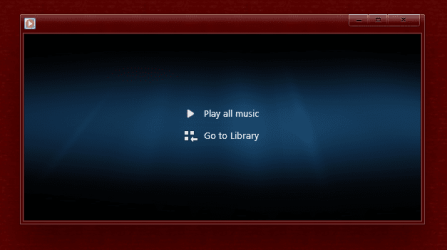
Result
Attached Thumbnails
Change background in WMP 12 in "Playing Now" mode-wmp-12-after.png  
My System SpecsSystem Spec
Reply

 Change background in WMP 12 in "Playing Now" mode problems?


Thread Tools


Similar help and support threads for: Change background in WMP 12 in "Playing Now" mode
Thread Forum
BSOD "Bad Pool Header" and "Page In Nonpage Area" Runs in Safe Mode BSOD Help and Support
Solved How do i change background's "my computer" Themes and Styles
"Blinking" windows while playing in Window Mode, saving Favs in Chrome Gaming
Change some folders to "Medium Icons" mode Customization
Re-do cover selection on "Now Playing" background? Media Center


All times are GMT -5. The time now is 11:47 PM.


Windows 7 Forums is an independent web site and has not been authorized,
sponsored, or otherwise approved by Microsoft Corporation.
"Windows 7" and related materials are trademarks of Microsoft Corp.
© Designer Media Ltd