Windows 7 Forums


Windows 7: Unable to change Wecome Screen Photo/Icon

19 May 2011   #1

Windows 7 Pro
Gahanna, Ohio
 
 
Unable to change Wecome Screen Photo/Icon

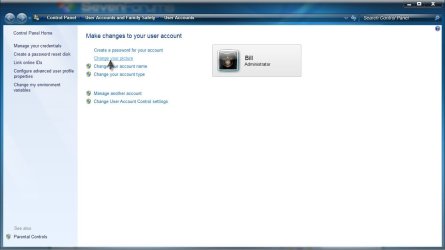
Clicking on Start Menu then clicking on small photo at top of Start Menu takes me to User Accounts (as does going to Control Panel/User Accounts), clicking on “Change Your Picture” I select a different photo. The photo changes at the top of the Start Menu but on shutdown and boot up the previous photo is the same. In what folder is the selected photo stored? I believe I copied a photo and renamed it Welcome.jpg but searching my hard drive I cannot find this file. Any ideas how to fix this problem so that the small selected photo at the top of the start menu is he same on the Welcome Screen? Thanks.

My System SpecsSystem Spec

21 May 2011   #2

Windows 7 Home Premium x64 SP1
Bay Area Peninsula


The default pictures are stored in C:\ProgramData\Microsoft\User Account Pictures\Default Pictures

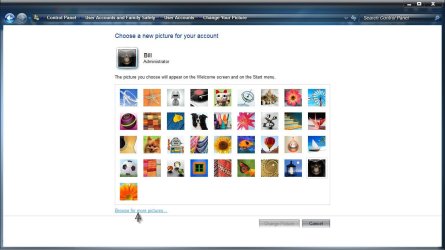
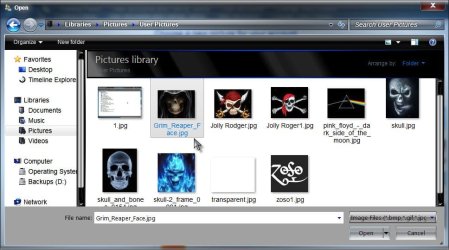
You can either store the image you want in C:\ProgramData\Microsoft\User Account Pictures , or when you choose the user picture, just browse to the location you save the picture to (the pictures library for instance).

Unable to change Wecome Screen Photo/Icon-change.jpg

Unable to change Wecome Screen Photo/Icon-browse.jpg

Unable to change Wecome Screen Photo/Icon-users.jpg

I actually have removed my user picture using the NoUserPicture.exe

Remove User Picture from Start Menu

A Guy
My System SpecsSystem Spec
21 May 2011   #3

Windows 7 Pro
Gahanna, Ohio


Does NoUserPicture.exe remove the welcome screen photo? The photo I use is in a photo folder and not the path described above. I have removed the photo and it still remains on the welcome screen. I can change the start menu photo but this action does not change the welcome screen photo. I believe the start menu photo automatically is suppose to be the welcome screen photo.

Last edited by Indian; 04 Jun 2011 at 12:53 PM..
My System SpecsSystem Spec
.


04 Jun 2011   #4

64-bit Windows 7 Ultimate SP1 & Windows 8 Enterprise
Texas


Hello Indian,

Double check using the tutorial below to make sure that the size of the image that you used is the correct size.

User Account Picture - Change

Did you modify or set any custom settings for the user display picture like below to set a default one for all users?

User Logon Display Picture - Set Default for All Users - Vista Forums
My System SpecsSystem Spec
Reply

 Unable to change Wecome Screen Photo/Icon problems?


Thread Tools


Similar help and support threads for: Unable to change Wecome Screen Photo/Icon
Thread Forum
Unable to change folder icon Customization
win 7 hang after wecome screen for 5 to 10 mins randomly General Discussion
No show desktop and switch screen,unable to drag icon to quicklaunch.. General Discussion
Need Help | Unable to change Icon color like theme Themes and Styles
Can you change the size of the Icon at the Log On screen? Customization


All times are GMT -5. The time now is 01:18 PM.


Seven Forums Android App Seven Forums IOS App Follow us on Facebook

Windows 7 Forums is an independent web site and has not been authorized,
sponsored, or otherwise approved by Microsoft Corporation.
"Windows 7" and related materials are trademarks of Microsoft Corp.
© Designer Media Ltd
  

1 2 3 4 5 6 7 8 9 10 11 12 13 14 15 16 17 18 19 20 21 22 23 24 25 26 27 28 29 30 31 32