How to set a picture as a desktop object ?

knk17forever

New member
Hi,

I have only ever owned windows xp home, xp professional, and now windows 7 premium 64 bit.

When I had xp I remember there was a way that I could set pictures as desktop objects. So that I could put multiple pictures on my desktop and size them and position them as I wanted.

Any know if this possible on windows 7 64 bit premium as well ? ...and how to do it ?

Thanks.
 

My Computer

Computer Manufacturer/Model Number
Acer Aspire M3910
OS
Windows 7 Premium 64 bit
CPU
Intel 870 quad core
Motherboard
Acer
Memory
4g
Graphics Card(s)
320 gt nvidia geforce
Sound Card
Realtek
Monitor(s) Displays
Acer P236H
Screen Resolution
1920 x 1080
Hard Drives
450 GB Sata 7200 RPM
PSU
Not sure is 250, 300 or 350 watt Acer OEM, needs upgrading.
Case
Acer M3910
Cooling
Air cooled... Coolmaster for cpu.
Keyboard
Acer USB Keyboard... made in China :)
Mouse
Acer USB optical mouse... made in China :)
Internet Speed
Get upto 4Mbps download and .7Mbps download :(
Other Info
Need to upgrade my PSU, and graphics card for sure and a faster internet service... I would also like to make my computer as silent as possible... and to get wireless keyboard, mouse, headphones, speakers and mic... may wait till its time to get a new computer though and build one myself :)
When you find the picture you want for your desktop right click on it and there shoud be a message to allow you to set it as desktop.

Will test and see if that works for me.
 

My Computer

Computer Manufacturer/Model Number
HP M9077c
OS
Windows 7 Home Premium 64bit
CPU
Intel(R)Core(TM)2 quad [email protected] 2.39GHz
Motherboard
ASUSeK
Memory
6GB DDR2 6400
Graphics Card(s)
GeForce 8500/512MB
Sound Card
Realtek High Def Audio
Monitor(s) Displays
HP w2408 LCD 24" widescreen
Screen Resolution
1920x1200
Cooling
6 pack of Bud
Keyboard
MS wireless Inteli
Mouse
MS wireless Inteli
This facility was part of the active desktop that was discontinued when XP was superseded by Vista, due to serious security concerns. the function may be duplicated to some extent by the use of desktop gadgets
 

My Computers

System One System Two

  • Computer type
    PC/Desktop
    Computer Manufacturer/Model Number
    ChillBlast - Custom to my design
    OS
    Windows 11 Pro x64 [Latest Release and Release Preview]
    CPU
    Ryzen 9 5950X, 3.8 - 5.2 MHz
    Motherboard
    Asus Prime X570-Pro
    Memory
    64GB [2 x 32GB] DDR4 3200MHz
    Graphics Card(s)
    4GB NVIDIA GEFORCE GTX 1650 Ti
    Sound Card
    On-board SPDIF to 5.1 System + HDMI [5.1 system]
    Monitor(s) Displays
    32" UHD 32 Bit HDR Monitor + 43" UHD 4K 32Bit HDR TV
    Screen Resolution
    2 x 3840 x 2160 @60Hz
    Hard Drives
    1TB M2 SSD OS, 500GB Fast Access SSD, 2 x 8TB Data + Various Externals from 1TB to 4TB, 10TB NAS
    PSU
    NZXT C750 80 PLUS Gold 750W Modular PSU
    Case
    Workstation Case [Matt Black]
    Cooling
    NZXT Kraken X63 280mm CPU Cooler +2x Quiet Case fans
    Keyboard
    Logitech Wireless MX Keys & K400 + others
    Mouse
    Logitech Wireless MX Master 3S
    Internet Speed
    920 MB Down 50 MB Up
    Antivirus
    BitDefender Total Security Pro
    Browser
    Chrome (always run latest Non-Beta)
    Other Info
    Also run ...
    Laptop - Quad 8GB - Windows 10 Pro x64
    Nexus 7 Android tablet x2
    Samsung 10.2" tablet
    Blackview TAB 8 4G Android Tablet c/w Keyboard
    Wacom Intuos Pro Medium Pen Pad
    Wacom Intuos Pro Small Pen Pad
    Wacom Expresskeys Remote
    Loopdeck+ Graphics Controller
    Shuttle Pro v2 Control
  • Computer type
    Laptop
    System Manufacturer/Model Number
    Dell XPS 17 10750H
    OS
    Windows 11 Pro x64 Latest RP
    CPU
    Intel I7 10750H 5.0GHz
    Motherboard
    Dell XPS
    Memory
    32GB [2x16GB] DDR4 2933 MHz
    Graphics Card(s)
    nVidia GTX1650Ti 4 GB GDDR6
    Sound Card
    Stock [Realtek] 4 Speaker
    Monitor(s) Displays
    17" IPS UHD+ Infinity Edge Touchscreen
    Screen Resolution
    3840 x 2400
    Hard Drives
    2TB M2 NVMe, 4TB External + various 500GB & 1TB External NVMe (also have access to spinner HDD from
    PSU
    Stock
    Case
    Stock XPS Aluminium & Carbon Fibre
    Cooling
    Stock - Active Fan Control
    Keyboard
    Backlit + Various Logitech
    Mouse
    Stock Track Pad + Logitech MX Trackball
    Internet Speed
    72 MB Down 18MB Up
    Browser
    Chrome
    Other Info
    Also run ...
    Laptop - Quad 8GB - Windows 10 Pro x64
    Nexus 7 Android tablet x2
    10.2" tablet
    Sony Z3 Android Smartphone
    Wacom Intuos Pro Medium Pen Pad
    Wacom Intuos Pro Small Pen Pad
    Wacom Expresskeys Remote
    Loopdeck+ Graphics Controller
    Shuttle Pro v2 Control Pad
    10TB NAS
Go to my pictures and highlight your picture then right click on in ...Set as Desktop background...
 

My Computer

Computer Manufacturer/Model Number
HP M9077c
OS
Windows 7 Home Premium 64bit
CPU
Intel(R)Core(TM)2 quad [email protected] 2.39GHz
Motherboard
ASUSeK
Memory
6GB DDR2 6400
Graphics Card(s)
GeForce 8500/512MB
Sound Card
Realtek High Def Audio
Monitor(s) Displays
HP w2408 LCD 24" widescreen
Screen Resolution
1920x1200
Cooling
6 pack of Bud
Keyboard
MS wireless Inteli
Mouse
MS wireless Inteli
Go to my pictures and highlight your picture then right click on in ...Set as Desktop background...

I know how to do that.

If you read my post I am not talking about setting it as a background but setting pictures on my desktop that can be moved around and re-sized.

But thanks.

I suppose I will have to try finding a gadget or make my own image by adding pictures to it and then setting it as a background.

Thanks everyone for your replies.
 

My Computer

Computer Manufacturer/Model Number
Acer Aspire M3910
OS
Windows 7 Premium 64 bit
CPU
Intel 870 quad core
Motherboard
Acer
Memory
4g
Graphics Card(s)
320 gt nvidia geforce
Sound Card
Realtek
Monitor(s) Displays
Acer P236H
Screen Resolution
1920 x 1080
Hard Drives
450 GB Sata 7200 RPM
PSU
Not sure is 250, 300 or 350 watt Acer OEM, needs upgrading.
Case
Acer M3910
Cooling
Air cooled... Coolmaster for cpu.
Keyboard
Acer USB Keyboard... made in China :)
Mouse
Acer USB optical mouse... made in China :)
Internet Speed
Get upto 4Mbps download and .7Mbps download :(
Other Info
Need to upgrade my PSU, and graphics card for sure and a faster internet service... I would also like to make my computer as silent as possible... and to get wireless keyboard, mouse, headphones, speakers and mic... may wait till its time to get a new computer though and build one myself :)
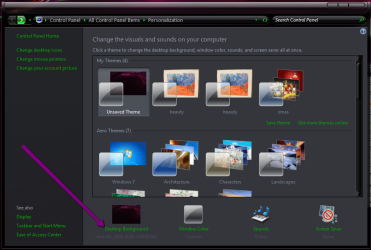
you could select a folder to show several images as your background ,click change background then just browse to the folder, and set it to change the pictures at the required time interval you wish to rotate them at
2011-06-11_2023.png 2011-06-11_2022.png
 

My Computer

Computer Manufacturer/Model Number
Hewlett packard/p6512uk
OS
Microsoft Windows 7 Home Premium 64-bit 7600
CPU
IIx4 amd athelon 635 processor
Motherboard
FOXCONN 2AA9
Memory
2x2gb
Graphics Card(s)
ati radeon HD 5450
Sound Card
(1) Realtek High Definition Audio (2) AMD High Definition
Monitor(s) Displays
samsung lcd tv 32"
Screen Resolution
1360x 768
Hard Drives
(1) WDC WD10 01FAES-60Z2A0 SATA Disk Device (2) Maxtor OneTouch USB Device (3) ST310003 33AS USB Device (4) WD My Book 1111 USB Device
PSU
?
Cooling
air!
Keyboard
wireless hp
Mouse
wireless Hp,optical
Internet Speed
1.10mb/s
Antivirus
MSE
Browser
Firefox
Back
Top