Windows 7 Forums


Windows 7: How:change color of adress bar,progress bar in chunks,access Adv set?

19 Jun 2011   #1

XP,Windows 7 Home Basic
 
 
How:change color of adress bar,progress bar in chunks,access Adv set?

I have a query regarding how change colour of address bar as shown in pic.i tried reshack on .msstyles but dont know which fle to patch or change Hex code.


secondly i also want solution to access Advance setting in .msstyles so that i dont have change these setting every time i apply visual style.For e.g. how can i change selected item colour by patching .msstyles,font etc.


A program called "Ave's Windows Style Builder" can be used for this purpose buy i don't know about how to operate.


Is it possible to make progress bar look like in chunks(XP) rather than a single stripe(windows 7).i tried the method of using small image but can't help.

What r the changes have to made in .msstyles file?


My System SpecsSystem Spec

19 Jun 2011   #2

Win 7 Pro x64
Council Bluffs, Iowa


Are you are using the default aero theme?
Do you have Ave's Windows Style Builder if so I can get you started.
Jerry
My System SpecsSystem Spec
20 Jun 2011   #3

XP,Windows 7 Home Basic


Code:
Are you are using the default aero theme?
Do you have Ave's Windows Style Builder if so I can get you started.
Jerry

I'm using windows 7 basic theme No aero.

any help would be appreciated.
My System SpecsSystem Spec
.


20 Jun 2011   #4

Win 7 Pro x64
Council Bluffs, Iowa


Quote   Quote: Originally Posted by vipz10 View Post
I'm using windows 7 basic theme No aero.

any help would be appreciated.
First buy Ave's Windows7 Style Builder
Then look at this Post #38 will show how to get ready to start a new theme
Start menu color change ??
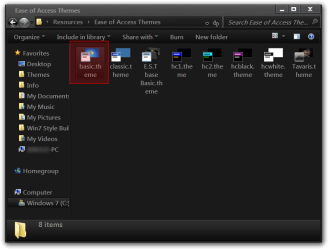
Plus you will need a copy of basic.theme from C:\Windows\Resources\Ease of Access Themes
How:change color of adress bar,progress bar in chunks,access Adv set?-ease-access-themes.png
And repeat steps #3, 4, 5 in post #38 with the basic.theme
after you get all of this done then you can start editing the .msstyles with Ave's Windows Style Builder and a image editor like Photoshop, Gimp, Paint.net, etc.
After purchasing Ave's Windows Style Builder they have an excellent forum that you can join with all kinds of information and locations to help you out.
Let me know if I can be of more help.
Jerry
My System SpecsSystem Spec
20 Jun 2011   #5

XP,Windows 7 Home Basic


actually this is not what i want but thanks for ur effort

the file i'm working on is aero.msstyles as windows basic doesn't support themes i changed the name of x.msstyles to aero.msstyles and place it in the "theme" folder.

i don't want to use Ave's Windows Style Builder and this can be done by editing hex files.
My System SpecsSystem Spec
20 Jun 2011   #6

Win 7 Pro x64
Council Bluffs, Iowa


Quote   Quote: Originally Posted by vipz10 View Post
actually this is not what i want but thanks for ur effort

the file i'm working on is aero.msstyles as windows basic doesn't support themes i changed the name of x.msstyles to aero.msstyles and place it in the "theme" folder.

i don't want to use Ave's Windows Style Builder and this can be done by editing hex files.
This has a 30 day trial Restorator - Bome Software - Restorator - the resource editor for customization, localization, and translation. it can edit aero.msstyles I can give you the image numbers if that helps.
Jerry
My System SpecsSystem Spec
20 Jun 2011   #7

XP,Windows 7 Home Basic


i have used Restorator,Reshack,Resourcer,So my Q is what to change.

As mentioned in OP for first two cases i don't know which image number has to changed.

in third case i replace 690.png-697.png with small images but after doing this it stop showing any progress bar(copying,moving,capacity bar). So i revert back to original size images and now it shows like this:

My System SpecsSystem Spec
21 Jun 2011   #8

Win 7 Pro x64
Council Bluffs, Iowa


Are you trying to edit a custom theme? If so post a link and I can give you the numbers. When a theme is made with WSB it changes the numbers.
Because image #690, 697 are not the progress bars in the default/original aero.msstyles
Jerry
My System SpecsSystem Spec
21 Jun 2011   #9

XP,Windows 7 Home Basic


i modify following theme to royale blue

Windows 7 Basic Black by ~cryeR on deviantART

now i come to know that this cannot be done by just replacing .png images.it needs to patch some.res files inside .msstyles.
My System SpecsSystem Spec
21 Jun 2011   #10

Win 7 Pro x64
Council Bluffs, Iowa


Quote   Quote: Originally Posted by vipz10 View Post
i modify following theme to royale blue

Windows 7 Basic Black by ~cryeR on deviantART

now i come to know that this cannot be done by just replacing .png images.it needs to patch some.res files inside .msstyles.
I will look at it.
You can just replace .png. What patch of .res are you talking about.
Jerry
My System SpecsSystem Spec
Reply

 How:change color of adress bar,progress bar in chunks,access Adv set? problems?


Thread Tools


Similar help and support threads for: How:change color of adress bar,progress bar in chunks,access Adv set?
Thread Forum
When Changing Window color only taskbar color change>>!! HeLp Customization
Color Change Graphic Cards
changing progress bar color Customization
color change? Themes and Styles
Progress bar color -- how to change? Customization


All times are GMT -5. The time now is 10:42 AM.


Seven Forums Android App Seven Forums IOS App Follow us on Facebook

Windows 7 Forums is an independent web site and has not been authorized,
sponsored, or otherwise approved by Microsoft Corporation.
"Windows 7" and related materials are trademarks of Microsoft Corp.
© Designer Media Ltd
  

1 2 3 4 5 6 7 8 9 10 11 12 13 14 15 16 17 18 19 20 21 22 23 24 25 26 27 28 29 30 31 32