Windows 7 Forums Search
Welcome to Windows 7 Forums. Our forum is dedicated to helping you find solutions with any problems, errors or issues you are experiencing with Windows 7. The Windows 7 forum also covers news and updates and has an extensive Windows 7 tutorial section that covers a wide range of tips and tricks.


Windows 7 - Change Shutdown / Restart / buttons

 
07-07-2011   #1


Windows 7 Ultimate x64


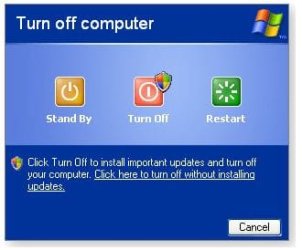
Change Shutdown / Restart / buttons

Is there a way on Windows 7 to have it like in the pic bellow ?
Cheers.

Attached Thumbnails
Change Shutdown / Restart / buttons-xp.jpg  
My System SpecsSystem Spec
07-20-2011   #2


Windows 7 x86 since December 2008


You can try my application.

Probably it would be nicer to make it in some other environment, but I decided to use HTML application technology.

Firstly, those apps are highly customizable and all tools are in the system already. Which is good for people, who know nothing about programming. Secondly, it was also announced that Windows 8 apps are going HTML 5!

So, here is my app. It is using VBScript for calling shutdown.exe and Rundll32.exe Powrprof.dll commands.

Since it is not a standard binary application, all resources should be kept in the same folder. But you can customize it as you want. You would have to have some knowledge of HTML (or google+copy&pasting skills).

As for using it, you need to install some customizable start menu replacers, like Classic Shell Start Menu.
Then customize Shutdown button to start this file. (In Classic Shell Start Menu you need to go Start orb – Settings – Classic Start menu- At the bottom click All settings –Customize Start menu – Select Shutdown –Right click - Edit).


Command for the menu should be changed to the following:
Code:
"%SystemRoot%\System32\mshta.exe" "C:\YOUR_PATH_HERE\turnOff.hta"
To make this application work on Windows 8 M2/M3, I had to give up GetObject function in VBScript, which didn’t want to work properly (Gurus! Your advice regarding GetObject would be appreciated here).

So, if you want it to work on Windows 8 M2/M3, you need to replace lines from 19 to 29 with:

window.resizeTo 321,206
window.moveTo 480,297
(application window is centered as for 1280x800)

On Windows 7 works out of the box.

Attached Thumbnails
Change Shutdown / Restart / buttons-screenshot.png  
Attached Files
File Type: zip TurnOff_beta.zip (35.2 KB, 11 views)
My System SpecsSystem Spec
Reply

 Change Shutdown / Restart / buttons problems?


Thread Tools


Similar Threads for: Change Shutdown / Restart / buttons
Thread Forum
Tabs go tiny, lists and buttons go hidden after a restart General Discussion
BSOD on shutdown/restart Crashes and Debugging
Windows 7 Navigation Buttons Customizer: Change Windows 7 Nav Buttons Customization
shutdown and restart of network PCs Performance & Maintenance
No Restart, or Shutdown General Discussion


All times are GMT -5. The time now is 08:25 AM.


Windows 7 Forums is an independent web site and has not been authorized,
sponsored, or otherwise approved by Microsoft Corporation.
"Windows 7" and related materials are trademarks of Microsoft Corp.
© Designer Media Ltd
  

1 2 3 4 5 6 7 8 9 10 11 12 13 14 15 16 17 18 19 20 21 22 23 24 25 26 27 28 29 30