I use Win7 Home Premium x64 SP1.
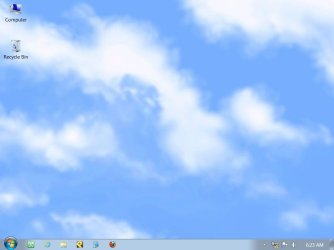
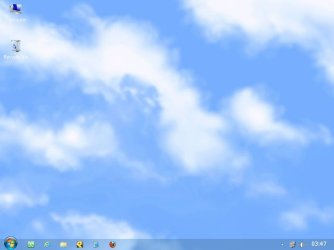
I'd like to have a 100% transparent taskbar with 0% transparent icons (including pinned program icons and systray icons). Can that be accomplished?
I have tried Glass2k, TransBar, Transparent Taskbar and TClock 2010. None of them allows the taskbar icons to be kept intact when the transparency of the taskbar reaches 100%.
I'd like to have a 100% transparent taskbar with 0% transparent icons (including pinned program icons and systray icons). Can that be accomplished?
I have tried Glass2k, TransBar, Transparent Taskbar and TClock 2010. None of them allows the taskbar icons to be kept intact when the transparency of the taskbar reaches 100%.
Last edited:
My Computer
At a glance
Windows 7 Home Premium x64 SP2AMD Phenom II X3 720 BEA-Data DDR3 1333 Supreme SU3U1333B2G9-R 2G x4ATI Raedon HD 4290 IGX on AMD SB850 chipset
- Computer type
- PC/Desktop
- Computer Manufacturer/Model Number
- self-built
- OS
- Windows 7 Home Premium x64 SP2
- CPU
- AMD Phenom II X3 720 BE
- Motherboard
- GigaByte GA-890GPA-UD3H
- Memory
- A-Data DDR3 1333 Supreme SU3U1333B2G9-R 2G x4
- Graphics Card(s)
- ATI Raedon HD 4290 IGX on AMD SB850 chipset
- Sound Card
- on-board Realtek ALC892
- Monitor(s) Displays
- Samsung S22D300NY 21.5" wide screen
- Screen Resolution
- 1280 x 720
- Hard Drives
- WD RE4 WD5003ABYX 500GB SATA2 x2 (RAID-0)
- PSU
- D.HIGH DHP-400GH-80P 400W
- Case
- no name
- Cooling
- Foxconn fan and heater for AMD CPU
- Keyboard
- Logitech standard keyboard Y-SM48
- Mouse
- Toshiba Pala Chan
- Internet Speed
- GPON 300M/100M
- Antivirus
- AVG AntiVirus Free
- Browser
- Vivaldi & Firefox





 ,
,