Windows 7 Forums Search
Welcome to Windows 7 Forums. Our forum is dedicated to helping you find solutions with any problems, errors or issues you are experiencing with Windows 7. The Windows 7 forum also covers news and updates and has an extensive Windows 7 tutorial section that covers a wide range of tips and tricks.


Windows 7 - On-Screen Keyboard (Win 7 Premium 32 bit)

 
07-11-2011   #1


Windows 7 Premium 32 Bit


On-Screen Keyboard (Win 7 Premium 32 bit)

Hi,
I am disabled but find the on-screen keyboard VERY usefull.
Does anyone know how to enable some transparency with out installing other software? Maybe a reg tweak or very noninvasive customizer program?

Your assistance is greatly appreciated
Thank You

My System SpecsSystem Spec
07-13-2011   #2


Windows 7 x86 since December 2008


Feel the Wheel / Nattyware

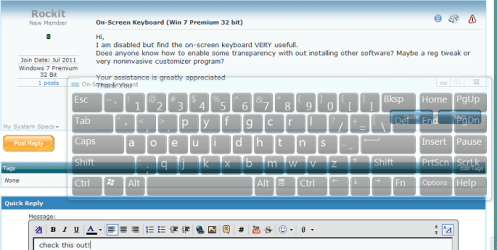
Feel the Wheel (Feewhee) is a small free program which consists of one 6.5 KB file with no GUI.

Quote   Quote: Originally Posted by addictivetips.com
The application is portable and works quietly in the background. Move the pointer to the title bar of the window and use mouse wheel to change the size of the window, with Shift key combination, it will change the windows transparency.
Attached Thumbnails
On-Screen Keyboard (Win 7 Premium 32 bit)-osk.png  
My System SpecsSystem Spec
07-13-2011   #3


Windows 7 Premium 32 Bit


Thank You Neutron16
I will give it a try

Rockit
My System SpecsSystem Spec
.


07-13-2011   #4


Windows 7 Premium 32 Bit


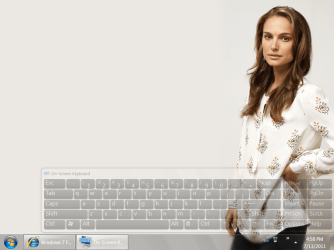
It works great !!

Thanks Allot
Attached Thumbnails
On-Screen Keyboard (Win 7 Premium 32 bit)-untitled.png  
My System SpecsSystem Spec
07-17-2011   #5


Windows 7 Home Premium 32bit


May I ask how you did this? I can make any window transparent, but not the on-screen keyboard. I think it has to do with the fact the OSK is never on top (does not have the focus)?
My System SpecsSystem Spec
07-20-2011   #6


Windows 7 x86 since December 2008


Quote   Quote: Originally Posted by Insert Coin View Post
OSK is never on top (does not have the focus)?
That is not quite true. To get it in focus, you just need to click on the titlebar of the application window or click it's icon in taskbar.
My System SpecsSystem Spec
07-21-2011   #7


Windows 7 Home Premium 32bit


I tried that, but if I then hold the shift key and roll the scroll wheel, nothing happens... Other windows do get transparent, not the OSK.
My System SpecsSystem Spec
07-21-2011   #8


Windows 7 x86 since December 2008


Ok, we are talking about Microsoft Windows 7 On-Screen Keyboard (in Aero theme). I start the program first, then I start OSK. I get OSK window in focus by clicking inside letter O in "On-Screen" word, then I hold Shift key and turn mouse wheel down. It works.
My System SpecsSystem Spec
07-23-2011   #9


Windows 7 Home Premium 32bit


Yes, I'm using Windows 7 too (Aero theme). I tried your procedure, but no luck: the OSK does not get transparent. I can see in the OSK the shift key is pressed, the window has the focus, but nothing happens when I roll the wheel of my mouse. All other windows do get transparent (Firefox, Windows Live Mail, calculator etc.). Strange...
My System SpecsSystem Spec
Reply

 On-Screen Keyboard (Win 7 Premium 32 bit) problems?


Thread Tools


Similar Threads for: On-Screen Keyboard (Win 7 Premium 32 bit)
Thread Forum
On screen keyboard General Discussion
Solved On-screen keyboard problem Customization
No more keyboard - 2 screen laptop Hardware & Devices
On Screen Keyboard System Security
Help with On-Screen Keyboard issue General Discussion


All times are GMT -5. The time now is 08:25 AM.


Windows 7 Forums is an independent web site and has not been authorized,
sponsored, or otherwise approved by Microsoft Corporation.
"Windows 7" and related materials are trademarks of Microsoft Corp.
© Designer Media Ltd
  

1 2 3 4 5 6 7 8 9 10 11 12 13 14 15 16 17 18 19 20 21 22 23 24 25 26 27 28 29 30