| Windows 7: Shaded User ID Picture |
12 Jul 2011
|
#1 | | Windows 7 Peofessional 64bit |
Shaded User ID Picture The "welcome" and "userid" picture is shaded from about half of the picture to the top. Anyone know how to get rid of the shade? It really messes up a nice picture. Thanks for help, in advance | My System Specs |
| OS Windows 7 Peofessional 64bit |
12 Jul 2011
|
#2 | | 64-Bit Windows7 Ult-SP1 UK |
- can you post us a screenshot - might clarify problem.. | My System Specs | | System Manufacturer/Model Number benchtec, built to personal specs OS 64-Bit Windows7 Ult-SP1 CPU i7-965 Extreme Edition (8 Cores) at 3.3GHz (no OC) Motherboard BloodRage QuantumForce X58 (Socket1366) Memory 6G Corsair Dominator DDR3 - tripled Graphics Card 2xMSI AMD6870's in crossfire Sound Card Sonar(SB)X-Fi onboard Monitor(s) Displays SyncMaster P2050 20" Screen Resolution 1600x900 (widescreen) Keyboard Logitech G19 (wired) Mouse Logitech G9 Laser (wired) PSU 1000w Corsair Case ANTEC 900/2 all blue lights, etc.. Cooling Noctua SE1366 NH-U12P - a tight fit, but a monster cooler!! Hard Drives 64G\OCZSeries2SSD, 60G\OCZVertex2SSD, 1TB\spinpointF1SATA Internet Speed 50mb |
12 Jul 2011
|
#3 | | Windows 7 Peofessional 64bit |
Shaded user id picture | My System Specs | | OS Windows 7 Peofessional 64bit |
12 Jul 2011
|
#4 | | Windows 7 Home Premium x64 SP1 Bay Area Peninsula |
Welcome to Seven Forums billb362. That is the "glass" look. Hopefully someone will be along who knows where that image resides. You can pick your own pictures for user pictures. User Account Picture - Change
A Guy | My System Specs | | OS Windows 7 Home Premium x64 SP1 CPU INTEL Core i5-750 Quad-Core 3.37GHz Motherboard ASUS P7P55D Memory KINGSTON 4GB (2 x 2GB) HyperX PC3-12800 DDR3 1600MHz CL8 Graphics Card MSI N240GT-MD1G/D5 GeForce GT 240 1GB 128-bit GDDR5 Monitor(s) Displays Samsung SyncMaster B2430H 24" Screen Resolution 1920 x 1080 PSU ANTEC TruePower New TP-550, 80 PLUS, 550W Case ANTEC Three Hundred Illusion Cooling COOLER MASTER Hyper 212 Plus, 4 x 120mm 1 x 140mm Noctua's Hard Drives Intel X25M Gen2 80GB, SEAGATE 500GB Barracudaź 7200.12, SATA 3 Gb/s, 7200 RPM, 16MB cache Internet Speed 20 + Mbps Antivirus Avast Browser Opera |
13 Jul 2011
|
#5 | | Windows 7 Peofessional 64bit |
Thanks "A GUY", the image is from my file folder, the "glass" seems to be a Windows 7 thing. I shut off "Aero" and it made no difference. Guess I will wait to find someone who can find where the file w/glass can be removed or changed. | My System Specs | | OS Windows 7 Peofessional 64bit |
14 Jul 2011
|
#6 | | |
Are you are referring to the User Picture Frame when you click the start orb? If it is, i think there isn't any setting
or registry tweak to remove the "shade", it is part of the picture frame image.
The only way to remove it is to hack into the system file and mod the image.
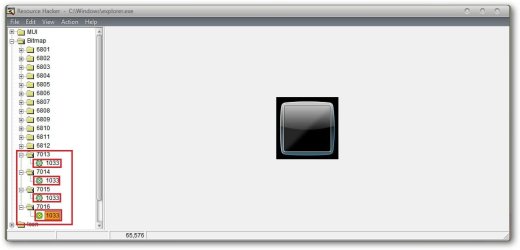
If you are ready to do that... the file is located in Windows\explorer.exe
Open the file with Resource Hacker... under Bitmap the image to mod is 7013.
You need to restart for it to take effect. | My System Specs | | |
14 Jul 2011
|
#7 | | Windows 7 Home Premium x64 SP1 Bay Area Peninsula |
He's talking about the glass reflection effect on the picture itself (see his picture). His picture doesn't have that effect, but when used as a user picture, windows adds it. A Guy | My System Specs | | OS Windows 7 Home Premium x64 SP1 CPU INTEL Core i5-750 Quad-Core 3.37GHz Motherboard ASUS P7P55D Memory KINGSTON 4GB (2 x 2GB) HyperX PC3-12800 DDR3 1600MHz CL8 Graphics Card MSI N240GT-MD1G/D5 GeForce GT 240 1GB 128-bit GDDR5 Monitor(s) Displays Samsung SyncMaster B2430H 24" Screen Resolution 1920 x 1080 PSU ANTEC TruePower New TP-550, 80 PLUS, 550W Case ANTEC Three Hundred Illusion Cooling COOLER MASTER Hyper 212 Plus, 4 x 120mm 1 x 140mm Noctua's Hard Drives Intel X25M Gen2 80GB, SEAGATE 500GB Barracudaź 7200.12, SATA 3 Gb/s, 7200 RPM, 16MB cache Internet Speed 20 + Mbps Antivirus Avast Browser Opera |
15 Jul 2011
|
#8 | | Windows 7 Home Premium 64 Bit SP 1 |
Windows 7 User Picture Frame Changer : Change Your User Picture Frame With One Click | door2windows
It should work . Just change the default frame .
The download contains a link, where you can get some alternative frames. | My System Specs | | Computer type PC/Desktop System Manufacturer/Model Number Self Assembled OS Windows 7 Home Premium 64 Bit SP 1 CPU Intel Core i3 2120 @ 3.30GHz Motherboard Gigabyte Technology Co., Ltd. H61M-DS2 DVI Memory Corsair 2GB x2 (Single-Channel DDR3 @ 665MHz) Graphics Card 2047MB GeForce GTS 450 (ZOTAC International) Sound Card Onboard (Realtek High Definition Audio) Monitor(s) Displays LG Flatron E2040T Screen Resolution 1600x900 Keyboard Logitech MK220 Mouse Logitech MK220 PSU uMAX 750 watt. Case iBall Cooling Air/ Fans Hard Drives Western Digital 1 TB
Seagate 500 GB Internet Speed BSNL Broadband Antivirus Microsoft Security Essentials Browser Waterfox Other Info Dell Studio 15" Laptop |
15 Jul 2011
|
#9 | | Windows 7 Home Premium x64 SP1 Bay Area Peninsula |
Guys, not the frame. The picture. It has the glassy reflection shading at top. He wants the picture in his start menu without the fake glass shine. A Guy | My System Specs | | OS Windows 7 Home Premium x64 SP1 CPU INTEL Core i5-750 Quad-Core 3.37GHz Motherboard ASUS P7P55D Memory KINGSTON 4GB (2 x 2GB) HyperX PC3-12800 DDR3 1600MHz CL8 Graphics Card MSI N240GT-MD1G/D5 GeForce GT 240 1GB 128-bit GDDR5 Monitor(s) Displays Samsung SyncMaster B2430H 24" Screen Resolution 1920 x 1080 PSU ANTEC TruePower New TP-550, 80 PLUS, 550W Case ANTEC Three Hundred Illusion Cooling COOLER MASTER Hyper 212 Plus, 4 x 120mm 1 x 140mm Noctua's Hard Drives Intel X25M Gen2 80GB, SEAGATE 500GB Barracudaź 7200.12, SATA 3 Gb/s, 7200 RPM, 16MB cache Internet Speed 20 + Mbps Antivirus Avast Browser Opera |
15 Jul 2011
|
#10 | | Windows 7 Home Premium 64 Bit SP 1 |

Quote: Originally Posted by A Guy Guys, not the frame. The picture. It has the glassy reflection shading at top. He wants the picture in his start menu without the fake glass shine. A Guy  It is inbuilt in the default frame . located in C:\Windows\Explorer.exe.
bitmap 7013 for normal display, 7014 for 125% enlarged display (medium), 7015 for larger (150% enlarged) display, and 7016 is for password protected user account display on the logon screen .... when prompting to enter password.
So , changing the frame which one is without that shine, it will not be there . | My System Specs | | Computer type PC/Desktop System Manufacturer/Model Number Self Assembled OS Windows 7 Home Premium 64 Bit SP 1 CPU Intel Core i3 2120 @ 3.30GHz Motherboard Gigabyte Technology Co., Ltd. H61M-DS2 DVI Memory Corsair 2GB x2 (Single-Channel DDR3 @ 665MHz) Graphics Card 2047MB GeForce GTS 450 (ZOTAC International) Sound Card Onboard (Realtek High Definition Audio) Monitor(s) Displays LG Flatron E2040T Screen Resolution 1600x900 Keyboard Logitech MK220 Mouse Logitech MK220 PSU uMAX 750 watt. Case iBall Cooling Air/ Fans Hard Drives Western Digital 1 TB
Seagate 500 GB Internet Speed BSNL Broadband Antivirus Microsoft Security Essentials Browser Waterfox Other Info Dell Studio 15" Laptop Shaded User ID Picture problems? All times are GMT -5. The time now is 09:13 PM. | |