qwiksilvertrav
New member
- Local time
- 4:35 PM
- Messages
- 7
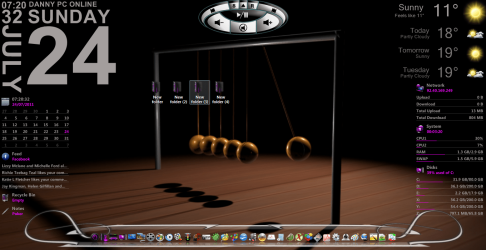
So just got Windows 7 and got dreamscene on it for animated desktops. Works great but now I'm trying to solve the shadowy fonts of my desktop icons.
I've tried a few methods described online with no luck.
First I tried this and here's the link Fix Icon Text in Windows 7 for Dreamscene patch - WinMatrix
1) right click a video and set to desktop background
2) set folder options to show hidden files
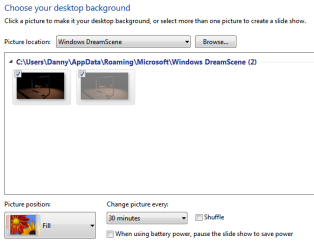
3) go to --> C:\Users\#username#\AppData\Roaming\Microsoft\Windows DreamScene
4) there should be 2 image files of the dreamscene running (1 hidden/greyed)
5) set both files to “read only” & uncheck “hidden”
6) right click desktop > personalise > desktop background
7) under windows dreamscene, you should see both image files
8) make sure both are checked by clicking checkboxes next to them
9) set Picture position: Fill
10)save changes
After all this my font comes back but then the animation stops...making it a still image. Maybe I"m missing something in the steps?
I've tried looking into changing the font color for the desktop icons but can't seem to figure that out.
Also I've tried setting my desktop background as a flat black. People have said that having a light background before setting a dreamscene causes the fonts to go black. So I set the background as a flat black and went to run the dreamscene video and it wouldn't activate because Aero was turned off. By selecting a Aero theme (which are all bright!) first I was then able to set a dreamscene file to my desktop but would again get the dark font.
I'm also wanting to avoid downloading the fixes available on the net in fear it might be a virus or something. PLus I'm just not sure how they work. I could look more into it though but would rather just change a settng to fix it.
ANYways I'm rather new to Windows 7 and only on day 2...lol I've tried fixing this and have searched and figured I'd post up to see if anyone can lend a hand.
Thanks
I've tried a few methods described online with no luck.
First I tried this and here's the link Fix Icon Text in Windows 7 for Dreamscene patch - WinMatrix
1) right click a video and set to desktop background
2) set folder options to show hidden files
3) go to --> C:\Users\#username#\AppData\Roaming\Microsoft\Windows DreamScene
4) there should be 2 image files of the dreamscene running (1 hidden/greyed)
5) set both files to “read only” & uncheck “hidden”
6) right click desktop > personalise > desktop background
7) under windows dreamscene, you should see both image files
8) make sure both are checked by clicking checkboxes next to them
9) set Picture position: Fill
10)save changes
After all this my font comes back but then the animation stops...making it a still image.
Maybe I"m missing something in the steps?I've tried looking into changing the font color for the desktop icons but can't seem to figure that out.
Also I've tried setting my desktop background as a flat black. People have said that having a light background before setting a dreamscene causes the fonts to go black. So I set the background as a flat black and went to run the dreamscene video and it wouldn't activate because Aero was turned off. By selecting a Aero theme (which are all bright!) first I was then able to set a dreamscene file to my desktop but would again get the dark font.
I'm also wanting to avoid downloading the fixes available on the net in fear it might be a virus or something. PLus I'm just not sure how they work. I could look more into it though but would rather just change a settng to fix it.
ANYways I'm rather new to Windows 7 and only on day 2...lol I've tried fixing this and have searched and figured I'd post up to see if anyone can lend a hand.
Thanks
My Computer
At a glance
Windows 7 Home Premium 32bitIntel Core 2 Quad4 GigNvidia 9500GT
- OS
- Windows 7 Home Premium 32bit
- CPU
- Intel Core 2 Quad
- Memory
- 4 Gig
- Graphics Card(s)
- Nvidia 9500GT
- Sound Card
- Xonar DS
- Monitor(s) Displays
- 23' Samsung Syncmaster/46' Samsung LED
- Screen Resolution
- 1920 X 1080
- Hard Drives
- 4 TB total
- Internet Speed
- 25Mbs