Windows 7 Forums Search
Welcome to Windows 7 Forums. Our forum is dedicated to helping you find solutions with any problems, errors or issues you are experiencing with Windows 7. The Windows 7 forum also covers news and updates and has an extensive Windows 7 tutorial section that covers a wide range of tips and tricks.


Windows 7 - Aero without glass

 
07-24-2011   #1


Windows 7 Ultimate x64


Aero without glass

Forgive me, I am a noob and this is my first post:

I have Aero. I like the features it gives me, especially like the Win-tab navigation functions. I can live with some of the other things it forced me to do.
But I have an issue with vision' being very sensitive to reflection. And it seems that whatever I do to Aero, the taskbar buttons have that very distracting pseudo-reflection look.

Is there any way of using Aero without that shading/reflection effect? Ideally, I would prefer a theme that looks like Classic (some call it Windows 98, but I have been using it in XP and so for me it "is" Windows) but runs under the Aero rendering engine?

Please save me! I tried using Aero all weekend, but just could not focus on my work due to the problem with the "reflections" and other annoying eye-candy. Eventually, last night I gave up and switched back to Windows Classic, which is annoying because I like all the shortcut keys that work in Aero but not in classic.

Rob

My System SpecsSystem Spec
07-24-2011   #2


Windows 7 Ultimate x64


Yep, go to Personalization, Window Color, and uncheck Enable Transparency.

Hope that helps!
My System SpecsSystem Spec
07-24-2011   #3


Windows 7 Ultimate x64


Thanks, that doesn't solve it. Transparency goes, but that white shading that streaks across the top-left one-third of each taskbar button is still there.

Thanks for the comment.

Meanwhile, I have been over at DeviantArt and suspect that it is visual styles, not themes, that I am looking to chance. It will involve patching my OS, but I am willing to give it a go. Am going to try this style: Classic AE 2.1 by ~Saarineames on deviantART

Cheers,
Rob
My System SpecsSystem Spec
.


07-24-2011   #4


Windows 7 Ultimate SP1 64-Bit


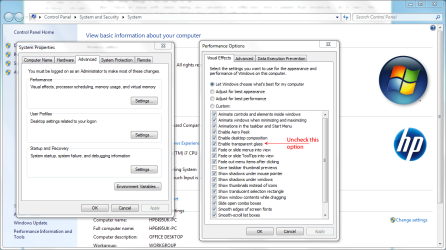
You can configure your Aero settings easily.

Go back and switch to full Aero settings and save them.

Press the Win+Pause keyboard combo then click Advanced System Settings.

In the System Properties box click the Advanced tab and click Settings in the Performance section.

From here, you can configure your settings as you like.

Aero without glass-perf.png
My System SpecsSystem Spec
07-24-2011   #5


Windows 7 Ultimate x64


Thanks, I'll try that. But I think that just removes the transparency, not the pseudo-reflectivity. Will try at home tonight
My System SpecsSystem Spec
07-25-2011   #6


Windows 7 Ultimate x64


Quote   Quote: Originally Posted by robertcz View Post
Thanks, that doesn't solve it. Transparency goes, but that white shading that streaks across the top-left one-third of each taskbar button is still there.

Thanks for the comment.

Meanwhile, I have been over at DeviantArt and suspect that it is visual styles, not themes, that I am looking to chance. It will involve patching my OS, but I am willing to give it a go. Am going to try this style: Classic AE 2.1 by ~Saarineames on deviantART

Cheers,
Rob
That theme looks interesting. If disabling transparency doesn't help, you can increase the color intensity by sliding the color adjuster to the far right, and there's a couple of other options to adjust the color. It seems to take the white streak away.
My System SpecsSystem Spec
07-25-2011   #7


Windows 7 Ultimate x64


Quote   Quote: Originally Posted by Coke Robot View Post
Quote   Quote: Originally Posted by robertcz View Post
Thanks, that doesn't solve it. Transparency goes, but that white shading that streaks across the top-left one-third of each taskbar button is still there.

Thanks for the comment.

Meanwhile, I have been over at DeviantArt and suspect that it is visual styles, not themes, that I am looking to chance. It will involve patching my OS, but I am willing to give it a go. Am going to try this style: Classic AE 2.1 by ~Saarineames on deviantART

Cheers,
Rob
That theme looks interesting. If disabling transparency doesn't help, you can increase the color intensity by sliding the color adjuster to the far right, and there's a couple of other options to adjust the color. It seems to take the white streak away.
Oh, maybe I didn't tweak enough. I tweaked and tweaked, and it wouldn't disappear. Maybe I was tweaking too many things at once - I'll give it a bash at home today

It's amazing how visual styles can so easily detract from work. I want my OS to be nice, but in the background. I find the standard Aero themes too "in my face".

Cheers,
Thanks for your advice!
My System SpecsSystem Spec
07-25-2011   #8


Windows 7 Ultimate SP1 64-Bit


You're very welcome.

In the meantime, we can leave this thread open so you can post back and let us know the outcome or get more help.
My System SpecsSystem Spec
07-25-2011   #9


Perhaps you can get some additional suggestions from these tutorials:
How to Enable or Disable Windows 7 Transparency
How to Enable Full Clear Glass Transparency in Windows 7

Last edited by Imperfect1; 07-25-2011 at 09:01 AM..
My System SpecsSystem Spec
07-25-2011   #10


Acer laptop W 7 Pro SP1 64 bit & Dell Desktop W 7 Pro SP1 32 bit


Welcome to the Seven Forums
I use Windows Style Builder and can change the look of the taskbar buttons and maybe a couple of other areas for you.
You will need to do 1 of these 2 ways of Enabling custom themes for it to work.
Enabling Custom Themes - Windows 7
Or
Theme - How to Apply Custom Themes
Here is the look of the taskbar buttons with no shine
Aero without glass-task.png

Let me know and I will post it in a zip here.
Jerry
My System SpecsSystem Spec
Reply

 Aero without glass problems?


Thread Tools


Similar Threads for: Aero without glass
Thread Forum
How do I change the Aero glass look? Customization
aero glass problems General Discussion
What is aero glass remoting General Discussion
Aero glass problem Graphic Cards
Aero and Glass effect Customization


All times are GMT -5. The time now is 08:30 AM.


Windows 7 Forums is an independent web site and has not been authorized,
sponsored, or otherwise approved by Microsoft Corporation.
"Windows 7" and related materials are trademarks of Microsoft Corp.
© Designer Media Ltd
  

1 2 3 4 5 6 7 8 9 10 11 12 13 14 15 16 17 18 19 20 21 22 23 24 25 26 27 28 29 30