Windows 7 Forums


Windows 7: Best way to apply icons or an icon set system wide.

17 Sep 2011   #1

Dual booting: Ubuntu 10.10 & Windows 7 Ultimate 32bit
UK
 
 
Best way to apply icons or an icon set system wide.

Best way to apply icons or an icon set system wide.

Hey guys well I've been using "icon packager" and the first time I used it, it was fine every icon was changed, but now (will share some screenshots below) only some icons are changed the rest are default windows ones.


Screenshots:


You see so some areas of my system the icons are applied properly, but others they are not, any ideas or other app recommendations would be appreciated.

- regards

- 4F.
My System SpecsSystem Spec

19 Sep 2011   #2

Windows 7 Ultimate


I am also experiencing the same issue.
My System SpecsSystem Spec
19 Sep 2011   #3

Win 7 Pro x64
Council Bluffs, Iowa


The best way to change icons is doing manually so you know what is being changed using "icon packager" you can only guess what is being changed and how many .dll have been modified. If you ever want to go back to the original icons most likely you're going to have to do a clean install.
You may want to try to rebuild your icon cache and see if that will help Icon Cache - Rebuild
Jerry
My System SpecsSystem Spec
.


20 Sep 2011   #4

Dual booting: Ubuntu 10.10 & Windows 7 Ultimate 32bit
UK


Quote   Quote: Originally Posted by Bongo View Post
The best way to change icons is doing manually so you know what is being changed using "icon packager" you can only guess what is being changed and how many .dll have been modified. If you ever want to go back to the original icons most likely you're going to have to do a clean install.
You may want to try to rebuild your icon cache and see if that will help Icon Cache - Rebuild
Jerry
Cool thank you for the tutorial. Since I posted this, after a couple of reboots some more icons have actually loaded through and my system now looks mostly flush with the better icons, except for a few directories on my C: drive like "tracing" and dropbox, also nearly all directories on removable media fail to load the icon theme (but I guess that's understandable).

OK well keep the information coming guys I'd appreciate it, I think others would too, I know this can be achieved It's definitely done by some of the guys over at deviantart with ease, but hell people on there can be unreliable and screenshots featured could just be showing the best bits or they may have changed each icon individually.
My System SpecsSystem Spec
21 Sep 2011   #5

Win 7 Pro x64
Council Bluffs, Iowa


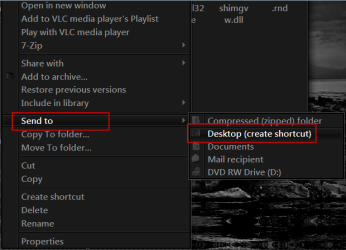
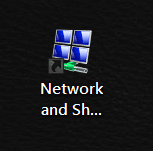
1 way of finding where an icon is at is to right click on it go to Send to> Desktop (create shortcut)
Best way to apply icons or an icon set system wide.-1.png

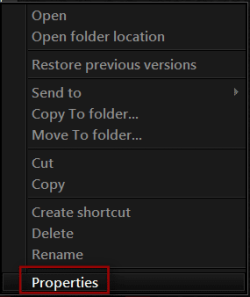
Right click on the shortcut go to Properties
Name:  2.png
Views: 2329
Size:  15.6 KBBest way to apply icons or an icon set system wide.-3.png

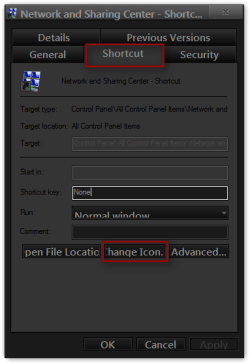
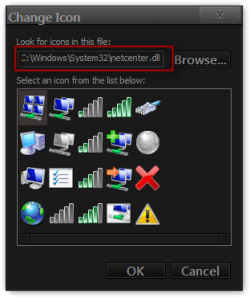
Go to the Shortcut tab and click on the Change Icon button
Best way to apply icons or an icon set system wide.-4.png

In most cases it will show you where it is located
Best way to apply icons or an icon set system wide.-5.png


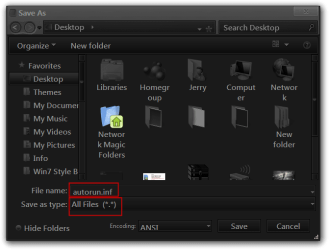
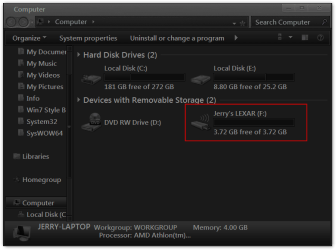
For the icon in the removable media you can create a AutoRun.inf file (If it does not have one if it does just modify it) and put it and a icon in the removable media and you will get the icon you want.
Open notepad type in
[autorun]
icon=logo.ico
label=any name you were (optional)

save it as AutoRun.inf be sure to use the drop-down menu at Save as type and switch to All Files (*.*)
Best way to apply icons or an icon set system wide.-save-.png


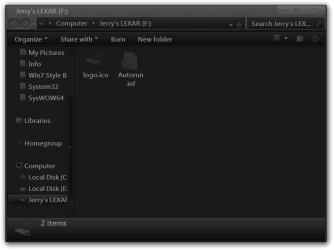
put it and a icon named logo.ico in the removable media.
Best way to apply icons or an icon set system wide.-jerrys-lexar-f-.pngBest way to apply icons or an icon set system wide.-computer.png
Jerry
My System SpecsSystem Spec
21 Sep 2011   #6

Dual booting: Ubuntu 10.10 & Windows 7 Ultimate 32bit
UK


Ah thanks again, another good tutorial.
My System SpecsSystem Spec
24 Sep 2011   #7

Windows 7 Home Premium x64 SP1
Bay Area Peninsula


Mr Grim makes some great icon sets with installers:

Icon Packs by MrGRiM01 on deviantART

Have to join VC to get the installers, but it's also a great site.

A Guy
My System SpecsSystem Spec
25 Sep 2011   #8

Dual booting: Ubuntu 10.10 & Windows 7 Ultimate 32bit
UK


Quote   Quote: Originally Posted by A Guy View Post
Mr Grim makes some great icon sets with installers:

Icon Packs by MrGRiM01 on deviantART

Have to join VC to get the installers, but it's also a great site.

A Guy
Haha OK thanks guy I'll give it a go too.
My System SpecsSystem Spec
26 Sep 2011   #9

Windows 7 Ultimate Vista Ultimate x64
QLD, Cairns


Must have felt my Ears burning lol, I have moved away from the old installers and now use 7tsp to change all the icons, my latest Icon sets are for my HUD and HUD RED premium themes but I give away all my Icons and extras for free.

Here are some previews of the new packs.


You can have a look at all the themes and Icon packs here Windows 7 Premium Themes
My System SpecsSystem Spec
26 Sep 2011   #10

Windows 7 Home Premium x64 SP1
Bay Area Peninsula


Quote   Quote: Originally Posted by Mark View Post
Must have felt my Ears burning lol, I have moved away from the old installers and now use 7tsp to change all the icons, my latest Icon sets are for my HUD and HUD RED premium themes but I give away all my Icons and extras for free.
Thanks Mark, good to see you here. I tout your stuff all the time. A Guy
My System SpecsSystem Spec
Reply

 Best way to apply icons or an icon set system wide. problems?


Thread Tools


Similar help and support threads for: Best way to apply icons or an icon set system wide.
Thread Forum
System-wide equalizer for Windows 7 Software
Major file corruption system wide General Discussion
How do i apply custom icons to programes quickly? Customization
How to get rid of system wide blue Customization
Directwrite System-wide General Discussion


All times are GMT -5. The time now is 03:52 PM.


Seven Forums Android App Seven Forums IOS App Follow us on Facebook

Windows 7 Forums is an independent web site and has not been authorized,
sponsored, or otherwise approved by Microsoft Corporation.
"Windows 7" and related materials are trademarks of Microsoft Corp.
© Designer Media Ltd
  

1 2 3 4 5 6 7 8 9 10 11 12 13 14 15 16 17 18 19 20 21 22 23 24 25 26 27 28 29 30 31 32