Windows 7 Forums


Windows 7: Need help with Windows 7 Search Results Viewing

23 Sep 2011   #1

Windows 7 Home Premium
 
 
Need help with Windows 7 Search Results Viewing

When I look for a file in windows 7's search, i get the file, but I don't get the file's actual location (like c:/desktop/documents/music... etc). I just get the file and it's kinda pointless if i need to search for a file every single time i need it. Someone told me that i should just click the file, then properties, then details, but that seems like needing to go too far for something simple.

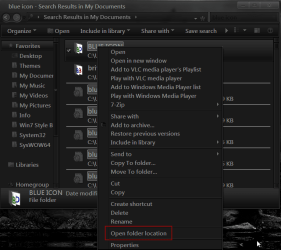
this is a search result for example:


is there a way i can change the settings to produce the actual file with the location under it or something?
My System SpecsSystem Spec

23 Sep 2011   #2

Win 7 Pro x64
Council Bluffs, Iowa


Welcome to the Seven Forums
Right click on the folder/file and chose
Open folder location
Jerry
Need help with Windows 7 Search Results Viewing-region.png
My System SpecsSystem Spec
24 Sep 2011   #3

Windows 7 Ultimate


Follow this tutorial:
Just right click on the tabs where you see, Name, Date Modified, etc tabs and then go to "More"


And then look for the Location option and check its box.


its done, now you would see the location of the files as well.
My System SpecsSystem Spec
.


Reply

 Need help with Windows 7 Search Results Viewing problems?


Thread Tools


Similar help and support threads for: Need help with Windows 7 Search Results Viewing
Thread Forum
Windows search button not returning results Performance & Maintenance
Windows Button Search NOT Returning Results BSOD Help and Support
Viewing a network adapter properties results in freezing. Network & Sharing
Search results take me to windows media center General Discussion
Google Desktop Search Results from Start menu search Software


All times are GMT -5. The time now is 05:22 AM.


Windows 7 Forums is an independent web site and has not been authorized,
sponsored, or otherwise approved by Microsoft Corporation.
"Windows 7" and related materials are trademarks of Microsoft Corp.
© Designer Media Ltd