Hi everyone,
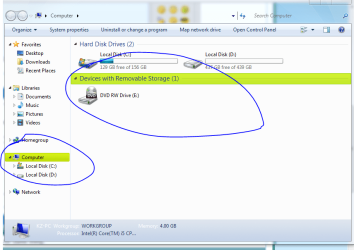
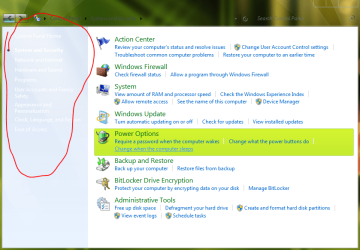
I just installed a glass theme and it made the start menu transparent and the font of the texts on the side panel white. Because the side panel is also white, it's impossible for me to see the texts until i hover over them to make them blue. By side panel i meant the extra options panel on the left side of the control panel. I attached a screen shot below.
I tried the advanced appearance options but it doesnt let me change any of that.
Any help would be appreciated!
I just installed a glass theme and it made the start menu transparent and the font of the texts on the side panel white. Because the side panel is also white, it's impossible for me to see the texts until i hover over them to make them blue. By side panel i meant the extra options panel on the left side of the control panel. I attached a screen shot below.
I tried the advanced appearance options but it doesnt let me change any of that.
Any help would be appreciated!
Attachments
My Computer
At a glance
Windows 7 Ultimate x64
- OS
- Windows 7 Ultimate x64


 there is another annoyance the item selection color is green