| Windows 7: Removing Hidden Files from Search or Reseting Search |
05 Aug 2009
|
#1 | | |
Removing Hidden Files from Search or Reseting Search I have some files in my PC that have passwords and such in them. I put them in hidden, but I noticed that after you click the file once. That file begins to appear on the search bar if you type the file name.
For example I have a file called "abc.txt" (It's hidden)
Before I ever click to see it. It does not show up on the search.
After I click to see it. It shows up if I even put "a" on search.
I am talking about the search bar right under program files. When you click on the windows start button.
*So my question is. Is there anyway for me to reset this everytime I finish vieweing these files?* | My System Specs |
| |
05 Aug 2009
|
#2 | | Windows 7 x64 Ultimate A Finnish immigrant in Leipzig, Germany |
Hello Brazuca, welcome to The SevenForums.
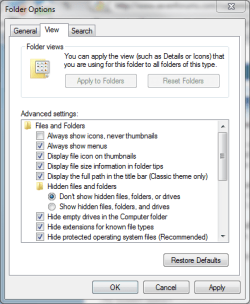
It is really simple: hidden files are always shown if you have chosen " Show hidden files, folders and drives" in Folder Options. Hidden files are never shown if you choose " Don't show hidden files, folders and drives" in Folder Options.
You find Folder Options by clicking the Orb (start menu) and tyoing "Folder Options" in search field. Choose then "View" and then one of the above mentioned options.
Kari | My System Specs | | Computer type Laptop System Manufacturer/Model Number HP ENVY 17-1150eg OS Windows 7 x64 Ultimate CPU 1.6 GHz Intel Core i7-720QM Processor Memory 6 GB Graphics Card ATI Mobility Radeon HD 5850 Graphics Sound Card Beats sound system with integrated subwoofer Monitor(s) Displays 17" laptop display, 22" LCD and 32" Full HD TV through HDMI Screen Resolution 1600*900, 1680*1050 and 1920*1080 Keyboard Logitech diNovo Media Desktop Laser (bluetooth) Mouse Logitech MX1000 Laser (Bluetooth) Hard Drives Internal: 2 x 500 GB SATA Hard Disk Drive 7200 rpm
External: 2TB for backups, 3TB USB3 network drive for media Internet Speed 50/10 Mbps VDSL Antivirus MSE, Windows Defender Browser Maxthon 3.5.2. Other Info Windows 7 Ultimate Retail Full in English, additional Guest-user accounts in Finnish, German and Swedish (Working languages English & Swedish, Family language German, my own language, mother tongue, Finnish. I really need Ultimate to get to use Language Packs!) |
05 Aug 2009
|
#3 | | |
Search Thank you for the welcome. I already know how to do that though.
What I mean is that after I access a hidden file it begins to show up on the search. http://img80.imageshack.us/img80/836/leek.jpg
The leeme file is hidden and did not show up on the search however after I accessed it once it began to show up in the search.
I take it the reason these hidden files begin to show up on search is for easier access to them. But I want hidden files to not appear on the search.
Is there anyway to do something like...
a) reset the search list so it doesn't show recently accessed items.
or
b) not show hidden items. | My System Specs | | |
06 Aug 2009
|
#4 | | Windows 7 x64 Ultimate A Finnish immigrant in Leipzig, Germany |

Quote: Originally Posted by Brazuca Thank you for the welcome. I already know how to do that though.
What I mean is that after I access a hidden file it begins to show up on the search.
...
...
Is there anyway to do something like...
a) reset the search list so it doesn't show recently accessed items.
or
b) not show hidden items. Sorry to say, Brazuca, but at least my system doesn't react like that. RC build 7100. What build do you have? ( EDIT: I do not believe this to be a build issue. Search works just as I'm telling)
Here:
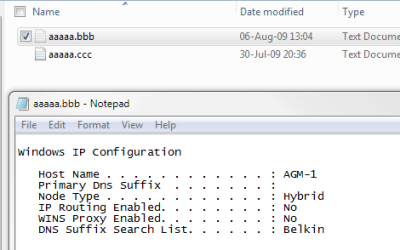
Two files here, aaaaa.ccc (not hidden) and aaaaa.bbb (hidden). I have opened the hidden file to edit or read or whatever reason:
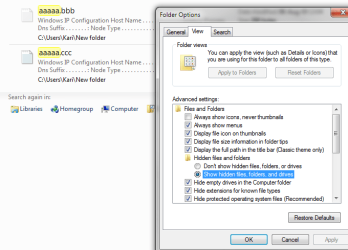
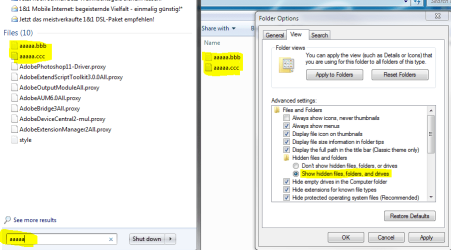
I go to Folder options and choose "Show hidden Files", then I search for files containing "aaaaa". Search displays 2 files:
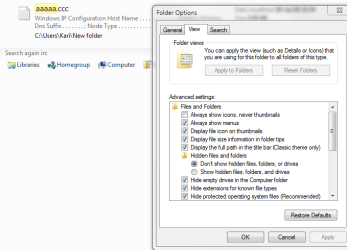
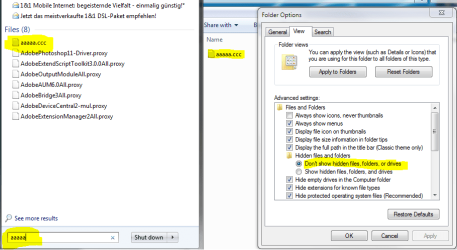
I go back to Folder Options and choose "Don't show hidden Files". When I click APPLY, the hidden file aaa.bbb disappears instantly from search results and won't come up in later searches:
My first answer was and still is correct to the question you asked. Hidden files are never shown in search results. After working with your hidden files you have to remember to go back to Folder Options and choose "Don't show hidden Files".
Last edited by Kari; 06 Aug 2009 at 06:56 AM..
| My System Specs | | Computer type Laptop System Manufacturer/Model Number HP ENVY 17-1150eg OS Windows 7 x64 Ultimate CPU 1.6 GHz Intel Core i7-720QM Processor Memory 6 GB Graphics Card ATI Mobility Radeon HD 5850 Graphics Sound Card Beats sound system with integrated subwoofer Monitor(s) Displays 17" laptop display, 22" LCD and 32" Full HD TV through HDMI Screen Resolution 1600*900, 1680*1050 and 1920*1080 Keyboard Logitech diNovo Media Desktop Laser (bluetooth) Mouse Logitech MX1000 Laser (Bluetooth) Hard Drives Internal: 2 x 500 GB SATA Hard Disk Drive 7200 rpm
External: 2TB for backups, 3TB USB3 network drive for media Internet Speed 50/10 Mbps VDSL Antivirus MSE, Windows Defender Browser Maxthon 3.5.2. Other Info Windows 7 Ultimate Retail Full in English, additional Guest-user accounts in Finnish, German and Swedish (Working languages English & Swedish, Family language German, my own language, mother tongue, Finnish. I really need Ultimate to get to use Language Packs!) |
06 Aug 2009
|
#5 | | Windows 7 x64 Ultimate A Finnish immigrant in Leipzig, Germany |
Reading you question one more time I realized we were talking about two different search possibilities. You are talking search in Start Orb > Search, I was talking and giving an example about search function in Folder Window:
What I told you is still valid: Hidden files are never shown in search results! Here's one more example, this time searching from Start Orb > Search.
Same files, file aaaaa.ccc is not hidden and file aaaaa.bbb is hidden. I choose "Show hidden Files" from folder options, here's the result:
Then I change my Folder Options by choosing "Don't show hidden files" and make a new search. My hidden file aaaaa.bbb is nowhere to see:
A file does not change it's visibility status even if you edit or read it. None of your hidden files are shown in search results as long as you have chosen not to show hidden files.
This is a fact.
Kari EDIT: As Brazuca in the next post tells, this issue was not so simple. It seems that if you use "Recent Items" feature, also your hidden files are showing in the search results.
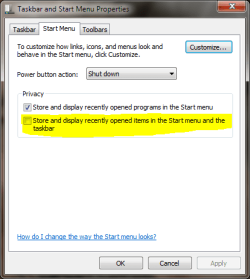
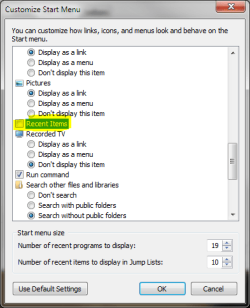
To completely hide hidden files from your search results you have to disable "Recent Items", as well as choose "Don't show hidden files" in Folder Options.
Last edited by Kari; 07 Aug 2009 at 05:33 AM..
| My System Specs | | Computer type Laptop System Manufacturer/Model Number HP ENVY 17-1150eg OS Windows 7 x64 Ultimate CPU 1.6 GHz Intel Core i7-720QM Processor Memory 6 GB Graphics Card ATI Mobility Radeon HD 5850 Graphics Sound Card Beats sound system with integrated subwoofer Monitor(s) Displays 17" laptop display, 22" LCD and 32" Full HD TV through HDMI Screen Resolution 1600*900, 1680*1050 and 1920*1080 Keyboard Logitech diNovo Media Desktop Laser (bluetooth) Mouse Logitech MX1000 Laser (Bluetooth) Hard Drives Internal: 2 x 500 GB SATA Hard Disk Drive 7200 rpm
External: 2TB for backups, 3TB USB3 network drive for media Internet Speed 50/10 Mbps VDSL Antivirus MSE, Windows Defender Browser Maxthon 3.5.2. Other Info Windows 7 Ultimate Retail Full in English, additional Guest-user accounts in Finnish, German and Swedish (Working languages English & Swedish, Family language German, my own language, mother tongue, Finnish. I really need Ultimate to get to use Language Packs!) |
06 Aug 2009
|
#6 | | |
I figured out what I had to do.
The "Recent Items" panel wans't appearing. So I made it appear.
After that I "cleared recent items list" and the hidden items no longer appeared when I used the search.
Whether they are hidden or not after you access them. Even if it is a folder it begins to show up on the search.
For the item to not show up on the search it has to be hidden & it can't be on the recent items list.
So now all I have to do is keep the files hidden and clear the recent items list when I am done looking at the files. | My System Specs | | |
06 Aug 2009
|
#7 | | Windows 7 Ultimate x64 SP1 Somewhere on the 3rd rock from the sun. |
But if you turn off recent items then they appear? Weird. Sounds like a bug report is in order.... | My System Specs | | Computer type PC/Desktop System Manufacturer/Model Number The Beast Model V OS Windows 7 Ultimate x64 SP1 CPU Core i7 965 EE @3.6 GHz Motherboard eVGA x58 Classified3 Memory 3 * 4GB Mushkin Enh Redline CL7 DDR3 1600 MHz (PC3-12800) Graphics Card eVGA 560 Ti 448 Core Classified + eVGA GTX260 SSC (PhysX) Sound Card Realtek HD Audio (on-board) Monitor(s) Displays 2 * Acer X213Wbd Screen Resolution 2 * 1680 x 1050 Keyboard Logitech G15 Keyboard Mouse Logitech Performance Mouse MX PSU ThermalTake BlackWidow TX TR2 850 W Case ThermalTake Level 10 GT (Black) Cooling Corsair H100 CPU | 2 * TT 140mm TriLED | 2 * Antec TriCool Hard Drives 1 * Intel Cheryville 520 180 GB SATA III SSD |
1 * Intel X-25M G2 80 GB SATA II SSD |
2 * Seagate 1 TB 32MB Cache 7200.12 SATA II Mech. Internet Speed Cable - 35 Mbit down / 12 Mbit up advertised (30 / 6 act.) Antivirus M$Se / MBAM Pro / WinPatrol Pro Browser Chome(dev) / Canary / Firefox Minefield / Opera Next / IE 10 Other Info Wacom Bamboo Touch |
Hauppauge WinTV-HVR-1850 |
Optimus STAV-3400 AV Receiver |
Bose 301 Series III Speakers (Main channel) |
Bose 161 Speakers (Surround) |
Optimus 3 way 100-W speaker (Center) |
Logitech Clearchat PC Wireless Headset |
Koss ProDJ 100 Headphones |
Microsoft LifeCam Studio |
Motorola Droid BIONIC |
ASUS Transformer Infinity 64GB |
07 Aug 2009
|
#8 | | Windows 7 x64 Ultimate A Finnish immigrant in Leipzig, Germany |

Quote: Originally Posted by johngalt But if you turn off recent items then they appear? Weird. Sounds like a bug report is in order.... Yeah, have to agree. Never used recent items, never noticed.
Nice you could fix the issue, Brazuca.
Kari | My System Specs | | Computer type Laptop System Manufacturer/Model Number HP ENVY 17-1150eg OS Windows 7 x64 Ultimate CPU 1.6 GHz Intel Core i7-720QM Processor Memory 6 GB Graphics Card ATI Mobility Radeon HD 5850 Graphics Sound Card Beats sound system with integrated subwoofer Monitor(s) Displays 17" laptop display, 22" LCD and 32" Full HD TV through HDMI Screen Resolution 1600*900, 1680*1050 and 1920*1080 Keyboard Logitech diNovo Media Desktop Laser (bluetooth) Mouse Logitech MX1000 Laser (Bluetooth) Hard Drives Internal: 2 x 500 GB SATA Hard Disk Drive 7200 rpm
External: 2TB for backups, 3TB USB3 network drive for media Internet Speed 50/10 Mbps VDSL Antivirus MSE, Windows Defender Browser Maxthon 3.5.2. Other Info Windows 7 Ultimate Retail Full in English, additional Guest-user accounts in Finnish, German and Swedish (Working languages English & Swedish, Family language German, my own language, mother tongue, Finnish. I really need Ultimate to get to use Language Packs!) |
07 Aug 2009
|
#9 | | |
It's like this in Vista too. They show up on the task bar search if they are in the "recent items" list even if they are hidden they still show up on the taskbar search. Whether "Show hidden files" are on or off.
Also thanks Kari for showing me that folder search feature. I thought it was the same thing as the taskbar search so I always kept "show hidden items".
I didn't know 7 had a recent items list. Appearently the list still exists even if it is not showing on the taskbar. So after making the recent item list appear I was able to fix my problem by clearing it every time I finish viewing a hidden file. I also put "Do not show hidden files" encase someone uses the folder search. | My System Specs | | |
07 Aug 2009
|
#10 | | Windows 7 Professional x64 Trinidad and Tobago |
I think it's just a simple matter of after he accesses the hidden file, he forgets to tick the "Don't show hidden files" options.. Which is basically what Kari has been drilling from the start because like he said, hidden files don't show up in searches.
Just a little emphasis | My System Specs | | System Manufacturer/Model Number DELL VOSTRO 3750 OS Windows 7 Professional x64 CPU 2nd generation Intel Core i5‐2450M (2C/4T, 2.5GHz, 3M Memory 6GB DDR3 Graphics Card NVIDIA GeForce GT 525M (128 bit), 1GB Grpahics Monitor(s) Displays 17.3 inch High Definition LED Display with anti Screen Resolution (1600 x 900) Hard Drives 500GB 5400 RPM SATA Hard Drive Removing Hidden Files from Search or Reseting Search problems? All times are GMT -5. The time now is 06:21 PM. | |