Custom Themes, Icons and Start Buttons.

Status
Not open for further replies.
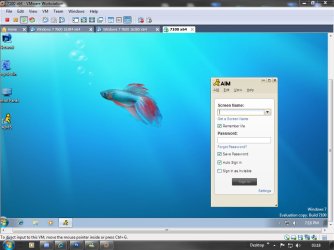
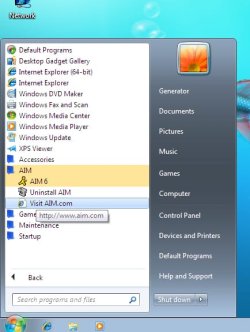
Just tried AIM in my VM and I can confirm it's well and truly broken, sorry people..
(It didn't even finish installing before killing Explorer)

EDIT: I've disabled links for 7100 whilst the bug is fixed.
Sorry to all who have downloaded the 7100 version.
 

My Computer

Computer Manufacturer/Model Number
Self Built
OS
XP Pro SP3 x86/Vista SP2 x64/Win7 x64 Triple-boot
CPU
AMD64 X2 AM2 5000+
Motherboard
Asus MSN-X Plus
Memory
Corsair TWX 2Gb (2x1Gb) DDR2 800Mhz
Graphics Card(s)
PCI-X 2.0 Inno3D (NVidia) 9500GT 1Gb DDR2
Sound Card
Onboard Realtec ALC662-GR
Monitor(s) Displays
Relisys 17' CRT (model unknown)
Screen Resolution
1024x768
Hard Drives
750Gb Samsung 7200-3Gb/s 32Mb Cache SATA
PSU
500W
Cooling
Standard AMD CPU Fan, One side, front and rear case fan.
Keyboard
Microsoft Multimedia Keyboard
Mouse
Samsung Optical
Internet Speed
10M
Mr GRiM's Glossy Blue Icon Pack Installer


With kind permission from Mr GRiM, I thought I'd make an install script to make the installation of the excellent 'Mr GRiM's Glossy Blue Icon Pack' a lot easier for everyone.

It's a couple of batch files that run without aid from any other third-party applications. It runs from within your current Windows 7 setup without the need to boot into another operating system or without the need to enter Safe Mode either.

View attachment 17355


Here's the contents of the "README.txt" file...

   Note

I MUST stress that everyone who decides to use the installer should manually creates backups of the files affected themselves, just as a saftey precaution with the script being new.
(The script does create backups and a System Restore Point but there is no harm in being extra safe!)

The affected files are as listed in the Readme.


Download links:
Build 7100 |- ! Bug Fixing ! -|- !! Bug Fixing !! -
*
Build 7264 |- Live Skydrive -|- Dropbox Mirror -
Build 7600 |- Live Skydrive -|- Dropbox Mirror -
(7600 - Works with both .16384 & .16385!)

* 7100 will be back up as soon as a unforeseeable bug has been fixed!


(Other builds will be available shortly!)
Don't forget to thank Mr GRiM if you like the icons! I just wrote the scripts...


Updates:

19th July 2009

Added downloads for build 7100 and build 7600 ( .16384 & .16385 ) .

17th July 2009

Icon Pack Installer updated to include icons for Floppy/Bluray drives.
View attachment 18743

Excellent work Sean, for everyones peice of mind I have also tested the script and it worked flawlessly, also I would like to add that running sfc /scannow in an Elevated command promt will also restore all icons to default after restart.

If you have any issues feel free to ask Sean or myself for help.

This is a preview of the icons that are included.

View attachment 17362

Enjoy :)

fantastic job guys. :D:D:D
 

My Computer

Computer Manufacturer/Model Number
Internet-Junkie
OS
Windows 7 RC Build 7100 x86 / Windows Vista SP2
CPU
Intel Core2Duo E8400
Motherboard
Asus Rampage Formula
Memory
3 Gigs DDR2 6400
Graphics Card(s)
Asus NVIDIA GeForce 9500 GT 512MB
Sound Card
Sound Blaster FX Extreme Audio PCI-E
Monitor(s) Displays
Sceptre X22WG Gamer 22" 1080p Widescreen LCD
Screen Resolution
1680 x 1050 32bit
Hard Drives
OCZ 64gig SSD Western Digital 300gig VelociRaptor 10,000RPM
Two Seagate Barracuda 320gig 7200RPM
PSU
700 Watt
Case
U2-UFO Black Powder Coat - Solid Top www.mountainmods.com
Cooling
Ultra ChillTech Thermo Electric Cooler/7 120mm 2500RMP Fans
Keyboard
Logitech diNOVO Edge
Mouse
Logitech LX 8 Cordless Laser Mouse
Internet Speed
7 MBPS Down / 784KBPS Up
Other Info
Hauppauge WinTV HVR-1800 Dual Tuner
Just tried AIM in my VM and I can confirm it's well and truly broken, sorry people..
(It didn't even finish installing before killing Explorer)

EDIT: I've disabled links for 7100 whilst the bug is fixed.
Sorry to all who have downloaded the 7100 version.
No worries, it's not too serious.

I have had no issues thus far - but I rarely go through the start menu to programs anymore, I type the name - and thus far The Last Remnant, Race Driver G.R.I.D. and other games I have do not cause any issues.
Even typing the name of the affected files in the Start Menu Search will crash Explorer. The only way to access the affected files is to have a shortcut to the files prior to installation or going into to Computer->Local Disk ( C: )->Whereever the affected files are in your HDD.
 
Last edited:

My Computer

Computer Manufacturer/Model Number
Dell Inspiron 14R N4110
OS
Windows 7 Home Premium x64
CPU
Intel Core i5-2410M Quad Core CPU @ 2.30 GHz
Memory
8 GB Shared Channel DDR3 Memory
Graphics Card(s)
Intel HD Graphics 3000, AMD Radeon HD 6470M
Sound Card
Intel Display Audio, Realtek High Definition Audio
Monitor(s) Displays
14" HD 720p LED Display
Screen Resolution
1366x768
Hard Drives
500 GB 5400 RPM SATA Hard Drive
Mouse
Microsoft USB IntelliMouse Explorer 3.0
Just tried all the other versions with installing AIM and it is just 7100 affected.


System001, Have you experienced any Explorer.exe crashes on the x86 verison of the build? It could narrow the problem down maybe to just x64 if you havn't. (& thanks for the appreciation btw!)
EDIT: or did you not get chance to download it before I just disabled the links for 7100?...
 

My Computer

Computer Manufacturer/Model Number
Self Built
OS
XP Pro SP3 x86/Vista SP2 x64/Win7 x64 Triple-boot
CPU
AMD64 X2 AM2 5000+
Motherboard
Asus MSN-X Plus
Memory
Corsair TWX 2Gb (2x1Gb) DDR2 800Mhz
Graphics Card(s)
PCI-X 2.0 Inno3D (NVidia) 9500GT 1Gb DDR2
Sound Card
Onboard Realtec ALC662-GR
Monitor(s) Displays
Relisys 17' CRT (model unknown)
Screen Resolution
1024x768
Hard Drives
750Gb Samsung 7200-3Gb/s 32Mb Cache SATA
PSU
500W
Cooling
Standard AMD CPU Fan, One side, front and rear case fan.
Keyboard
Microsoft Multimedia Keyboard
Mouse
Samsung Optical
Internet Speed
10M
I've got issues with build 7600 RTM x86 I run the install and when she restarts just get BSOD its weird coz I've done it many times with 7600 RTM x64 and it all goes sweet anyone else having troubles with x86?
 

My Computer

Computer Manufacturer/Model Number
Handy manny
OS
Windows 7 (x64)
CPU
i7 870
Motherboard
Evga P55 FTW
Memory
G.Skill Trident (F3-17066CL9D-4GBTDS 2x2GB) - 2133MHz
Graphics Card(s)
Evga GTX 460 EE 1GB
Sound Card
On Board
Monitor(s) Displays
Samsung P2350
Screen Resolution
1920x1080
Hard Drives
1 x 64GB G-Skill Falcon SSD
1 x 60GB Corsair Force Series SSD
1 x 1TB WD Caviar Black
2 x 640GB WD Caviar Black
1 x 1TB Samsung Spinpoint F3
PSU
Corsair 620w
Case
Corsair 800D
Cooling
Corsair H50
Keyboard
Logitech MX5500 Revolution
Mouse
Logitech MX5500 Revolution
Internet Speed
http://www.speedtest.net/result/939062765.png
Other Info
http://www.sevenforums.com/overclocking-case-mods/104136-show-us-your-rig-2-a-4.html#post937213
Mine reboots while booting with shell32 installed. Could be a blue screen. But I dont see it.
 

My Computer

Computer type
PC/Desktop
Computer Manufacturer/Model Number
Made by Dixon Butz
OS
Win7 Win 10, Win 8.1
CPU
AMD FX-8350, Corsair H100i
Motherboard
ASUS Crosshair V Formula-Z
Memory
16GB G.SKILL Ripjaws DDR3
Graphics Card(s)
EVGA GTX 980, EVGA GTX 860
Sound Card
Denon x4200 Dolby AMOS!
Monitor(s) Displays
65" Samsung 4K, +3 27inch
Screen Resolution
4K, 1080x3
Hard Drives
2TB Samsung hd204ui

1X Samsung 850 SSD
PSU
1000w EVGA, 2000VA UPS, 1000VA UPS and many others
Case
Lian Li
Cooling
Corsair H100i
Keyboard
Logitech K800
Mouse
Logitech Couch Mouse
Internet Speed
Gigabit!
Antivirus
Defender
Browser
Slimjet Chrome

My Computer

Computer type
PC/Desktop
Computer Manufacturer/Model Number
Made by Dixon Butz
OS
Win7 Win 10, Win 8.1
CPU
AMD FX-8350, Corsair H100i
Motherboard
ASUS Crosshair V Formula-Z
Memory
16GB G.SKILL Ripjaws DDR3
Graphics Card(s)
EVGA GTX 980, EVGA GTX 860
Sound Card
Denon x4200 Dolby AMOS!
Monitor(s) Displays
65" Samsung 4K, +3 27inch
Screen Resolution
4K, 1080x3
Hard Drives
2TB Samsung hd204ui

1X Samsung 850 SSD
PSU
1000w EVGA, 2000VA UPS, 1000VA UPS and many others
Case
Lian Li
Cooling
Corsair H100i
Keyboard
Logitech K800
Mouse
Logitech Couch Mouse
Internet Speed
Gigabit!
Antivirus
Defender
Browser
Slimjet Chrome
I'll look into the x86 version of 7600.16385 next then and see if I can figure out whats happening guys. :confused:


EDIT: Build 7100 problems now sorted and files are re-up'd...
VMWare_7100.jpgAOL_Sub_Folder.jpg
 
Last edited:

My Computer

Computer Manufacturer/Model Number
Self Built
OS
XP Pro SP3 x86/Vista SP2 x64/Win7 x64 Triple-boot
CPU
AMD64 X2 AM2 5000+
Motherboard
Asus MSN-X Plus
Memory
Corsair TWX 2Gb (2x1Gb) DDR2 800Mhz
Graphics Card(s)
PCI-X 2.0 Inno3D (NVidia) 9500GT 1Gb DDR2
Sound Card
Onboard Realtec ALC662-GR
Monitor(s) Displays
Relisys 17' CRT (model unknown)
Screen Resolution
1024x768
Hard Drives
750Gb Samsung 7200-3Gb/s 32Mb Cache SATA
PSU
500W
Cooling
Standard AMD CPU Fan, One side, front and rear case fan.
Keyboard
Microsoft Multimedia Keyboard
Mouse
Samsung Optical
Internet Speed
10M
I've reinstalled the fixed version and tested the previously affected files and all the others to be safe. I'm happy to report that everything now works perfectly as it was intended to. Thanks Generator (EDIT: and Mr GRiM), excellent work!
 
Last edited:

My Computer

Computer Manufacturer/Model Number
Dell Inspiron 14R N4110
OS
Windows 7 Home Premium x64
CPU
Intel Core i5-2410M Quad Core CPU @ 2.30 GHz
Memory
8 GB Shared Channel DDR3 Memory
Graphics Card(s)
Intel HD Graphics 3000, AMD Radeon HD 6470M
Sound Card
Intel Display Audio, Realtek High Definition Audio
Monitor(s) Displays
14" HD 720p LED Display
Screen Resolution
1366x768
Hard Drives
500 GB 5400 RPM SATA Hard Drive
Mouse
Microsoft USB IntelliMouse Explorer 3.0
Thanks mate, Glad that one's fixed now! :D

It was still work from both of us btw! Mr GRiM fixed the actual dll's and I tested, updated and re-upped the install. ;)
 

My Computer

Computer Manufacturer/Model Number
Self Built
OS
XP Pro SP3 x86/Vista SP2 x64/Win7 x64 Triple-boot
CPU
AMD64 X2 AM2 5000+
Motherboard
Asus MSN-X Plus
Memory
Corsair TWX 2Gb (2x1Gb) DDR2 800Mhz
Graphics Card(s)
PCI-X 2.0 Inno3D (NVidia) 9500GT 1Gb DDR2
Sound Card
Onboard Realtec ALC662-GR
Monitor(s) Displays
Relisys 17' CRT (model unknown)
Screen Resolution
1024x768
Hard Drives
750Gb Samsung 7200-3Gb/s 32Mb Cache SATA
PSU
500W
Cooling
Standard AMD CPU Fan, One side, front and rear case fan.
Keyboard
Microsoft Multimedia Keyboard
Mouse
Samsung Optical
Internet Speed
10M
Newgrounds Black Dual Monitor

This is a Newgrounds theme I created using custom dual monitor wallpaper I made. The wallpaper is 2048x768 and intended for dual monitor spanning.

Newgrounds Black.rar

Preview:

NGBlackPreview.jpg
 

My Computer

Computer Manufacturer/Model Number
Custom
OS
Win7 64bit Ultimate
CPU
AMD Phenom II X6 1100T Black Edition Thuban 3.3GHz, 3.7GHz
Motherboard
Gigabyte GA-890FXA-UD5
Memory
CORSAIR DOMINATOR GT 8GB (2 x 4GB) 1866 DDR3
Graphics Card(s)
XFX HD-697A-CNDC Radeon HD6970 2GB 256-bit
Sound Card
Creative SoundBlaster X-Fi Platinum Fatal1ty Edition
Monitor(s) Displays
Dual 25 Inch Hanns-G HZ251
Screen Resolution
1920x1080 X 2
PSU
Corsair 850W Single Rail
Case
Thermaltake V9 BlacX w/ Dual HDD Docking Station
Cooling
Air lots and lots of air and copper...
Keyboard
Kensington (Low-Profile)
Mouse
Creative Fatal1ty
Internet Speed
15Gbit (15 Down 5 Up)
Other Info
XIGMATEK HDT-S1284F 120mm HYPRO Bearing CPU Cooler, LG Blu-Ray Burner.
Ok, I think the Bluray icon is located in 'imagesp1.dll' in both the 'System32' & 'SysWOW64' folders, which means I'll have to alter the installer to include this dll...

If someone with a Blu-Ray drive could confirm that the selected icon shown below is the one please. ;)
View attachment 18699


Thanx but Mr GRiM deserves the credit.. he created the icon pack, I just wrote the installer. :)

I have not gone through the rest of the thread yet, however BD drive on my system is Daemon Tools virtual cd/dvd.
 

My Computer

Computer Manufacturer/Model Number
Internet-Junkie
OS
Windows 7 RC Build 7100 x86 / Windows Vista SP2
CPU
Intel Core2Duo E8400
Motherboard
Asus Rampage Formula
Memory
3 Gigs DDR2 6400
Graphics Card(s)
Asus NVIDIA GeForce 9500 GT 512MB
Sound Card
Sound Blaster FX Extreme Audio PCI-E
Monitor(s) Displays
Sceptre X22WG Gamer 22" 1080p Widescreen LCD
Screen Resolution
1680 x 1050 32bit
Hard Drives
OCZ 64gig SSD Western Digital 300gig VelociRaptor 10,000RPM
Two Seagate Barracuda 320gig 7200RPM
PSU
700 Watt
Case
U2-UFO Black Powder Coat - Solid Top www.mountainmods.com
Cooling
Ultra ChillTech Thermo Electric Cooler/7 120mm 2500RMP Fans
Keyboard
Logitech diNOVO Edge
Mouse
Logitech LX 8 Cordless Laser Mouse
Internet Speed
7 MBPS Down / 784KBPS Up
Other Info
Hauppauge WinTV HVR-1800 Dual Tuner
Just tried all the other versions with installing AIM and it is just 7100 affected.


System001, Have you experienced any Explorer.exe crashes on the x86 verison of the build? It could narrow the problem down maybe to just x64 if you havn't. (& thanks for the appreciation btw!)
EDIT: or did you not get chance to download it before I just disabled the links for 7100?...

I came to this thread yesterday and noticed your in the process of fixing the 7100 package, so I decided to wait to download anything. But since you asked, before I do download and install I am running Winstep Xtreme 9.6 Beta 3. I am running NextSTART, NeXuS, and WorkShelf and no gadgets on a modified Win 7 RC 7100 release from Rockers Team. Rockers Team - Technical :: Software Solutions :: RT Galleries :: Tutorials . I would like to know if you have heard of any issues with any of the above?:D:D:D
 

My Computer

Computer Manufacturer/Model Number
Internet-Junkie
OS
Windows 7 RC Build 7100 x86 / Windows Vista SP2
CPU
Intel Core2Duo E8400
Motherboard
Asus Rampage Formula
Memory
3 Gigs DDR2 6400
Graphics Card(s)
Asus NVIDIA GeForce 9500 GT 512MB
Sound Card
Sound Blaster FX Extreme Audio PCI-E
Monitor(s) Displays
Sceptre X22WG Gamer 22" 1080p Widescreen LCD
Screen Resolution
1680 x 1050 32bit
Hard Drives
OCZ 64gig SSD Western Digital 300gig VelociRaptor 10,000RPM
Two Seagate Barracuda 320gig 7200RPM
PSU
700 Watt
Case
U2-UFO Black Powder Coat - Solid Top www.mountainmods.com
Cooling
Ultra ChillTech Thermo Electric Cooler/7 120mm 2500RMP Fans
Keyboard
Logitech diNOVO Edge
Mouse
Logitech LX 8 Cordless Laser Mouse
Internet Speed
7 MBPS Down / 784KBPS Up
Other Info
Hauppauge WinTV HVR-1800 Dual Tuner
I came to this thread yesterday and noticed your in the process of fixing the 7100 package, so I decided to wait to download anything. But since you asked, before I do download and install I am running Winstep Xtreme 9.6 Beta 3. I am running NextSTART, NeXuS, and WorkShelf and no gadgets on a modified Win 7 RC 7100 release from Rockers Team. Rockers Team - Technical :: Software Solutions :: RT Galleries :: Tutorials . I would like to know if you have heard of any issues with any of the above?:D:D:D


Providing nothing has modified the dll's in question (see first post!) it should be fine. No-one has reported anything regarding the products mentioned... (but no-one else maybe using them who's tried.)

If 'Modified Win 7' means it's just a lite version and all the other stuff you mention is just docks and the alike, I can't see there being a problem.

You may want to wait awhile and see if anyone disagree's with me though!
(If you can wait a couple of hours, I'll try Winstep Xtreme, NextSTART, NeXuS, and WorkShelf first on my Virtual Machine. ;) )
 

My Computer

Computer Manufacturer/Model Number
Self Built
OS
XP Pro SP3 x86/Vista SP2 x64/Win7 x64 Triple-boot
CPU
AMD64 X2 AM2 5000+
Motherboard
Asus MSN-X Plus
Memory
Corsair TWX 2Gb (2x1Gb) DDR2 800Mhz
Graphics Card(s)
PCI-X 2.0 Inno3D (NVidia) 9500GT 1Gb DDR2
Sound Card
Onboard Realtec ALC662-GR
Monitor(s) Displays
Relisys 17' CRT (model unknown)
Screen Resolution
1024x768
Hard Drives
750Gb Samsung 7200-3Gb/s 32Mb Cache SATA
PSU
500W
Cooling
Standard AMD CPU Fan, One side, front and rear case fan.
Keyboard
Microsoft Multimedia Keyboard
Mouse
Samsung Optical
Internet Speed
10M
i ran the removal script for the 7600 x86 icons since some didnt convert and others kept reverting back to the old ones, however i still have blue ones that didn't revert back to default afterwards.
 

My Computer

OS
Windows 7 Ultimate 64Bit
CPU
AMD Athlon x4 650 3Ghz
Motherboard
ASUS
Memory
4gb
Graphics Card(s)
ATI Radeon 3000 series Onboard
i ran the removal script for the 7600 x86 icons since some didnt convert and others kept reverting back to the old ones, however i still have blue ones that didn't revert back to default afterwards.

It could just be the iconcache.db that hasn't caught up yet if it seems random upon restarts etc.. It can take a few restarts and some general use to catch up to itself normally.

If you think it isn't that, run a System File Check by running an 'Elevated Command Prompt' and typing 'SFC /SCANNOW'. (It may take some time to do it though, but this will restore the original files)


Just out of curiosity, what version of 7600 x86 are you running? the install for 7600 has been incompatible with x86 builds, it blue-screened upon first restart. (I'm just uploading the fixed install now.) :confused:
 

My Computer

Computer Manufacturer/Model Number
Self Built
OS
XP Pro SP3 x86/Vista SP2 x64/Win7 x64 Triple-boot
CPU
AMD64 X2 AM2 5000+
Motherboard
Asus MSN-X Plus
Memory
Corsair TWX 2Gb (2x1Gb) DDR2 800Mhz
Graphics Card(s)
PCI-X 2.0 Inno3D (NVidia) 9500GT 1Gb DDR2
Sound Card
Onboard Realtec ALC662-GR
Monitor(s) Displays
Relisys 17' CRT (model unknown)
Screen Resolution
1024x768
Hard Drives
750Gb Samsung 7200-3Gb/s 32Mb Cache SATA
PSU
500W
Cooling
Standard AMD CPU Fan, One side, front and rear case fan.
Keyboard
Microsoft Multimedia Keyboard
Mouse
Samsung Optical
Internet Speed
10M
Thanks mate, Glad that one's fixed now! :D

It was still work from both of us btw! Mr GRiM fixed the actual dll's and I tested, updated and re-upped the install. ;)
Ok, edited last post to give both of you credit.
 

My Computer

Computer Manufacturer/Model Number
Dell Inspiron 14R N4110
OS
Windows 7 Home Premium x64
CPU
Intel Core i5-2410M Quad Core CPU @ 2.30 GHz
Memory
8 GB Shared Channel DDR3 Memory
Graphics Card(s)
Intel HD Graphics 3000, AMD Radeon HD 6470M
Sound Card
Intel Display Audio, Realtek High Definition Audio
Monitor(s) Displays
14" HD 720p LED Display
Screen Resolution
1366x768
Hard Drives
500 GB 5400 RPM SATA Hard Drive
Mouse
Microsoft USB IntelliMouse Explorer 3.0
It could just be the iconcache.db that hasn't caught up yet if it seems random upon restarts etc.. It can take a few restarts and some general use to catch up to itself normally.

If you think it isn't that, run a System File Check by running an 'Elevated Command Prompt' and typing 'SFC /SCANNOW'. (It may take some time to do it though, but this will restore the original files)


Just out of curiosity, what version of 7600 x86 are you running? the install for 7600 has been incompatible with x86 builds, it blue-screened upon first restart. (I'm just uploading the fixed install now.) :confused:

16835 - rtm
 

My Computer

OS
Windows 7 Ultimate 64Bit
CPU
AMD Athlon x4 650 3Ghz
Motherboard
ASUS
Memory
4gb
Graphics Card(s)
ATI Radeon 3000 series Onboard
Ok, edited last post to give both of you credit.
Thanks Klaw :D

16835 - rtm

Strange, That's the build that caused all the problems for everyone else.. (You must be blessed or something!)

The new working version should be up real soon, just finalising the testing.. (If you do wish to try that one, check the re-installation notes first! ;) )


EDIT: Separate 7600 X86 version now uploaded to resolve the x86 BSOD's.
 
Last edited by a moderator:

My Computer

Computer Manufacturer/Model Number
Self Built
OS
XP Pro SP3 x86/Vista SP2 x64/Win7 x64 Triple-boot
CPU
AMD64 X2 AM2 5000+
Motherboard
Asus MSN-X Plus
Memory
Corsair TWX 2Gb (2x1Gb) DDR2 800Mhz
Graphics Card(s)
PCI-X 2.0 Inno3D (NVidia) 9500GT 1Gb DDR2
Sound Card
Onboard Realtec ALC662-GR
Monitor(s) Displays
Relisys 17' CRT (model unknown)
Screen Resolution
1024x768
Hard Drives
750Gb Samsung 7200-3Gb/s 32Mb Cache SATA
PSU
500W
Cooling
Standard AMD CPU Fan, One side, front and rear case fan.
Keyboard
Microsoft Multimedia Keyboard
Mouse
Samsung Optical
Internet Speed
10M
Thanks Klaw :D


Strange, That's the build that caused all the problems for everyone else.. (You must be blessed or something!)

The new working version should be up real soon, just finalising the testing.. (If you do wish to try that one, check the re-installation notes first! ;) )


EDIT: Separate 7600 X86 version now uploaded to resolve the x86 BSOD's.

Thanks for fixing the issue with 7600 x86 I'm about to install now.:D
 

My Computer

Computer Manufacturer/Model Number
Handy manny
OS
Windows 7 (x64)
CPU
i7 870
Motherboard
Evga P55 FTW
Memory
G.Skill Trident (F3-17066CL9D-4GBTDS 2x2GB) - 2133MHz
Graphics Card(s)
Evga GTX 460 EE 1GB
Sound Card
On Board
Monitor(s) Displays
Samsung P2350
Screen Resolution
1920x1080
Hard Drives
1 x 64GB G-Skill Falcon SSD
1 x 60GB Corsair Force Series SSD
1 x 1TB WD Caviar Black
2 x 640GB WD Caviar Black
1 x 1TB Samsung Spinpoint F3
PSU
Corsair 620w
Case
Corsair 800D
Cooling
Corsair H50
Keyboard
Logitech MX5500 Revolution
Mouse
Logitech MX5500 Revolution
Internet Speed
http://www.speedtest.net/result/939062765.png
Other Info
http://www.sevenforums.com/overclocking-case-mods/104136-show-us-your-rig-2-a-4.html#post937213
Status
Not open for further replies.
Back
Top