Windows 7 Forums Search
Welcome to Windows 7 Forums. Our forum is dedicated to helping you find solutions with any problems, errors or issues you are experiencing with Windows 7. The Windows 7 forum also covers news and updates and has an extensive Windows 7 tutorial section that covers a wide range of tips and tricks.


Windows 7 - Context Menu Handlers-Can Norton or Win 7 Block them?

 
12-13-2011   #1


windows 7 home premium 64bit


Context Menu Handlers-Can Norton or Win 7 Block them?

There are several programs that with previous versions of windows would automatically add a context menu handler for their program. I just recently purchased a new hp laptop that has a new build of Windows 7 home premium 64 bit. But a different build would allow the context menu handlers for their programs. I use unlocker HJ-Splitter and QuickPar a lot and to have to go through open with and to search for the actual file folder in Program Files is a major pain in seating muscle. I just downloaded ShellViewMenu hoping it would allow me to add these programs to the right click menu. But to no avail. I feel comfortable with working externally with most applications but fooling around with Windows Registery scares the weebee jeeves out of me. I know that bat.files and VB script files might be an answer but we may have a New US President before I get a good handle on there processes.


My System SpecsSystem Spec
12-13-2011   #2


Acer laptop W 7 Pro SP1 64 bit & Dell Desktop W 7 Pro SP1 32 bit


Welcome to the Seven Forums
I know working with the registry can be scary but if you backed it up Registry - Backup and Restore in be careful what you're doing it's not too bad. I can show you how to add a program to your right click menu through the registry if you would like.
Jerry
My System SpecsSystem Spec
12-13-2011   #3


windows 7 home premium 64bit


re:Context Menu Handlers Can Norton?

Bongo that would be a blessing. Any help in this matter would be most appreciative.
My System SpecsSystem Spec
.


12-14-2011   #4


Acer laptop W 7 Pro SP1 64 bit & Dell Desktop W 7 Pro SP1 32 bit


Sorry for the late reply.
#1
Create a restore point System Restore Point - Create
I will show you how to backup the registry in a couple more steps.

#2
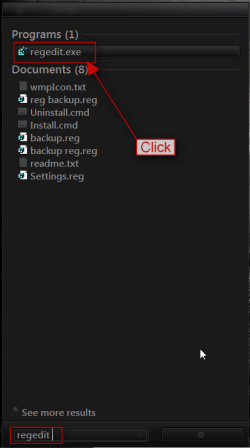
In the start menu search box type regedit and click on it in the search results to open up the registry editor.
Context Menu Handlers-Can Norton or Win 7 Block them?-search.png

#3
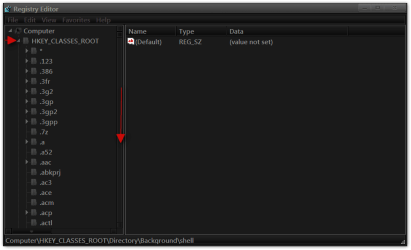
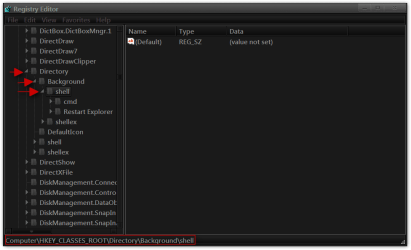
Navigate to HKEY_CLASSES_ROOT\Directory\Background\shell
Context Menu Handlers-Can Norton or Win 7 Block them?-1.pngContext Menu Handlers-Can Norton or Win 7 Block them?-2.png

#4
Now we will back up the registry Registry - Backup and Restore
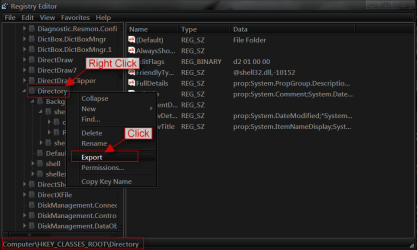
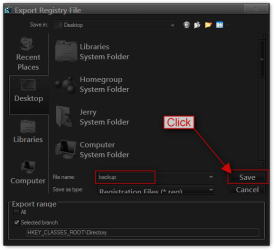
Right click on Directory and click on Export.
Context Menu Handlers-Can Norton or Win 7 Block them?-3.png

Give it a name and click on Save (I usually save them to the desktop and tell them done and then you can either store it in a folder in your documents folder or delete it).
Context Menu Handlers-Can Norton or Win 7 Block them?-4.png

#5
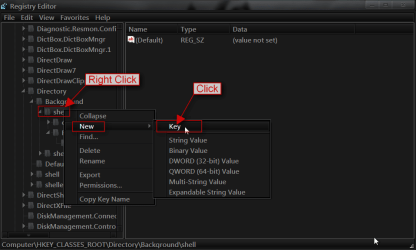
Now we will add a program (I am going to use Firefox as an example)
Right-click on shell go to New > Key and click on it.
Context Menu Handlers-Can Norton or Win 7 Block them?-5.png

#6
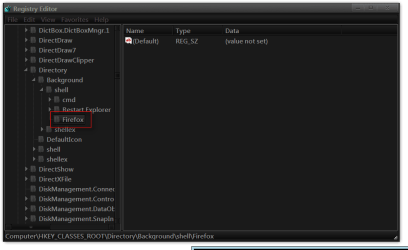
In the New Key #1 Box Add Your Program Name That You Want to See in the Right-Click menu here I put Firefox.
Context Menu Handlers-Can Norton or Win 7 Block them?-6.pngContext Menu Handlers-Can Norton or Win 7 Block them?-7.png

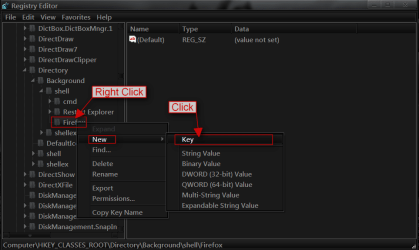
#7
Right-click on Firefox go to New > Key and click on it.
Context Menu Handlers-Can Norton or Win 7 Block them?-8.png

#8
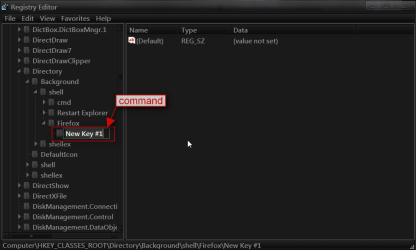
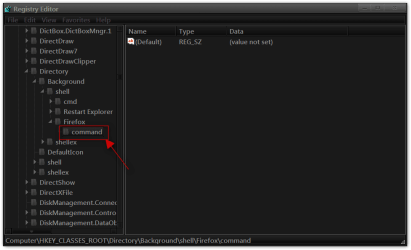
In the New Key #1 Box Add command in lowercase.
Context Menu Handlers-Can Norton or Win 7 Block them?-9.pngContext Menu Handlers-Can Norton or Win 7 Block them?-10.png

#9
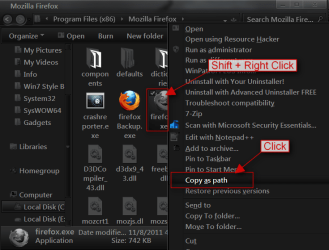
Now you need to navigate to the programs .exe then push and hold Shift + and Right click on the program .exe and click on Copy as Path.
Context Menu Handlers-Can Norton or Win 7 Block them?-11.png

#10
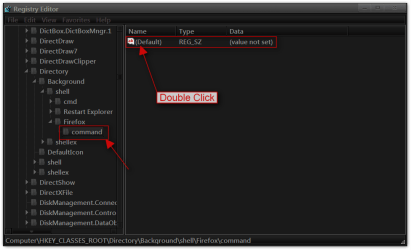
Go back to the registry editor make sure you click on command on the left side and then on the right side Double-click on Default.
Context Menu Handlers-Can Norton or Win 7 Block them?-12.png

#11
In the Edit String box in the value data Paste or Ctrl + V the path of the program .exe and click on OK.
Context Menu Handlers-Can Norton or Win 7 Block them?-13.png

You should have your program in the right click menu(you may have to logoff/logon or restart to see it in the menu)
Context Menu Handlers-Can Norton or Win 7 Block them?-14.png

If you would like add icon to it follow this tutorial Context Menu - Add Shortcuts with Icons
If something is confusing let me know and I will try to straighten it out for you.
Jerry
My System SpecsSystem Spec
12-17-2011   #5


win 7 ultimate x64


Quote   Quote: Originally Posted by win7rust View Post
There are several programs that with previous versions of windows would automatically add a context menu handler for their program. I just recently purchased a new hp laptop that has a new build of Windows 7 home premium 64 bit. But a different build would allow the context menu handlers for their programs. I use unlocker HJ-Splitter and QuickPar a lot and to have to go through open with and to search for the actual file folder in Program Files is a major pain in seating muscle. I just downloaded ShellViewMenu hoping it would allow me to add these programs to the right click menu. But to no avail. I feel comfortable with working externally with most applications but fooling around with Windows Registery scares the weebee jeeves out of me. I know that bat.files and VB script files might be an answer but we may have a New US President before I get a good handle on there processes.
1 - You don't need to to use "Open With" every time and browse for the program in programs folder. For example, the first file of the HJSplitter would have an extension
of .001, so the first time you use "Open With" and browse for HJSplittter.exe, make sure you put a check mark on: Always use the selected program to open this kind of file. This will register the extension .001 to be used with HJSplitter.exe. The next time you just double click on the file with extension .001 and it will open HJSplitter.exe program.

2 - After you installed Quickpart, Open the option and check on 'Integrate QuickPar into Shell' this will add QuickPar to the context menu. I dont use Quickpart but I google it to their website and this is all you need to do.

3 - The info I gave you in 1 & 2 just for future reference. Since you are uncomfortable to work with regedit, here is an easy way to add an item or a cascading menu in the context menu.
Go to this website: http://win7utilities.com and download Your Menu1.0
and you're all set. This program is self explanatory, just read the first screen and you'll know what to do.

Oops: I forgot, the program will generate 2 .reg files, save it to your desktop and just double click one to add to your registry, the other .reg file is to remove it from registry. Hope this help !!!

Here is a screen shot of my desktop context menu.
Capture.png picture by topgundcp - Photobucket

Last edited by topgundcp; 12-17-2011 at 06:43 PM..
My System SpecsSystem Spec
Reply

 Context Menu Handlers-Can Norton or Win 7 Block them? problems?


Thread Tools


Similar Threads for: Context Menu Handlers-Can Norton or Win 7 Block them?
Thread Forum
New Context Menu - Remove & Restore Default Menu Items Tutorials
Why is the context menu in Start Menu and Taskbar so small? General Discussion
Solved Unable to remove MagicISO context menu from right click menu in Win 7 Customization
Custom Items on Start Menu Context Menu Customization
Duplicate Context menu entries in Start menu General Discussion


All times are GMT -5. The time now is 09:25 AM.


Windows 7 Forums is an independent web site and has not been authorized,
sponsored, or otherwise approved by Microsoft Corporation.
"Windows 7" and related materials are trademarks of Microsoft Corp.
© Designer Media Ltd
  

1 2 3 4 5 6 7 8 9 10 11 12 13 14 15 16 17 18 19 20 21 22 23 24 25 26 27 28 29 30