Windows 7 Forums Search
Welcome to Windows 7 Forums. Our forum is dedicated to helping you find solutions with any problems, errors or issues you are experiencing with Windows 7. The Windows 7 forum also covers news and updates and has an extensive Windows 7 tutorial section that covers a wide range of tips and tricks.


Windows 7 - Location for OEM items in start menu

 
12-13-2011   #1


Windows 7 enterprise x64


Location for OEM items in start menu

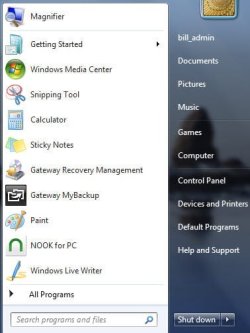
A new Gateway laptop has 10 links on the left side of the Start Menu for various Windows programs and Gateway programs. I am trying to find the location on the HDD or registry where these exist. Reading through tutorials and threads on Start Menu has not helped.

Recent Items is turned off and I started with no pinned items. None of the items in the list is included in
C:\Users\(User Name)\AppData\Roaming\Microsoft\Windows\Recent Items

If I drag a shortcut in this list to the top of the start menu, then that shortcut becomes "pinned" and there is a seperator line between it and other items below. Is there another place I can find this group of shortcuts?

Bill.

My System SpecsSystem Spec
12-13-2011   #2


Acer laptop W 7 Pro SP1 64 bit & Dell Desktop W 7 Pro SP1 32 bit


Welcome to the Seven Forums Bill
Would you post a screenshot of your start menu.
Screenshot with Paint
Screenshots and Files - Upload and Post in Seven Forums
How to Use the Snipping Tool in Vista - Vista Forums
When you say there is a separator from the top and bottom you must have recent items turned on.
Jerry
My System SpecsSystem Spec
12-13-2011   #3


Windows 7 enterprise x64


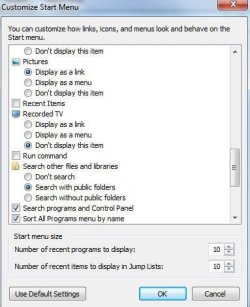
That's why I was looking to find a section other than recent items or pinned. Attached are screens.

Magnifier was originally below and there was no separator line. When I dragged it up it pinned to the top and Windows Live Writer was added to the bottom list. Most of those items have never been used by me. It was the list when I first turned it on.

Bill.
Attached Thumbnails
Location for OEM items in start menu-startmenu.jpg   Location for OEM items in start menu-customize_start.jpg  
My System SpecsSystem Spec
.


12-13-2011   #4


Acer laptop W 7 Pro SP1 64 bit & Dell Desktop W 7 Pro SP1 32 bit


Some of those can be found at C:\ProgramData\Microsoft\Windows\Start Menu\Programs

What are you trying to do?
Jerry
My System SpecsSystem Spec
12-13-2011   #5


Vista x64 / 7 X64


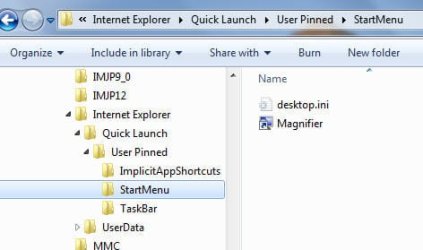
"%systemdrive%\Users\YourUserName\AppData\Roaming\Microsoft\Internet Explorer\Quick Launch\User Pinned"

It is hidden so you need to show hidden files in folder options.

reg entries are here:

HKEY_CURRENT_USER\Software\Microsoft\Windows\CurrentVersion\Explorer\StartPage2
My System SpecsSystem Spec
12-13-2011   #6


Windows 7 enterprise x64


User pinned is just the Magnifier item I dragged to the pinned area. I am trying to find the disk location of the other items (which are not in recent items). The initial reason was so I could restore the factory list if needed without having to restore complete factory image. But now it seems this is a differnt animal and I want to see how Gateway did it.

Bill.
Attached Thumbnails
Location for OEM items in start menu-quicklaunch.jpg  
My System SpecsSystem Spec
12-13-2011   #7


Windows 7 x86 since December 2008


Customize the Windows 7 Start Menu and Taskbar Using unattend.xml

This is how they done it with Windows AIK or MDT (which uses AIK's functionality anyway).
My System SpecsSystem Spec
12-13-2011   #8


Vista x64 / 7 X64


It would be easier to back up the startpage2 reg entries I posted earlier - make a backup, then delete the programscache entries. Refresh explorer - see what happens.
My System SpecsSystem Spec
12-13-2011   #9


Vista x64 / 7 X64


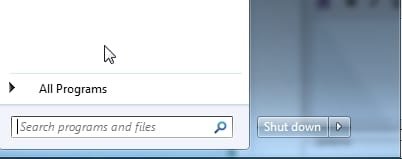
To refreh Explorer, press ctrl+shift while rt clicking a blank area on the right of the start menu - just above the shutdown button will be fine.

Select Exit Explorer.

Then restart explorer with ctrl+shift+esc for task mgr , select File>NewTask, type explorer, ok
My System SpecsSystem Spec
12-13-2011   #10


Windows 7 enterprise x64


Thanks guys. I have not found where these shortcuts are stored, but I have a much better appreciation for what is going on.

Bill.
My System SpecsSystem Spec
Reply

 Location for OEM items in start menu problems?


Thread Tools


Similar Threads for: Location for OEM items in start menu
Thread Forum
cleaned out all of my start menu items General Discussion
Custom Items on Start Menu Context Menu Customization
What items can be pinned to start menu? General Discussion
Start menu pinned items General Discussion
Remove start menu items Media Center


All times are GMT -5. The time now is 09:26 AM.


Windows 7 Forums is an independent web site and has not been authorized,
sponsored, or otherwise approved by Microsoft Corporation.
"Windows 7" and related materials are trademarks of Microsoft Corp.
© Designer Media Ltd
  

1 2 3 4 5 6 7 8 9 10 11 12 13 14 15 16 17 18 19 20 21 22 23 24 25 26 27 28 29 30