Windows 7 Forums Search
Welcome to Windows 7 Forums. Our forum is dedicated to helping you find solutions with any problems, errors or issues you are experiencing with Windows 7. The Windows 7 forum also covers news and updates and has an extensive Windows 7 tutorial section that covers a wide range of tips and tricks.


Windows 7 - Customised user account picture

 
12-22-2011   #1


Windows 7 Home Premium 64 bit


Customised user account picture

Hi all,

Some time back, I set up two user accounts on my Windows 7 PC, customised to use desk top icons from my personal photo library. Now I would like to copy these images to another Windows 7 PC. Of course I cant now remember where I got them from, and whats more cant find where they are located on the first machine. Can anyone point me to the right place?

My System SpecsSystem Spec
12-22-2011   #2


Win7 Pro SP1 x64


I dont quite understand what you mean but I think this will help

Quote:
C:\ProgramData\Microsoft\User Account Pictures\Default Pictures
My System SpecsSystem Spec
12-22-2011   #3


Windows 7 Home Premium 64 bit


Hi Netbox

That location only shows all the default images. As I tried to explain, I didnt use any of them , but used a more meaningful image from my my personal photo collection. Its those images I cant now find.
My System SpecsSystem Spec
.


12-22-2011   #4


Win 7 Home Premium 64bit Ver 6.1.7600 Build 7601 - SP1


Have you tried to right click on the icon/image to check its properties?

It may tell you the location under the General or Shortcut tabs.
My System SpecsSystem Spec
12-22-2011   #5


Windows 7 Home Premium 64 bit


Quote   Quote: Originally Posted by Anak View Post
Have you tried to right click on the icon/image to check its properties?

It may tell you the location under the General or Shortcut tabs.

Yes tried that. It doesnt do anything
My System SpecsSystem Spec
12-22-2011   #6


Win 7 Home Premium 64bit Ver 6.1.7600 Build 7601 - SP1


Quote:
Some time back, I set up two user accounts on my Windows 7 PC, customised to use desk top icons from my personal photo library.
Do you still have access to your personal photo library (PPL) Folder?

Quote:
I cant now remember where I got them from,
Do you mean online, scanned, or your PPL?

Quote:
and whats more cant find where they are located on the first machine.
There are several options here. You will need a third party search program that works with images, I do not think windows search will be able to handle this, although you could try typing images into the Start >Search box to see what it can find, and then trying any Folder or files that show.

I have used Picasa, but found it to be a little too intrusive.

I use XnView now. or you can pick one from Best Free Digital Photo Organizers

You can install any of these, and once run, they will find any image on your machine, no matter how insignificant.

With any of these methods it will still be tedious to find the images you are looking for, as long as they still exist.
My System SpecsSystem Spec
12-22-2011   #7


Windows 7 Home Premium 64 bit


Anak,

Yes I still have access to these photos. I'm just too lazy to search through them all. They are all oganised in folders so I could find them again with enough effort.

I thought the simplest way to do it was find the location of these customised icons where they are setup on my first machine.
My System SpecsSystem Spec
12-22-2011   #8


Win 7 Home Premium 64bit Ver 6.1.7600 Build 7601 - SP1


Quote   Quote: Originally Posted by keithr View Post
Yes I still have access to these photos. I'm just too lazy to search through them all.
Well, I certainly can not fault you for not being honest!

Quote   Quote: Originally Posted by keithr View Post
I thought the simplest way to do it was find the location of these customised icons where they are setup on my first machine.
Jeez, I can not understand why, when you right click on these images, and you look in their properties.....Wait a minute,

Quote   Quote: Originally Posted by keithr View Post
Quote   Quote: Originally Posted by Anak View Post
Have you tried to right click on the icon/image to check its properties?

It may tell you the location under the General or Shortcut tabs.

Yes tried that. It doesnt do anything
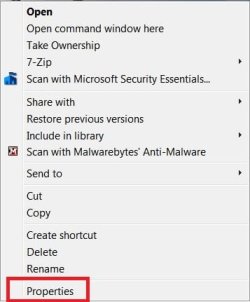
When you right click, you are not seeing a context menu?

Like the one I have of an icon shortcut on my desktop?:

Customised user account picture-context-menu.jpg

Do you remember if you tagged them with a name? A date?
My System SpecsSystem Spec
12-22-2011   #9


Windows 7 Professional x32


Type following command on run box
C:\Users\(eneter your computer name i mean admin name)\appdata

you will find folders here
Go through on each entry and you will find image
My System SpecsSystem Spec
12-22-2011   #10


Windows 7 Home Premium 64 bit


When you right click, you are not seeing a context menu?

Like the one I have of an icon shortcut on my desktop?:


Do you remember if you tagged them with a name? A date?[/QUOTE]

When I right click, I dont get a context menu

Sorry cant remember any date info, but I definitely didnt tag them
My System SpecsSystem Spec
Reply

 Customised user account picture problems?


Thread Tools


Similar Threads for: Customised user account picture
Thread Forum
Low Quality User Account Picture Customization
One last try, Get rid of User Account picture on login screen. Customization
No "Change Picture" option for User Account Picture General Discussion
Add Custom User account picture and Win Logon picture to Theme file ? Themes and Styles
User Account Picture - Change Tutorials


All times are GMT -5. The time now is 09:34 AM.


Windows 7 Forums is an independent web site and has not been authorized,
sponsored, or otherwise approved by Microsoft Corporation.
"Windows 7" and related materials are trademarks of Microsoft Corp.
© Designer Media Ltd
  

1 2 3 4 5 6 7 8 9 10 11 12 13 14 15 16 17 18 19 20 21 22 23 24 25 26 27 28 29 30