Windows 7 Forums Search
Welcome to Windows 7 Forums. Our forum is dedicated to helping you find solutions with any problems, errors or issues you are experiencing with Windows 7. The Windows 7 forum also covers news and updates and has an extensive Windows 7 tutorial section that covers a wide range of tips and tricks.


Windows 7 - Searching for way to put shortcut on Windows Explorer toolbar

 
12-27-2011   #1


Windows 7 Professional 32 bit


Searching for way to put shortcut on Windows Explorer toolbar

Hi, I'm a new member, been searching for a way to put a shortcut on the Windows Explorer toolbar as a button. I would think others have requested something like this, perhaps I'm not using the right search words, can't find any tutorial specific to this. In this Shortcut tutorial, it ends with "6. You can now move the shortcut to where you like for ease of use." For me, I'd love to have it as a button on the WE toolbar. Any way that might be possible?

My System SpecsSystem Spec
12-27-2011   #2


Acer laptop W 7 Pro SP1 64 bit & Dell Desktop W 7 Pro SP1 32 bit


Welcome to the Seven Forums
Have a look at this tutorial it may help Windows Explorer Toolbar Buttons - Customize
Jerry
My System SpecsSystem Spec
12-27-2011   #3


Windows 7 Ultimate x64 SP1


Hello Hcgood,

In addition, the free program StExBar will allow you to add custom toolbars to Windows Explorer in Windows 7.

Hope this helps,
Shawn
My System SpecsSystem Spec
.


12-28-2011   #4


Windows 7 Professional 32 bit


Jerry, I had viewed all those tutorials but didn't see how to make a button to run a shortcut.
Shawn, I had already installed StExBar but couldn't figure out how to make anything on it run a shortcut. Do you know if it can be done?
Thanks for your help!
Harold
My System SpecsSystem Spec
12-28-2011   #5


Windows 7 Ultimate x64 SP1


Harold,

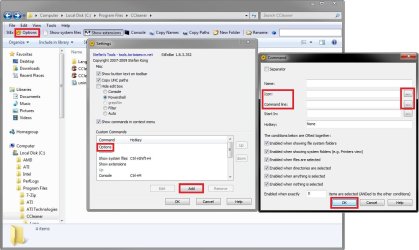
It took me a bit to figure it out, but here you go. On the StExBar toolbar in Windows Explorer, click on the Options button. In the Custom Commands box at the bottom, select Options, and click on the Add button like below. From here, you can enter the full path of the program you want to run in the Command line field, select a icon in the Icon field, type in a Name for reference, then click on OK to add it to the toolbar.

Searching for way to put shortcut on Windows Explorer toolbar-stexbar.jpg

Last edited by Brink; 12-28-2011 at 11:50 AM.. Reason: addition
My System SpecsSystem Spec
12-28-2011   #6


Windows 7 Professional 32 bit


Thanks, I finally got it to run an executable file with your instructions. What I'd really like is for it to go to a folder and open it.
E.g. I have a shortcut I use frequently, in this shortcut, under Properties, Target this is what shows:
"C:\Users\goodh\Documents\!!!My Shortcuts"

Is there any way I could get this button to open this folder within Win Explorer?
My System SpecsSystem Spec
12-28-2011   #7


Windows 7 Ultimate x64 SP1


StExBar seems to only accept application files and not folders for shortcuts on the toolbar.

If you like, the tutorial below will help show you how to pin a folder to the taskbar in Windows 7 instead that may help.

Taskbar - Pin or Unpin a Folder
My System SpecsSystem Spec
01-03-2012   #8


Windows 7 Professional 32 bit


This is as close as I can get:
%SystemRoot%\explorer.exe /root,/select,c:\My Documents\!!!My Shortcuts

But unfortunately it always opens a new Explorer window which I don't want. So I guess I'm at a dead end with this one.
My System SpecsSystem Spec
Reply

 Searching for way to put shortcut on Windows Explorer toolbar problems?


Thread Tools


Similar Threads for: Searching for way to put shortcut on Windows Explorer toolbar
Thread Forum
Explorer Toolbar Editor and or remove buttons on Explorer toolbar Customization
Windows Explorer - Searching for items. Performance & Maintenance
Windows Explorer Toolbar Missing General Discussion
Searching for files with Windows 7 file explorer General Discussion
Standard buttons toolbar on windows explorer General Discussion


All times are GMT -5. The time now is 09:45 AM.


Windows 7 Forums is an independent web site and has not been authorized,
sponsored, or otherwise approved by Microsoft Corporation.
"Windows 7" and related materials are trademarks of Microsoft Corp.
© Designer Media Ltd
  

1 2 3 4 5 6 7 8 9 10 11 12 13 14 15 16 17 18 19 20 21 22 23 24 25 26 27 28 29 30