Windows 7 Forums


Windows 7: How can I freeze the "Recycle bin" location on Windows 7

29 Dec 2011   #1

Windows 7 Home Premium 64-bit
 
 
How can I freeze the "Recycle bin" location on Windows 7

Is there any way I can freeze the location where the Recycle Bin is on Windows 7? I want it to be on the bottom right corner of the screen (as seen below):


I want it to be in that position even when I right click and choose any of the "Sort by" options. How can I do this?
My System SpecsSystem Spec

29 Dec 2011   #2

64-bit Windows 7 Ultimate SP1 & Windows 8 Enterprise
Texas


Hello Problemo,

Sorry, but that's not going to be possible when using the Sort by options. However, as a workaround, you could place the Recycle Bin anywhere you like on the taskbar instead if you like using the tutorial below.

Recycle Bin - Pin to Taskbar

Hope this helps,
Shawn
My System SpecsSystem Spec
30 Dec 2011   #3

Windows 7 Home Premium (64)
London, England


You could always install Yahoo Widgets and the Trash Bin Deluxe widget

Trash Bin Deluxe - Yahoo! Widgets

You can place the trash bin anywhere and lock it in position, change the size and customise how it looks with any png images.
Attached Thumbnails
How can I freeze the "Recycle bin" location on Windows 7-scrsht.jpg  
My System SpecsSystem Spec
.


30 Dec 2011   #4

Win7 Pro SP1 x64
Tagbilaran City


Quote   Quote: Originally Posted by problemo View Post
Is there any way I can freeze the location where the Recycle Bin is on Windows 7? I want it to be on the bottom right corner of the screen (as seen below):

I want it to be in that position even when I right click and choose any of the "Sort by" options. How can I do this?
We do have the same Favorite Bin location

This is what I do;

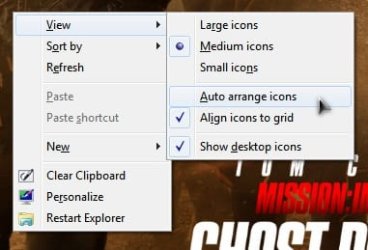
Right-Click desktop > View > uncheck Auto Arrange

How can I freeze the "Recycle bin" location on Windows 7-disable-auto-arrange.jpg
My System SpecsSystem Spec
30 Dec 2011   #5

Win 7 Pro x64
Council Bluffs, Iowa


One more alternative would be to use Stardock Corporation - Software - Fences and make one small fence in the bottom right corner put the recycling bin icon in their and it should stay there. If you need help setting this up let me know.
Jerry
My System SpecsSystem Spec
Reply

 How can I freeze the "Recycle bin" location on Windows 7 problems?


Thread Tools


Similar help and support threads for: How can I freeze the "Recycle bin" location on Windows 7
Thread Forum
Yep, another "stops responding" /"freeze" issue BSOD Help and Support
Default "Browse for file" location in web browser "choose file" box Customization
Location of "Windows Help and Support" file General Discussion
Windows freeze on boot at "Starting Windows" and "LOADED ...\disk.sys" General Discussion
New HD, new Win7x64 install, freeze on "Starting Windows," *no* Events BSOD Help and Support


All times are GMT -5. The time now is 11:40 PM.


Seven Forums Android App Seven Forums IOS App Follow us on Facebook

Windows 7 Forums is an independent web site and has not been authorized,
sponsored, or otherwise approved by Microsoft Corporation.
"Windows 7" and related materials are trademarks of Microsoft Corp.
© Designer Media Ltd
  

1 2 3 4 5 6 7 8 9 10 11 12 13 14 15 16 17 18 19 20 21 22 23 24 25 26 27 28 29 30 31 32