Windows 7 Forums Search
Welcome to Windows 7 Forums. Our forum is dedicated to helping you find solutions with any problems, errors or issues you are experiencing with Windows 7. The Windows 7 forum also covers news and updates and has an extensive Windows 7 tutorial section that covers a wide range of tips and tricks.


Windows 7 - Custom themes just change wallpaper to black

 
12-29-2011   #1


Windows 7 Home Premium x64


Custom themes just change wallpaper to black

I'm trying to install the Gizdom Reloaded theme for Windows 7. However, when I click the .theme file, I get the default Aero theme and a black wallpaper. I have patched the required files using the Universal Theme Patcher. I'm using Windows 7 Home Premium x64 (build 7601) with SP1.

My System SpecsSystem Spec
12-29-2011   #2


Win 7 premium 64bit/Win Pro XP 32bit /Ubuntu 12.04


did you patch your system so you could use custom themes? if not thats why that happens
My System SpecsSystem Spec
12-29-2011   #3


Win 7 Home Premium 64bit Ver 6.1.7600 Build 7601 - SP1


Hi Bommster, welcome to 7F!

From what I have read, that theme is fraught with problems especially for x64 systems, nice theme though.

Did you see the notes from your link?
Quote:
Note : Check x64 system files here : [link] thanks to ~Enzoisamazing

Note 2 : some part of Gizdom Reloaded has been corrupted for no reason,so i'm sorry if some parts weren't changed or some bugs can't be fixed
If you believe you have followed the instructions properly there, and still want to try installing, see:
Theme - How to Apply Custom Themes, and try that patch.

You might want to do a System Restore to before your recent attempt, you never know what may have happened to your system files.
My System SpecsSystem Spec
.


12-29-2011   #4


Windows 7 Ultimate x86/Ubuntu


Thanks for this, really like it, just installed.

Running 32 Bit (x86)

Is working fine for me.
My System SpecsSystem Spec
12-29-2011   #5


Windows 7 Home Premium x64


Quote   Quote: Originally Posted by Anak View Post
Hi Bommster, welcome to 7F!

From what I have read, that theme is fraught with problems especially for x64 systems, nice theme though.

Did you see the notes from your link?
Quote:
Note : Check x64 system files here : [link] thanks to ~Enzoisamazing

Note 2 : some part of Gizdom Reloaded has been corrupted for no reason,so i'm sorry if some parts weren't changed or some bugs can't be fixed
If you believe you have followed the instructions properly there, and still want to try installing, see:
Theme - How to Apply Custom Themes, and try that patch.

You might want to do a System Restore to before your recent attempt, you never know what may have happened to your system files.
After being silly for a while I noticed I'm supposed to put the system files on the Windows folder. Did that. It changed the start orb, slider and back/forward buttons in the Windows Explorer, but it didn't change the frame or the close/minimize/maximize buttons. Those still are from the Aero theme, even though this theme is selected. Also, first thing I did before installing is apply the patch, so I'm pretty sure it's not that.
My System SpecsSystem Spec
12-29-2011   #6


Windows 7 Ultimate x86/Ubuntu


Did you change ExplorerFrame.dll?
My System SpecsSystem Spec
12-29-2011   #7


Windows 7 Home Premium x64


Quote   Quote: Originally Posted by Infinite View Post
Did you change ExplorerFrame.dll?
Yep. I did back it up and make a system restore point, though, just in case.
My System SpecsSystem Spec
12-30-2011   #8


Acer laptop W 7 Pro SP1 64 bit & Dell Desktop W 7 Pro SP1 32 bit


I just downloaded and installed this theme on 64-bit and it works fine.
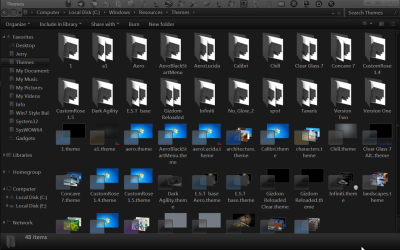
Post us been shot of C:\Windows\Resources\Themes with Windows Explorer maximize like my example below.
Jerry
Custom themes just change wallpaper to black-themes.png
My System SpecsSystem Spec
Reply

 Custom themes just change wallpaper to black problems?


Thread Tools


Similar Threads for: Custom themes just change wallpaper to black
Thread Forum
[Ask] Locked Windows 7 Themes and Wallpaper Customization
Wallpaper packs/Themes for kids Themes and Styles
Can you add a wallpaper to the themes? Themes and Styles
Custom Themes, Custom Icons Themes and Styles


All times are GMT -5. The time now is 09:50 AM.


Windows 7 Forums is an independent web site and has not been authorized,
sponsored, or otherwise approved by Microsoft Corporation.
"Windows 7" and related materials are trademarks of Microsoft Corp.
© Designer Media Ltd
  

1 2 3 4 5 6 7 8 9 10 11 12 13 14 15 16 17 18 19 20 21 22 23 24 25 26 27 28 29 30