
Hello.
I've been trying to replace the back/forward buttons in explorer, both by using pre-made DLL's and/or apply the theming myself using ResHack and using same procedure that's described in a tutorial i found here.
The main problem with this is that every "Open file/folder" dialog will look like this no matter what software i try to open something with:

(Click on it for a closer look)
I get zero response when clicking the white area.
How to solve that ?
And also:
I find the frame for Aero Peek somewhat ugly, is there a way to make it look more like this?:

(This is an Aero Peek effect rip-off that's available in Display Fusion with a custom taskbar which runs on my 2ndary monitor)
I've been trying to replace the back/forward buttons in explorer, both by using pre-made DLL's and/or apply the theming myself using ResHack and using same procedure that's described in a tutorial i found here.
The main problem with this is that every "Open file/folder" dialog will look like this no matter what software i try to open something with:
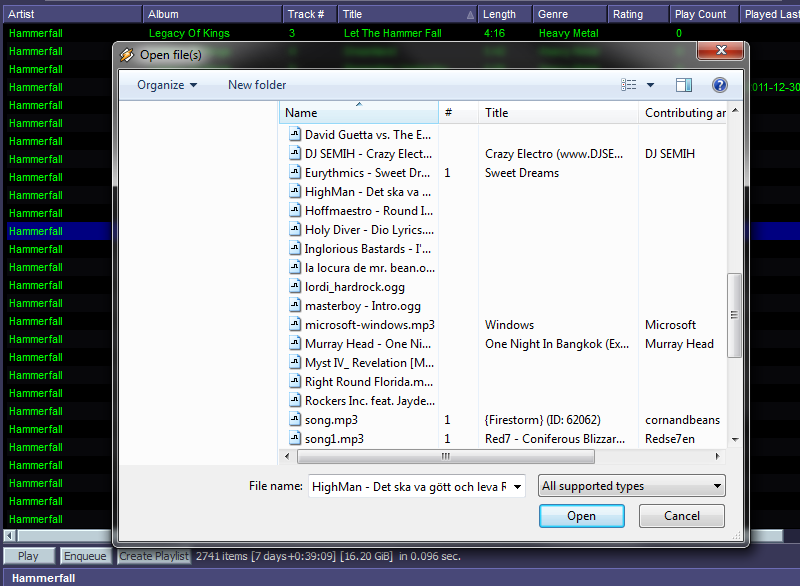
(Click on it for a closer look)
I get zero response when clicking the white area.
How to solve that ?
And also:
I find the frame for Aero Peek somewhat ugly, is there a way to make it look more like this?:
(This is an Aero Peek effect rip-off that's available in Display Fusion with a custom taskbar which runs on my 2ndary monitor)
My Computer
At a glance
Win7 Home Premium x64Intel(R) Core(TM) i5-2320 CPU @ 3.00GHz16GB: 2x4GB + 1x8GBAMD Radeon HD7770 2GB REFERENCE
- Computer Manufacturer/Model Number
- Acer Predator G3620
- OS
- Win7 Home Premium x64
- CPU
- Intel(R) Core(TM) i5-2320 CPU @ 3.00GHz
- Motherboard
- Acer Predator G3620 (mATX)
- Memory
- 16GB: 2x4GB + 1x8GB
- Graphics Card(s)
- AMD Radeon HD7770 2GB REFERENCE
- Sound Card
- Realtek onboard crap. Awaiting new sound card...
- Monitor(s) Displays
- Samsung S22B350 [HDMI] 6ms + HP f1703 [DVI] 8ms
- Screen Resolution
- 1920x1080 + 1280x1024 = 3200x1080
- Hard Drives
- 1TB Seagate
- PSU
- 430W Standard
- Case
- Acer Predator G3620
- Cooling
- Standard
- Keyboard
- Logitech G11
- Mouse
- Microsoft SideWinder Gaming Mouse (First Version)
- Internet Speed
- 100Mbit/s Fiber
- Other Info
- Note to self: AMD CPU in next pc.


