Windows 7 Forums Search
Welcome to Windows 7 Forums. Our forum is dedicated to helping you find solutions with any problems, errors or issues you are experiencing with Windows 7. The Windows 7 forum also covers news and updates and has an extensive Windows 7 tutorial section that covers a wide range of tips and tricks.


Windows 7 - Could I replace these 2 Icons with the Icon of my desired choice?

 
01-04-2012   #1


Windows 7 Ultimate x86/Ubuntu


Could I replace these 2 Icons with the Icon of my desired choice?

Hi, I installed an Icon Pack, everything I like except the folder icons obviously, it added 2 folder icons to shell32.dll, I am assuming this makes them the default icon when a new folder is created Edit: That is correct, how can I change the old folder icons in shell32.dll to the new ones I would prefer

Even AutoPlay - Open device to view files has the old icon


I was wondering if I could replace these 2 Icons with the Icon of my desired choice:

Icons I want to change:


Icons I want to change to:


Edit: Further in there are icons like My Pictures/My Videos from my UserFolder I want to change.

Any idea how to modify shell32?


Last edited by Brink; 01-04-2012 at 12:22 PM.. Reason: Moved to new thread
My System SpecsSystem Spec
01-04-2012   #2


Acer laptop W 7 Pro SP1 64 bit & Dell Desktop W 7 Pro SP1 32 bit


1st mistake was installing a icon pack not knowing how many .dll were changed even with a SFC/ scannow you most likely will never be a will to go back to the original icons without doing a reinstall.
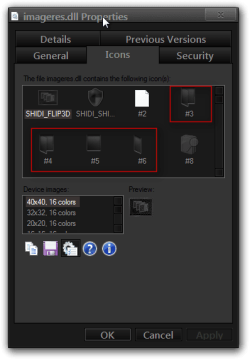
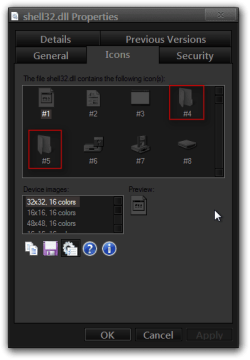
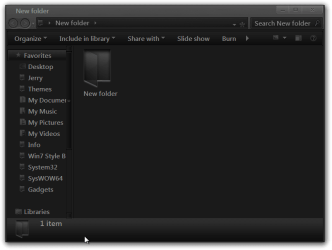
With that being said icons you need to change are in imageres.dll not shell32.dll the new open folder is either icon #3 or 4 to do it right you should also change #5 and 6 and 162 as shown in this tutorial by Arc Folder Icon - Change Default Icon Here are some screenshots from imageres.dll, shell32.dll Properties showing what I have and one showing what a new folder looks like, They look like the ones in imageres.dll icon #3, 4.
Could I replace these 2 Icons with the Icon of my desired choice?-imageres.dll-properties.pngCould I replace these 2 Icons with the Icon of my desired choice?-shell32.dll-properties.pngCould I replace these 2 Icons with the Icon of my desired choice?-new-folder.png


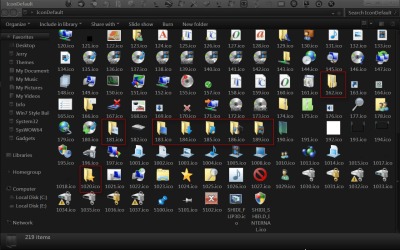
The other icons in your user folder are also located in imageres.dll I have provided two screenshots highlighting the icons that should be changed other than #3, 4, 5, 6 and 162.
Could I replace these 2 Icons with the Icon of my desired choice?-icondefault.pngCould I replace these 2 Icons with the Icon of my desired choice?-icondefault2.png


Jerry
My System SpecsSystem Spec
01-04-2012   #3


Windows 7 Ultimate x86/Ubuntu


Well I fixed it but all folders are black except folders with files inside show as the default Windows 7 yellow folder, anyway to change that?
My System SpecsSystem Spec
.


01-04-2012   #4


Acer laptop W 7 Pro SP1 64 bit & Dell Desktop W 7 Pro SP1 32 bit


Quote   Quote: Originally Posted by Infinite View Post
Well I fixed it but all folders are black except folders with files inside show as the default Windows 7 yellow folder, anyway to change that?
Post a screeenshot of the folders with files inside.
Jerry
My System SpecsSystem Spec
01-04-2012   #5


Windows 7 Ultimate x86/Ubuntu


Quote   Quote: Originally Posted by Bongo View Post
Quote   Quote: Originally Posted by Infinite View Post
Well I fixed it but all folders are black except folders with files inside show as the default Windows 7 yellow folder, anyway to change that?
Post a screeenshot of the folders with files inside.
Jerry
I think a restore point fixed it:

Change default iPhone 4S icon

:Post 73:
My System SpecsSystem Spec
Reply

 Could I replace these 2 Icons with the Icon of my desired choice? problems?


Thread Tools


Similar Threads for: Could I replace these 2 Icons with the Icon of my desired choice?
Thread Forum
Icon Help: Icons missing and replaced with Illustrator File Icon General Discussion
Desktop ICONS being overlaind with "no icon" icon Crashes and Debugging
Replace icons for single files ? Customization
Back up function does not backup the desired disk Backup and Restore
How to permanently replace icon? Customization


All times are GMT -5. The time now is 09:57 AM.


Windows 7 Forums is an independent web site and has not been authorized,
sponsored, or otherwise approved by Microsoft Corporation.
"Windows 7" and related materials are trademarks of Microsoft Corp.
© Designer Media Ltd
  

1 2 3 4 5 6 7 8 9 10 11 12 13 14 15 16 17 18 19 20 21 22 23 24 25 26 27 28 29 30