I looked around here, but I couldn't find a problem quite like mine.
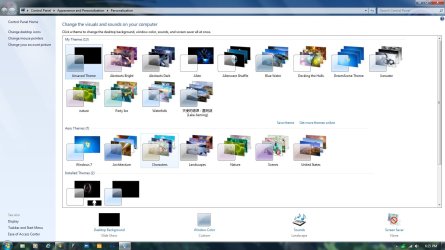
I've had the same desktop theme forever. I customized it. I tried to get rid of the pic on my desktop for a new one. It wouldn't change. The desktop picture wouldn't go away until I did a reboot. The only themes that will work are the high contrast themes. Since I had a blank desktop with those I tried to add a picture, but I still can't.
When I try to use any other theme besides High contrast it'll change the color of the windows and change the music. The screen saver isn't on and when I pick one and click save, it doesn't save. I can't change the color of the windows and I still can't put a desktop picture on nor does it use the desktop picture that theme comes with.
This is out of the blue. It was working fine not so long ago. What could have happened and how do I fix it?
Thank you
I've had the same desktop theme forever. I customized it. I tried to get rid of the pic on my desktop for a new one. It wouldn't change. The desktop picture wouldn't go away until I did a reboot. The only themes that will work are the high contrast themes. Since I had a blank desktop with those I tried to add a picture, but I still can't.
When I try to use any other theme besides High contrast it'll change the color of the windows and change the music. The screen saver isn't on and when I pick one and click save, it doesn't save. I can't change the color of the windows and I still can't put a desktop picture on nor does it use the desktop picture that theme comes with.
This is out of the blue. It was working fine not so long ago. What could have happened and how do I fix it?
Thank you
My Computer
At a glance
Windows 7 Professional 64 bitAMD Phenom(tm) II X4 955 Processor8 GBXFX Radeon R7 260 X 1GB
- Computer type
- PC/Desktop
- Computer Manufacturer/Model Number
- (1) Hitachi HDP725050GLA360 ATA Device (2) ST31000528AS ATA Device (3) Generic USB CF Reader USB
- OS
- Windows 7 Professional 64 bit
- CPU
- AMD Phenom(tm) II X4 955 Processor
- Motherboard
- ASUSTeK Computer INC. M3A78-CM
- Memory
- 8 GB
- Graphics Card(s)
- XFX Radeon R7 260 X 1GB
- Sound Card
- AMD High Definition Audio Device
- Monitor(s) Displays
- Westinghouse TV 26"
- Screen Resolution
- 1366x768
- Hard Drives
- 1TB SATA
- PSU
- Corsair CX 750 ATX 80 Plus
- Keyboard
- Standard PS/2
- Mouse
- Standard
- Internet Speed
- 80-100
- Antivirus
- Defender
- Browser
- Opera and Firefox

 . if you have any other problems, let us know.