| Windows 7: How to disable glow animation in progress bar |
12 Jan 2012
|
#1 | | Windows 7 Professional x64 |
How to disable glow animation in progress bar I only want to disable the glow animation in progress bars.
How can I do that?
Unchecking "Animate controls and elements inside Windows" in "Performance options" does not turn off the glow animation.
I hope there is a much more simple tweak available then installing and using an application. | My System Specs |
| OS Windows 7 Professional x64 CPU Intel i7-2600K Motherboard ASUS P8Z68 DELUXE/GEN3 Memory 8 gig Graphics Card ASUS GTX570 Monitor(s) Displays Samsung Syncmaster 206bw Hard Drives no harddisk: 2x SSD 128MB raid0 |
12 Jan 2012
|
#2 | | Systems 1 and 2: Windows 7 Enterprise x64, Win 8 Developer University of Kentucky |
Quote: void SetGlowVisibility(ProgressBar progressBar, Visibility visibility) {
var glow = progressBar.Template.FindName("PART_GlowRect", progressBar) as FrameworkElement;
if (glow != null) glow.Visibility = visibility;
} taken from: WPF / Windows 7: Disable Default Progress Bar Glow Animation - Stack Overflow | My System Specs | | System Manufacturer/Model Number Dell and Custom OS Systems 1 and 2: Windows 7 Enterprise x64, Win 8 Developer CPU System 1: i7 2600@3.4GHz, System 2: AMD FX-4100 Zambezi 3.6G Motherboard System 1:Dell 06NWYK System 2: ASUS M5A97 AM3+ Memory System 1: 8GB System 2: 8GB Graphics Card System 1: ATI FirePro V4800 System 2: Radeon HD 6850 Sound Card System 1: onboard System 2: onboard Monitor(s) Displays System1: Viewsonic HDMI 24" Screen Resolution System 1: 1920x1080 System 2: 1920x1080 Case System 1: Dell System 2: Cooler Master Hard Drives System 1: Mirrored .5B drives System 2: Seagate Barracuda ST1000DM003 1TB 7200 RPM 64MB Cache SATA 6.0Gb/s Internet Speed 10 MBPS |
12 Jan 2012
|
#3 | | Windows 7 Professional x64 |
wow! that looks impressive!
But where do I type that in?? | My System Specs | | OS Windows 7 Professional x64 CPU Intel i7-2600K Motherboard ASUS P8Z68 DELUXE/GEN3 Memory 8 gig Graphics Card ASUS GTX570 Monitor(s) Displays Samsung Syncmaster 206bw Hard Drives no harddisk: 2x SSD 128MB raid0 |
12 Jan 2012
|
#4 | | Systems 1 and 2: Windows 7 Enterprise x64, Win 8 Developer University of Kentucky |
From same link, this might be easier for you... Quote: You can also disable this effect in Windows 7 all together.
Right-click on My Computer icon on Desktop and select Properties (or press Windows Key + Pause/Break key), click on Advanced system settings link in left side pane (You can also open it by typing sysdm.cpl in RUN or start menu search box and press Enter). Now click on Settings button in Performance section:
Uncheck "Animate controls and elements inside windows", it should be the first selection. | My System Specs | | System Manufacturer/Model Number Dell and Custom OS Systems 1 and 2: Windows 7 Enterprise x64, Win 8 Developer CPU System 1: i7 2600@3.4GHz, System 2: AMD FX-4100 Zambezi 3.6G Motherboard System 1:Dell 06NWYK System 2: ASUS M5A97 AM3+ Memory System 1: 8GB System 2: 8GB Graphics Card System 1: ATI FirePro V4800 System 2: Radeon HD 6850 Sound Card System 1: onboard System 2: onboard Monitor(s) Displays System1: Viewsonic HDMI 24" Screen Resolution System 1: 1920x1080 System 2: 1920x1080 Case System 1: Dell System 2: Cooler Master Hard Drives System 1: Mirrored .5B drives System 2: Seagate Barracuda ST1000DM003 1TB 7200 RPM 64MB Cache SATA 6.0Gb/s Internet Speed 10 MBPS |
12 Jan 2012
|
#5 | | Win 7 Pro x64 Council Bluffs, Iowa |
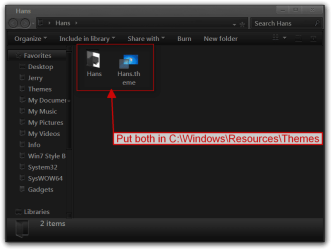
If you are using the default aero theme I can change that for you by editing an image using Windows Style Builder and posted here in a zip folder.
If you are using a custom theme you will need to ask the theme maker. It's not cool to change someone else work.
&
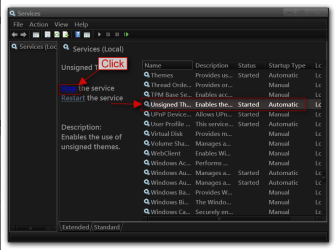
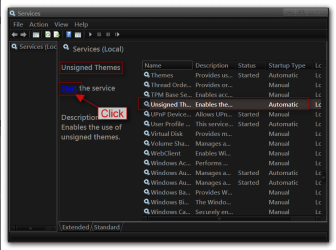
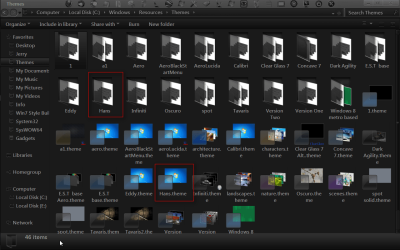
This makes a custom theme so you will need to do 1 of these 2 ways of Enabling custom themes for it to work. Enabling Custom Themes - Windows 7
Or Theme - How to Apply Custom Themes
Let me know if you would like this done if so all I need is a name to call the theme.
Jerry | My System Specs | | Computer type Laptop System Manufacturer/Model Number Sager NP9170 OS Win 7 Pro x64 CPU Intel(R) Core(TM) i7-3630QM CPU @ 2.40GHz Motherboard CLEVO P170EM Memory 12 GB Graphics Card (1) Intel(R) HD Graphics 4000 (2) NVIDIA GeForce GTX 675M Sound Card (1) Realtek High Definition Audio (2) Intel(R) Display Aud Monitor(s) Displays 17.3 Screen Resolution 1920x1080 Keyboard Backlite Hard Drives (1) M4-CT256M4SSD2 ATA Device 256 GB (2) ST9500424AS ATA Device 500 GB Antivirus MSE, Malwarebytes Pro Browser Firefox |
12 Jan 2012
|
#6 | | Windows 7 Professional x64 |
with all respect, but... 
Quote: Originally Posted by Lemur From same link, this might be easier for you... Quote: You can also disable this effect in Windows 7 all together.
Right-click on My Computer icon on Desktop and select Properties (or press Windows Key + Pause/Break key), click on Advanced system settings link in left side pane (You can also open it by typing sysdm.cpl in RUN or start menu search box and press Enter). Now click on Settings button in Performance section:
Uncheck "Animate controls and elements inside windows", it should be the first selection. ...I typed that in my question: unchecking that option does not stop the glow effect. | My System Specs | | OS Windows 7 Professional x64 CPU Intel i7-2600K Motherboard ASUS P8Z68 DELUXE/GEN3 Memory 8 gig Graphics Card ASUS GTX570 Monitor(s) Displays Samsung Syncmaster 206bw Hard Drives no harddisk: 2x SSD 128MB raid0 |
12 Jan 2012
|
#7 | | Systems 1 and 2: Windows 7 Enterprise x64, Win 8 Developer University of Kentucky |
| My System Specs | | System Manufacturer/Model Number Dell and Custom OS Systems 1 and 2: Windows 7 Enterprise x64, Win 8 Developer CPU System 1: i7 2600@3.4GHz, System 2: AMD FX-4100 Zambezi 3.6G Motherboard System 1:Dell 06NWYK System 2: ASUS M5A97 AM3+ Memory System 1: 8GB System 2: 8GB Graphics Card System 1: ATI FirePro V4800 System 2: Radeon HD 6850 Sound Card System 1: onboard System 2: onboard Monitor(s) Displays System1: Viewsonic HDMI 24" Screen Resolution System 1: 1920x1080 System 2: 1920x1080 Case System 1: Dell System 2: Cooler Master Hard Drives System 1: Mirrored .5B drives System 2: Seagate Barracuda ST1000DM003 1TB 7200 RPM 64MB Cache SATA 6.0Gb/s Internet Speed 10 MBPS |
12 Jan 2012
|
#8 | | Windows 7 Professional x64 |
@ Bongo, thanks!
I am at work now, I use the default theme but I have 'freshened' it up a little by making the light blue a little more pale.
In a few hours I am at home, then I will mail you the details.
..or will I be able to do color ajustments with your tweaked file?
regards,
Hans | My System Specs | | OS Windows 7 Professional x64 CPU Intel i7-2600K Motherboard ASUS P8Z68 DELUXE/GEN3 Memory 8 gig Graphics Card ASUS GTX570 Monitor(s) Displays Samsung Syncmaster 206bw Hard Drives no harddisk: 2x SSD 128MB raid0 |
12 Jan 2012
|
#9 | | Win 7 Pro x64 Council Bluffs, Iowa |

Quote: Originally Posted by hansham thanks!
I am at work now, I use the default theme but I have 'freshened' it up a little by making the light blue a little more pale.
In a few hours I am at home, then I will mail you the details.
..or will I be able to do color ajustments with your tweaked file?
regards,
Hans What did you do to do this Quote: but I have 'freshened' it up a little by making the light blue a little more pale. Then I can tell you if you can do it to the theme I'm going to make afterwards.
Jerry | My System Specs | | Computer type Laptop System Manufacturer/Model Number Sager NP9170 OS Win 7 Pro x64 CPU Intel(R) Core(TM) i7-3630QM CPU @ 2.40GHz Motherboard CLEVO P170EM Memory 12 GB Graphics Card (1) Intel(R) HD Graphics 4000 (2) NVIDIA GeForce GTX 675M Sound Card (1) Realtek High Definition Audio (2) Intel(R) Display Aud Monitor(s) Displays 17.3 Screen Resolution 1920x1080 Keyboard Backlite Hard Drives (1) M4-CT256M4SSD2 ATA Device 256 GB (2) ST9500424AS ATA Device 500 GB Antivirus MSE, Malwarebytes Pro Browser Firefox |
12 Jan 2012
|
#10 | | Windows 7 Professional x64 |
by shifting the transparity bar a little.. but now I remember I returned to default again.
I use the windows 7 default theme with a custom wallpaper.
I guess that what you do does not affect the wallpaper.
regards,
Hans | My System Specs | | OS Windows 7 Professional x64 CPU Intel i7-2600K Motherboard ASUS P8Z68 DELUXE/GEN3 Memory 8 gig Graphics Card ASUS GTX570 Monitor(s) Displays Samsung Syncmaster 206bw Hard Drives no harddisk: 2x SSD 128MB raid0 How to disable glow animation in progress bar problems? All times are GMT -5. The time now is 03:29 AM. | |