Setting background on laptop

trojwl

New member
I'm sure there is an easy fix to this.

When I select any saved pic and set is as background, the image is greatly magnified and the entire screen is fill with a close-up partial view of said pic.

Happens no matter what pic I select.

No other anamolies noted.

This just now started happening.

I have made no changes in any settings.

Bueller?
Bueller?
Bueller?
 

My Computer

OS
32 bit
hi trojwl, and welcome to sevenforums,

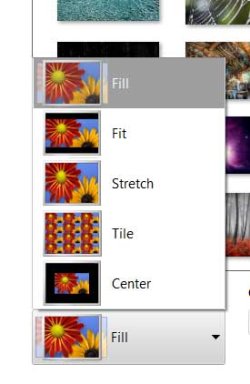
check your 'picture position' settings. right-click desktop >> personalise >> desktop background

yours seems to be set to 'fill' or 'stretch', which will make the picture fill the screen.

fill.jpg

it depends on the shape of your desktop, and the image too - imagine trying to fill a rectangle desktop with a square picture. you're either going to have to chop things off (fill), have black bars (fit), stretch and distort the square into a rectangle etc etc
 

My Computer

Computer Manufacturer/Model Number
mickey megabyte 1234
OS
ultimate 64 sp1
CPU
i5 2500K [email protected]
Motherboard
MSI P67A-GD53
Memory
8 gigs GSkill Ripjaws 1600
Graphics Card(s)
amd hd6950
Sound Card
creative x-fi gamer
Monitor(s) Displays
samsung 24"
Screen Resolution
1920x1080
Hard Drives
ocz vertex 2e 60 gig, samsung f3 1tb, buffalo 2tb ext
PSU
antec 550
Case
antec three hundred
Cooling
i'm a cooling fan
Keyboard
saitek eclipse ii
Mouse
logitech g3
Internet Speed
about 4 Mbps
Other Info
i love win7
How does your screen look otherwise? Are you using the native resolution for the screen?
 

My Computer

OS
Windows 7 Ultimate x64 SP1
CPU
Intel Core i7-2600
Motherboard
Gigabyte GA-P67A-UD3P-B3
Memory
12 GB Patriot Extreme DDR3-1333
Graphics Card(s)
Nvidia GTX 470
Monitor(s) Displays
Dell UltraSharp 2209WA
Hard Drives
OCZ Agility3 240 GB, WD5001AALS, WD7501AALS
PSU
OCZ ModStream 700W
Case
CoolerMaster HAF 912 Advanced
Cooling
CoolerMaster Hyper 212 Plus
Clarification

If it was as simple as "unstretching" the settings, I would not need this forum.

It's like you took a small piece of the pic and blew it up to where it covers the whole screen. There is no stretching to fit at all. Everything is in proportion.
And it covers entire screen (16x9 aspect ratio).

Also when I try pics taken with older camera (i.e. 500-700 KB) the magnification is not as much. When I try a pic from newer camera (3-4 MB), the magnification is much greater.

In other words, if I used a pic of dog sitting on porch for desktop background, a pic taken with older camera would show just his head and a pic with newer camera would show just his nose. There is no "stretching".

Apparently the size of the pic affects the degree of magnification.
 

My Computer

OS
32 bit
If it was as simple as "unstretching" the settings, I would not need this forum.
Spend some time here before you cop an attitude about the questions you are asked. You'll see we get a very large range of questions from experts and people new to their computers. When in doubt, you always start from the beginning.
 

My Computer

OS
Windows 7 Ultimate x64 SP1
CPU
Intel Core i7-2600
Motherboard
Gigabyte GA-P67A-UD3P-B3
Memory
12 GB Patriot Extreme DDR3-1333
Graphics Card(s)
Nvidia GTX 470
Monitor(s) Displays
Dell UltraSharp 2209WA
Hard Drives
OCZ Agility3 240 GB, WD5001AALS, WD7501AALS
PSU
OCZ ModStream 700W
Case
CoolerMaster HAF 912 Advanced
Cooling
CoolerMaster Hyper 212 Plus

My Computer

Computer Manufacturer/Model Number
HP M9077c
OS
Windows 7 Home Premium 64bit
CPU
Intel(R)Core(TM)2 quad [email protected] 2.39GHz
Motherboard
ASUSeK
Memory
6GB DDR2 6400
Graphics Card(s)
GeForce 8500/512MB
Sound Card
Realtek High Def Audio
Monitor(s) Displays
HP w2408 LCD 24" widescreen
Screen Resolution
1920x1200
Cooling
6 pack of Bud
Keyboard
MS wireless Inteli
Mouse
MS wireless Inteli
Just remember not to take offense if we ask a follow-up question (even if it sounds dumb or noob-ish). This forum has the entire range of users, so anything is possible. I wasn't asking to belittle you...it was just to knock out the easy solution so if that wasn't it...we could move on to others.

Going by what you said, it definitely sounds like something is causing the photo to show in "actual pixels" as opposed to sized appropriately for your screen. Again, I'm just guessing here, but are you using the latest video drivers? If so, check to see if your computer is set to think there's a second display....maybe the photo is being stretched out across your display, as if you were extending your desktop. Some laptops have hotkeys for this, others have it in their video driver settings.
 

My Computer

OS
Windows 7 Ultimate x64 SP1
CPU
Intel Core i7-2600
Motherboard
Gigabyte GA-P67A-UD3P-B3
Memory
12 GB Patriot Extreme DDR3-1333
Graphics Card(s)
Nvidia GTX 470
Monitor(s) Displays
Dell UltraSharp 2209WA
Hard Drives
OCZ Agility3 240 GB, WD5001AALS, WD7501AALS
PSU
OCZ ModStream 700W
Case
CoolerMaster HAF 912 Advanced
Cooling
CoolerMaster Hyper 212 Plus
More observations.

:)It looks to me like the "setting background display" function will only allow a limited number of pixels in the display. Thus a denser pic (4 MB) would end up being highly "magnified". The less dense pics (700 KB) show a lot more of the pic in the background display.

This only happens when setting background. Otherwise pics look OK. Somewhere there is a setting for this. I just need to find it.

I don't think resizing pics is the answer. I'd be treating a symptom and not the disease.

Also, there is no stretching of the pics at all.

And this just started happening recently. I've done this a million times and never seen this happen before.
 

My Computer

OS
32 bit
trojwl,
Have you download something or done something recently to your computer?
You may try restoring it back to when it was working correctly.
You don't quit as we won't quit until your problem is resolved so hang in there.
THW
 

My Computer

Computer Manufacturer/Model Number
HP M9077c
OS
Windows 7 Home Premium 64bit
CPU
Intel(R)Core(TM)2 quad [email protected] 2.39GHz
Motherboard
ASUSeK
Memory
6GB DDR2 6400
Graphics Card(s)
GeForce 8500/512MB
Sound Card
Realtek High Def Audio
Monitor(s) Displays
HP w2408 LCD 24" widescreen
Screen Resolution
1920x1200
Cooling
6 pack of Bud
Keyboard
MS wireless Inteli
Mouse
MS wireless Inteli
Found the answer

Went thru control panel. Looks like the pic position was set to center. However the display didn't have the large black border. I don't know why it would take a small "box" out of center of selected pic and then fill the entire screen with it while in the "center" mode. Like I said, everything was in proportion.

How the setting for position got changed is beyond me.

Anyway, problem is resolved.

Thanks for inputs.

And have a great day!
 

My Computer

OS
32 bit
Glad you posted back with your resolve.
You have a great day also.
 

My Computer

Computer Manufacturer/Model Number
HP M9077c
OS
Windows 7 Home Premium 64bit
CPU
Intel(R)Core(TM)2 quad [email protected] 2.39GHz
Motherboard
ASUSeK
Memory
6GB DDR2 6400
Graphics Card(s)
GeForce 8500/512MB
Sound Card
Realtek High Def Audio
Monitor(s) Displays
HP w2408 LCD 24" widescreen
Screen Resolution
1920x1200
Cooling
6 pack of Bud
Keyboard
MS wireless Inteli
Mouse
MS wireless Inteli
Back
Top