
I'm sure there is an easy fix to this.
When I select any saved pic and set is as background, the image is greatly magnified and the entire screen is fill with a close-up partial view of said pic.
Happens no matter what pic I select.
No other anamolies noted.
This just now started happening.
I have made no changes in any settings.
Bueller?
Bueller?
Bueller?
When I select any saved pic and set is as background, the image is greatly magnified and the entire screen is fill with a close-up partial view of said pic.
Happens no matter what pic I select.
No other anamolies noted.
This just now started happening.
I have made no changes in any settings.
Bueller?
Bueller?
Bueller?
My Computer
At a glance
32 bit
- OS
- 32 bit

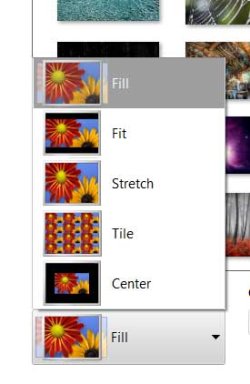


 It looks to me like the "setting background display" function will only allow a limited number of pixels in the display. Thus a denser pic (4 MB) would end up being highly "magnified". The less dense pics (700 KB) show a lot more of the pic in the background display.
