Windows 7 Forums


Windows 7: Icon Size on Desktop Toolbar

18 Aug 2009   #1

Windows 7 Ultimate (x64) SP1
 
 
Icon Size on Desktop Toolbar

I've searched for a while now but can't seem to find a way to increase the size of the icons on the desktop toolbar. Maybe it's something that can't be done but it'd be good because they look silly that small when you have large icons set on the taskbar

My System SpecsSystem Spec

18 Aug 2009   #2

7600 x86
budapest


right-click - view - large icons
My System SpecsSystem Spec
18 Aug 2009   #3

Windows 7 Ultimate (x64) SP1


Quote   Quote: Originally Posted by garbanzo View Post
right-click - view - large icons
doesn't do anything when using the desktop toolbar
My System SpecsSystem Spec
.


18 Aug 2009   #4

7600 x86
budapest


works fine for me...
My System SpecsSystem Spec
18 Aug 2009   #5

ultimate 64 sp1


i've just tried it and it doesn't work on the desktop toolbar...it makes the taskbar bigger, but the actual icons on the '>>' menu are still small.
My System SpecsSystem Spec
18 Aug 2009   #6

Windows 7 Ultimate (x64) SP1


Quote   Quote: Originally Posted by mickey megabyte View Post
i've just tried it and it doesn't work on the desktop toolbar...it makes the taskbar bigger, but the actual icons on the '>>' menu are still small.
nothing I've tried works.Surely there's a way but if there is, I can't find it
My System SpecsSystem Spec
18 Aug 2009   #7

7600 x86
budapest


oh i see. the toolbar buttons get big, but the >> menu buttons stay small...
My System SpecsSystem Spec
18 Aug 2009   #8

Windows 7 Ultimate x64 + x86 + Windows 8 x64
Newport, South Wales, UK


The actual icons displayed are shown as large icons if you expand the toolbar but unfortunately the pop up list is fixed as small icons

Looks like it's back to a 3rd party solution

Alastria Software :: Software :: 7stacks

The developer of this application is actually a member here so I have found that any issues are acted on
My System SpecsSystem Spec
18 Aug 2009   #9

Windows 7 Ultimate (x64) SP1


Quote   Quote: Originally Posted by Barman58 View Post
The actual icons displayed are shown as large icons if you expand the toolbar but unfortunately the pop up list is fixed as small icons

Looks like it's back to a 3rd party solution

Alastria Software :: Software :: 7stacks

The developer of this application is actually a member here so I have found that any issues are acted on
thankx mate...i'll give it a go
My System SpecsSystem Spec
22 Feb 2012   #10

Windows 7 Ultimate x64
Raleigh, NC


Okay, I've got to say that 7Stacks is an awesome piece of software.

I was building a machine for the wife which came preloaded with Windows 7 Home Premium x64, but she wanted the same look and feel as her existing Vista x32 machine.

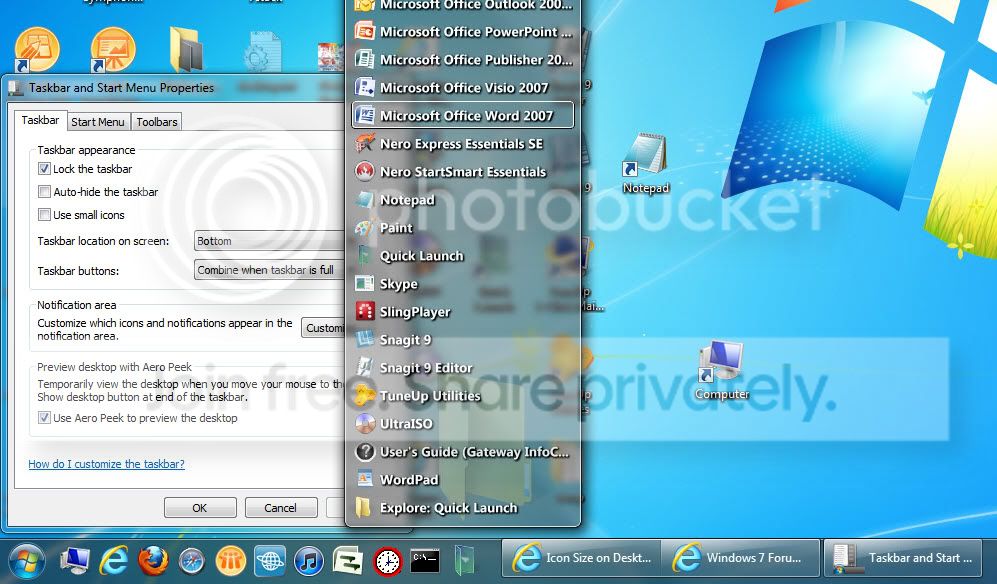
What I ended up doing was creating a TOOLBAR called QL in her Users folder, creating all of the most common shortcuts she uses as well as a shortcut to 7Stacks at the end of the list (a total of 10 icons.) I unchecked "Use small icons" on the TASKBAR properties which made these TOOLBAR icons large. I know, it doesn't seem intuitive but it works.

The 7Stacks shortcut opens a folder with ALL of the applications she uses (34 icons.)

Finally, I set the TASKBAR properties to say "Taskbar buttons: Combine when taskbar is full" which makes open programs look like Vista programs.

Here's a partial screenshot showing the results...


What do you think?

Stephen

Last edited by skfurr; 22 Feb 2012 at 03:20 PM.. Reason: Insert screenshot
My System SpecsSystem Spec
Reply

 Icon Size on Desktop Toolbar problems?


Thread Tools


Similar help and support threads for: Icon Size on Desktop Toolbar
Thread Forum
windows 7 desktop icon size Customization
change toolbar/quicklaunch icon size other than large/small. Customization
How do increase toolbar icon size in Windows Explorer? Customization
Desktop icon/font size on the laptop and the TV General Discussion
Size of Desktop Toolbar on locked taskbar General Discussion


All times are GMT -5. The time now is 09:40 PM.


Seven Forums Android App Seven Forums IOS App Follow us on Facebook

Windows 7 Forums is an independent web site and has not been authorized,
sponsored, or otherwise approved by Microsoft Corporation.
"Windows 7" and related materials are trademarks of Microsoft Corp.
© Designer Media Ltd
  

1 2 3 4 5 6 7 8 9 10 11 12 13 14 15 16 17 18 19 20 21 22 23 24 25 26 27 28 29 30 31 32