Windows 7 Forums Search
Welcome to Windows 7 Forums. Our forum is dedicated to helping you find solutions with any problems, errors or issues you are experiencing with Windows 7. The Windows 7 forum also covers news and updates and has an extensive Windows 7 tutorial section that covers a wide range of tips and tricks.


Windows 7 - Can't change my desktop background

 
02-08-2012   #1


Windows 7 premium


Can't change my desktop background

So, for a month or so now I've been trying and trying to change my desktop background. After a few days I gave up and just recently went back to trying to fix it.

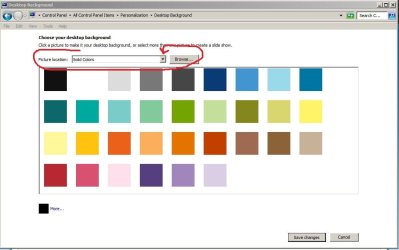
I found out that I can only change my background from the control panel to solid colors but not anything else.
When I go into a browser (I use chrome but have also tried this in IE) and right click, it gives me the option to use the picture as my background but when I click it, it comes up and says "access denied" . I've tried everything I can think of, updating, checked for viruses, restarted, everything! Any idea what it could be?

My System SpecsSystem Spec
02-08-2012   #2


Windows 7 x64


Hi Alexa, take a look at this thread My personalization is all messed up suddenly.
My System SpecsSystem Spec
02-08-2012   #3


Windows 7 premium


That didn't help. There was nothing to delete so the tips in that thread didn't help me so frustrating!
My System SpecsSystem Spec
.


02-09-2012   #4


win7 ultimate 32bit


"I found out that I can only change my background from the control panel to solid colors but not anything else."

does your control panel look like the attached jpeg?--if so--try clicking the indicated triangle--it should give you a flyout menu with other choices

for images that you locate via a 'browser'--download them first--put it somewhere easy to find--then proceed from there
Attached Thumbnails
Can't change my desktop background-capture.jpg  
My System SpecsSystem Spec
02-19-2012   #5


windows 7 32 bit


Perform the following.

a. Press theWindows Logo Key+R to open the Run box.


b.Copy and paste the following path into the box, then pressOK:

%USERPROFILE%\AppData\Roaming\Microsoft\Windows\Themes\


c. Delete theTranscodedWallpaper.jpg file, and then try tochange your theme again.

Iam a microsoft Engineer, this has happen to me. let me know if this works.
My System SpecsSystem Spec
04-18-2012   #6


Windows 7 Ultimate x64


Thank you so much AbluMarlin! I signed up just because I wanted you to know that it worked and it was by far the EASIEST step to do (some blogs require creating admin account and deleting old one - which worked but I want the same desktop icons)!

I know that a virus I had affected my laptop so I wasn't able to change my background. I'm glad I finally decided to figure it out

Also, just to note, When I got to the folder "themes" I did not see any files. I had to unhide, hide, and then unhide again (odd I know) and then saw 2 files! I deleted the TranscodedWallpaper.jpg (which happened to be a picture of my last wallpaper), changed my theme and it worked instantly! =D If you don't mind, could you explain why that .jpg file needed to be deleted? Thank you so much!!
My System SpecsSystem Spec
Reply

 Can't change my desktop background problems?


Thread Tools


Similar Threads for: Can't change my desktop background
Thread Forum
Solved I can't change my desktop background Customization
Desktop Background - Change Tutorials
Can't change my desktop background Themes and Styles
Does not let me change my desktop background Customization
Cannot change desktop background Themes and Styles


All times are GMT -5. The time now is 07:27 AM.


Windows 7 Forums is an independent web site and has not been authorized,
sponsored, or otherwise approved by Microsoft Corporation.
"Windows 7" and related materials are trademarks of Microsoft Corp.
© Designer Media Ltd
  

1 2 3 4 5 6 7 8 9 10 11 12 13 14 15 16 17 18 19 20 21 22 23 24 25 26 27 28 29 30