Windows 7: Icons in Desktop - How to make them invisible temporarily
04 Apr 2012
MSwhip
Windows 7 Home Premium 64 bit
78 posts
Icons in Desktop - How to make them invisible temporarily
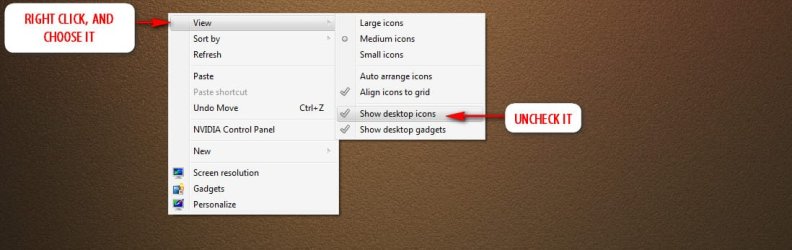
in Windows 7 can i hide the Icons in the desktop? Can i toggle back and forth between just the wallpaper and the icons on a backdrop of the wallpaper? How can i do that?
System Manufacturer/Model Number Dell Studio 540 Desktop OS Windows 7 Home Premium 64 bit CPU Intel Q9550 2.83Mhtz Motherboard Dell Memory 6 GB in 4 slots: 2 x 2GB + 2 x 1GB Graphics Card Nvidia 240 GTS 1 GB Sound Card Realtek Monitor(s) Displays Dell W2309 16:9 Aspect ratio
PSU N/A Case N/A Cooling N/A Hard Drives Drive 0: WD Caviar Black 2TB Sata 2 (has OS installed on it))
Drive 1: WD Caviar Black 1TB Sata 3 (no OS installed on it)
External Enclosure USB 2.0 or eSata Interfaces linked to the Desktop PC contain 4 mechanical HDDs for total storage cap
Computer type Laptop System Manufacturer/Model Number Sager NP9170 OS Win 7 Pro x64 CPU Intel(R) Core(TM) i7-3630QM CPU @ 2.40GHz Motherboard CLEVO P170EM Memory 12 GB Graphics Card (1) Intel(R) HD Graphics 4000 (2) NVIDIA GeForce GTX 675M Sound Card (1) Realtek High Definition Audio (2) Intel(R) Display Aud Monitor(s) Displays 17.3 Screen Resolution 1920x1080
Keyboard Backlite Hard Drives (1) M4-CT256M4SSD2 ATA Device 256 GB (2) ST9500424AS ATA Device 500 GB Antivirus MSE, Malwarebytes Pro Browser Firefox Other Info Desktop.
System Manufacturer: Custom-built.
OS: Win 7 Home Premium x64.
Case: Rosewill R5.
CPU: Intel I5 4670K CPU @ 3.40GHz.
CPU Cooler: Cool Master Hyper 212 EVO.
Motherboard: Asus Z87-A.
Memory: Kingston Hyper 2x4 GB.
Graphics Card: Intel HD Graphics 4600.
Power Supply: Corsair TX750.
Hard Drives: (1) Samsung 840 120 GB (2) Western Digital blue 500 GB 7200 RPM.
Computer type PC/Desktop System Manufacturer/Model Number Self Assembled OS Windows 7 Home Premium 64 Bit SP 1 CPU Intel Core i3 2120 @ 3.30GHz Motherboard Gigabyte Technology Co., Ltd. H61M-DS2 DVI Memory Corsair 2GB x2 (Single-Channel DDR3 @ 665MHz) Graphics Card 2047MB GeForce GTS 450 (ZOTAC International) Sound Card Onboard (Realtek High Definition Audio) Monitor(s) Displays LG Flatron E2040T Screen Resolution 1600x900
Keyboard Logitech MK220 Mouse Logitech MK220 PSU uMAX 750 watt. Case iBall Cooling Air/ Fans Hard Drives Western Digital 1 TB
Seagate 500 GB Internet Speed BSNL Broadband Antivirus Microsoft Security Essentials Browser Waterfox Other Info Dell Studio 15" Laptop
System Manufacturer/Model Number Home Made OS Win 7 Pro 64 bit CPU I7 3770k Ivy @ 4.2 GHz Motherboard ASRock Z77 OC Formula Memory Kingston Hyper X Graphics Card 2 x EVGA GeForce GTX 560 Ti Superclocked Sound Card On board Realtek Monitor(s) Displays LG Flatron WD2753V / Lg Flatron W1943TB Screen Resolution 1929x1080
Keyboard Logitech G15 Mouse Logitech G5 PSU Antec Truepower Quattro 1000W Case Cooler Master Cosmos II Cooling Processor Corsair Hydro Series H100 Extreme w/Corsair Link Hard Drives Op System Seagate 2 x 1 TB Raid 0 Stripe
2 x Seagate 3 TB internal drives
2 x Seagate GoFlex 1.5 TB external drives
2 x Seagate 3TB External Backup drives Internet Speed 50 MB
09 Apr 2012
A Guy
Windows 7 Home Premium x64 SP1
32,119 posts
Bay Area Peninsula
Welcome to Seven Forums Rockydog1947. You're welcome. I like it because click and they show, and hide again by themselves. Want to work on the desktop, just disable until you are done, then untick disable, and back hidden. A Guy