Windows 7 Forums


Windows 7: Make my desktop icons more readable!

08 Apr 2012   #1

Windows 7
 
 
Make my desktop icons more readable!

I enclose a screenshot of what I mean. I'm talking about the icons on the 'sky' background, which I have great difficulty in reading. Is it possible to have so;id clour for those icons (all of the desktop icons)?

I'm using Win 7 64 HP. I've tried using Fences and Iconoid, but couldn't make much sense of them!

Thank you,

Attached Thumbnails
Make my desktop icons more readable!-icons.jpg  
My System SpecsSystem Spec

08 Apr 2012   #2

64-bit Windows 7 Ultimate SP1 & Windows 8 Enterprise
Texas


Hello Bertie,

You might see how the icon text looks to you after turning off drop shadows for them.

Desktop Icon Labels - Turn Drop Shadows On or Off


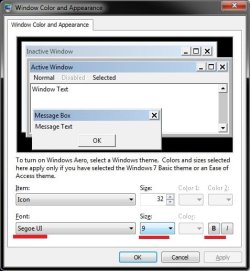
In addition, you might open the Advanced Appearance Settings, select the Icon item, then adjust either it's font, font size, and try bold or unbold to see if it may help. I marked them in red in the screenshot below to help. The screenshot shows the default settings for the "Icon" item. This will change the text for all icons though, and not just on your desktop.

Make my desktop icons more readable!-appearance.jpg

Hope this helps,
Shawn
My System SpecsSystem Spec
08 Apr 2012   #3

Windows 7


Hello Shawn

Well, I think it is now a bit better. If I turned off Drop shadow, I couldn't see ANY text so I had to turn it on again. I finished up just making the same size font (Segoe 9.5) bold.

It is better now but not as good as I would like. I notice that I cannot change the colour of the font as it is greyed out.

Thanks for a very detailed tutorial!
My System SpecsSystem Spec
.


08 Apr 2012   #4

Microsoft Windows 7 Home Premium 64-bit 7600
cornwall UK


have you considered using stardock fences
i think this will suit your needs and hide your icons so you can enjoy your wallpapers properly.

Fences - Windows Desktop Organization Software
My System SpecsSystem Spec
08 Apr 2012   #5

64-bit Windows 7 Ultimate SP1 & Windows 8 Enterprise
Texas


Quote   Quote: Originally Posted by bertie11 View Post
Hello Shawn

Well, I think it is now a bit better. If I turned off Drop shadow, I couldn't see ANY text so I had to turn it on again. I finished up just making the same size font (Segoe 9.5) bold.

It is better now but not as good as I would like. I notice that I cannot change the colour of the font as it is greyed out.

Thanks for a very detailed tutorial!
You're welcome Bertie.

Hopefully what Julian posted above may work better for you.
My System SpecsSystem Spec
09 Apr 2012   #6

Windows 7


I had another try with Fences, and this time, I can see what you mean! I think that will probably do the trick.

Thank you Shawn and Julian.
My System SpecsSystem Spec
09 Apr 2012   #7

64-bit Windows 7 Ultimate SP1 & Windows 8 Enterprise
Texas


That's great news. I'm happy to hear that will work for you.
My System SpecsSystem Spec
09 Apr 2012   #8

W7 X-64 RTM,SUSE 11.1, XP PRO SP3 as a VM, VMware ESXi
Hafnarfjörður IS


Hi there
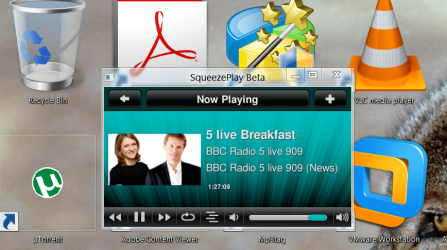
Another trick -- this changes the size of them. (W8 users too this works as well).

1) Click anywhere on the desktop

2) Hold down the CTRL key

3) Rotate the scroll wheel on your Mouse.

This increases the size of the Icons (pic shown) - extreme case but just to show !!

For TEXT use the properties in the display to change the std text size - in personalisation you can change the text size.

Cheers
jimbo
Attached Thumbnails
Make my desktop icons more readable!-d.png  
My System SpecsSystem Spec
09 Apr 2012   #9

Microsoft Windows 7 Home Premium 64-bit 7600
cornwall UK


Quote   Quote: Originally Posted by bertie11 View Post
I had another try with Fences, and this time, I can see what you mean! I think that will probably do the trick.

Thank you Shawn and Julian.
good news, changing the color of the fence background to one that suits will definitely help make the shortcut text stand out.
i have used fences since the first try ,cant imagine not having them now.
although it has made me lazy at keeping my desktop cleaner, before i just used a dock that was hidden until mouseover, and that made me keep the desktop clear now i can just hide my crap with a click and i clean it usually when i run out of desk space.
My System SpecsSystem Spec
Reply

 Make my desktop icons more readable! problems?


Thread Tools


Similar help and support threads for: Make my desktop icons more readable!
Thread Forum
How-to Make Cube Desktop With Own Icons Customization
Icons in Desktop - How to make them invisible temporarily Customization
Microsoft please make .gif readable like in XP Customization
How can I make this readable? General Discussion
How do I make the text in Desktop icons smoother? General Discussion


All times are GMT -5. The time now is 06:29 AM.


Seven Forums Android App Seven Forums IOS App Follow us on Facebook

Windows 7 Forums is an independent web site and has not been authorized,
sponsored, or otherwise approved by Microsoft Corporation.
"Windows 7" and related materials are trademarks of Microsoft Corp.
© Designer Media Ltd
  

1 2 3 4 5 6 7 8 9 10 11 12 13 14 15 16 17 18 19 20 21 22 23 24 25 26 27 28 29 30 31 32