Windows 7 Forums


Windows 7: help me locate the .dll file for these

25 Apr 2012   #1

Windows 7 Ultimate 32bit
 
 
help me locate the .dll file for these

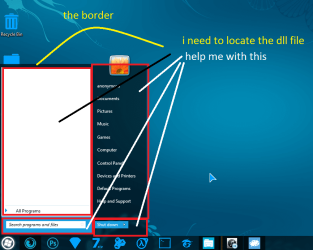
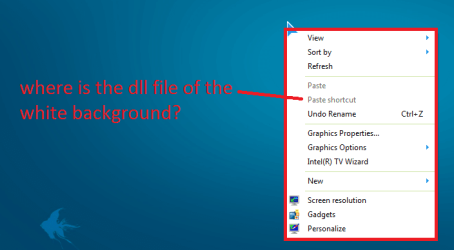
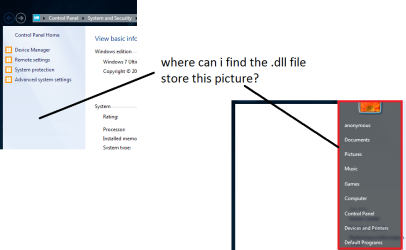
help me locate the dll file.
your opinion matter

help me locate the .dll file for these-screenshot001.png
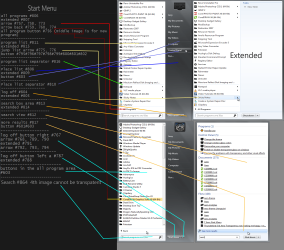
help me locate the .dll file for these-screenshot002.png
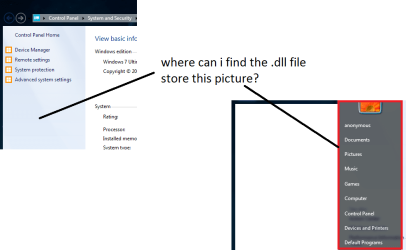
help me locate the .dll file for these-untitled.png

Last edited by mejoh73; 25 Apr 2012 at 07:25 AM..
My System SpecsSystem Spec

25 Apr 2012   #2

Win 7 Pro x64
Council Bluffs, Iowa


help me locate the .dll file for these-screenshot001.png
These are in the C:\Windows\Resources\Themes\Aero\ aero.msstyles in the image folder
background #974
border #975
side #979

help me locate the .dll file for these-screenshot002.png
These are in the C:\Windows\Resources\Themes\Aero\ aero.msstyles in the image folder
See screenshot, the white background is a fill color and the only way I know to change it is with Windows Style Builder.
help me locate the .dll file for these-start-menu-2-.png

help me locate the .dll file for these-untitled.png
The one on the left is in the shell32.dll and it is bitmap image number 632 and 633
My System SpecsSystem Spec
25 Apr 2012   #3

Windows 7 Ultimate 32bit


thanks for replying
My System SpecsSystem Spec
.


25 Apr 2012   #4

Win 7 Pro x64
Council Bluffs, Iowa


You're welcome
My System SpecsSystem Spec
25 Apr 2012   #5

Windows 7 Ultimate 32bit


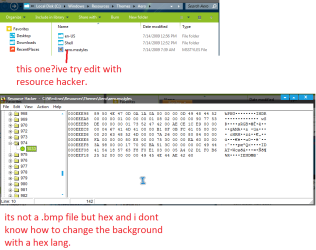
btw, im still confused because when i open aero.msstyles using resource hacker.and narrow down to image folder 974.
all i see is hex and i dont know how to change it when its hex mode.
help me locate the .dll file for these-screenshot003.png
My System SpecsSystem Spec
25 Apr 2012   #6

Windows 8; Windows 7 x86 (Dec2008-Jan2013)


That is a PNG image file. Resource Hacker does not have viewer algorithm for those images. You can use alternative programs like Restorator (cost money).

Or you can export it the following way:
Highlight it in a list, - Action menu - Save resource as a binary file - name it "974.png"

After you modify it, you can replace original:
Action menu - Replace other resource.
In a new window open you file and type:
Resource Type: IMAGE
Resource Name: 974
Resource Language: 1033
My System SpecsSystem Spec
26 Apr 2012   #7

Win 7 Pro x64
Council Bluffs, Iowa


If you are going to edit the aero.msstyles I would recommend you do it with a copy (so you do not corrupt the original) and rename it and create a custom theme, look at post #38 of this thread it will show you how to start a new theme Start menu color change ??
This will be a custom theme and you will need to do 1 of these 2 ways of Enabling custom themes for it to work.
Enabling Custom Themes - Windows 7
Or
Theme - How to Apply Custom Themes

Jerry
My System SpecsSystem Spec
26 Apr 2012   #8

Windows 7 Ultimate 32bit


thanks for the warning.
if not, i might corrupt the file
My System SpecsSystem Spec
26 Apr 2012   #9

Win 7 Pro x64
Council Bluffs, Iowa


Not so much corrupt it but if you ever wanted to go back to the default aero theme you would not be able to unless you had a copy that's why it's best to make a custom theme from a copy.
Jerry
My System SpecsSystem Spec
26 Apr 2012   #10

Windows 7 Ultimate 32bit


the restorator quite sucks because its only a trial version and i need to buy for full version.
i guess im gonna have to cling onto the resource hacker after trial period is over.
My System SpecsSystem Spec
Reply

 help me locate the .dll file for these problems?


Thread Tools


Similar help and support threads for: help me locate the .dll file for these
Thread Forum
Locate shortcuts of a file? [How To] General Discussion
how do I locate explorer bar ? General Discussion
browsers won't give me option to locate file to upload Browsers & Mail
Cannot locate my files Backup and Restore
Solved Locate .ISO file General Discussion


All times are GMT -5. The time now is 12:53 AM.


Windows 7 Forums is an independent web site and has not been authorized,
sponsored, or otherwise approved by Microsoft Corporation.
"Windows 7" and related materials are trademarks of Microsoft Corp.
© Designer Media Ltd