Windows 7 Forums


Windows 7: Changing Default Windows 7 Color with Style Builder

09 Jun 2012   #1

Windows 7
 
 
Changing Default Windows 7 Color with Style Builder

Hello - I recently purchased a new Dell XPS 8500 system running Windows 7 and otherwise am very happy with it, with one exception: I find the default baby blue/sky blue color in Windows 7 absolutely unbearable.


I use the computer primarily for extensive photo, video and music editing, and even after a week of use simply cannot stand this light blue color - it hurts my eyes as I work. I wish I could simply change that default color to a simple gray like in Vista.

As that is no simple chore, I purchased Ave's Windows7 Style Builder but cannot for the life of me figure out how to change the default color from that baby blue to a simple gray. Any help/advice would be most appreciated. I am not looking for a fancy theme or style, but rather simply wish to get rid of that baby blue default. Thank you in advance for your assistance!
My System SpecsSystem Spec

09 Jun 2012   #2

Win 7 Pro x64
Council Bluffs, Iowa


Welcome to the Seven Forums
1st
You need to use a copy of the aero theme to make a custom theme so you do not damage the default theme.
Look at post #38 it will show you how to start a new theme Start menu color change ??
2nd
This will be a custom theme and you will need to do 1 of these 2 ways of Enabling custom themes for it to work.
Enabling Custom Themes - Windows 7
Or
Theme - How to Apply Custom Themes
3rd
Open the new themes .msstyles up in Windows Style Builder
4th
Here is a start after you get this will help more.
Look at screenshots

Changing Default Windows 7 Color with Style Builder-computer.png
1
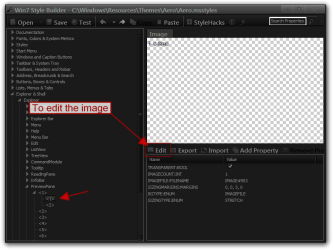
Explorer & Shell > Explorer > CommandModule > <1> (edit the

image)
2
Explorer & Shell > Explorer > PreviewPane > <1> > <1> (edit

the image)
3
Explorer & Shell > Explorer > Menu Bar > Background (edit

the image)
and
Toolbars, Headers and Rebar > Rebar > Rebar (edit the

image)
they need to be to same
4
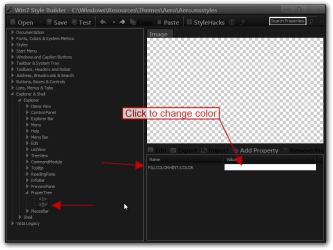
Explorer & Shell > Explorer > Items View > ItemsView >

FILLCOLOR:COLOR (change the color)
5
Explorer & Shell > Explorer > ProperTree > <2> >

FILLCOLOR:COLOR (change the color)

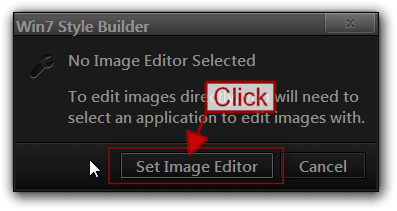
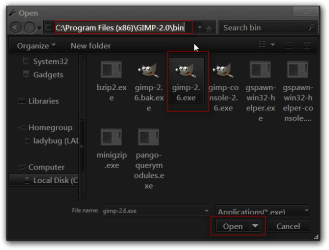
The 1st time you go to edit a image it will ask what image editor you want to use navigate to your editor .exe in the program file.
Changing Default Windows 7 Color with Style Builder-1.pngChanging Default Windows 7 Color with Style Builder-2.png

If you need more help let me know
Jerry
My System SpecsSystem Spec
09 Jun 2012   #3

Windows 7


Thank you Bongo for your assistance! I followed your instructions and successfully created the "test" copy of the aero style & folder. However perhaps you could clarify - once in StyleBuilder, how exactly do I "edit the image"? I have Photoshop Elements but am unsure how to change the color, and then input that back into Style Builder. My apologies if I am missing something obvious, but thank you again for your help.
My System SpecsSystem Spec
.


09 Jun 2012   #4

Win 7 Pro x64
Council Bluffs, Iowa


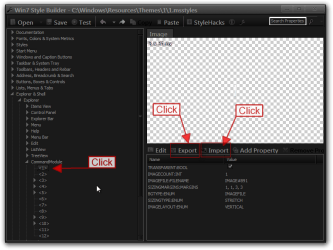
Navigate to the image and click on it then click Edit.
Changing Default Windows 7 Color with Style Builder-1.png


The 1st time you go to edit a image it will ask what image editor you want to use navigate to your editor .exe in the program file.
Changing Default Windows 7 Color with Style Builder-2.pngChanging Default Windows 7 Color with Style Builder-2b.png


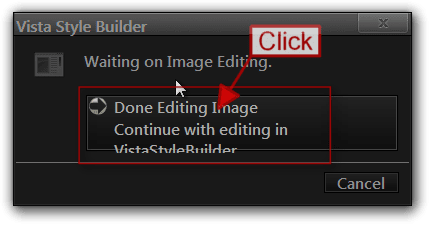
After you edit the image click save in your image editor after it saves click on Done editing image.
Changing Default Windows 7 Color with Style Builder-3.png


Or
Export the image to your desktop then edit it then Import the image back in.
Changing Default Windows 7 Color with Style Builder-5.png


Jerry
My System SpecsSystem Spec
Reply

 Changing Default Windows 7 Color with Style Builder problems?


Thread Tools


Similar help and support threads for: Changing Default Windows 7 Color with Style Builder
Thread Forum
windows 7 style builder help Themes and Styles
color intensity in Windows Style Builder Themes and Styles
Where can i find Windows Style Builder? Software


All times are GMT -5. The time now is 07:09 PM.


Seven Forums Android App Seven Forums IOS App Follow us on Facebook

Windows 7 Forums is an independent web site and has not been authorized,
sponsored, or otherwise approved by Microsoft Corporation.
"Windows 7" and related materials are trademarks of Microsoft Corp.
© Designer Media Ltd
  

1 2 3 4 5 6 7 8 9 10 11 12 13 14 15 16 17 18 19 20 21 22 23 24 25 26 27 28 29 30 31 32