Windows 7 Forums


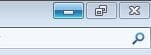
Windows 7: Windows 7 Caption Buttons Appear Small in Boxes

16 Jul 2012  
jm13

Windows 7 Professional 32 bit
 
 
Windows 7 Caption Buttons Appear Small in Boxes

Hello All,
Sorry if this is a repeat post, as this is my first forum post ever. I have a little problem with my Windows 7 Professional laptop. In open windows, the caption buttons come up fairly small in little boxes. I have tried the window color advanced options, but that only makes the boxes bigger or smaller. You may get a better idea of it with the screenshot attached. I am using the default Windows 7 Aero Theme. Any help is appreciated.
Thanks.

Attached Images
 
My System SpecsSystem Spec

17 Jul 2012  
Bongo

Win 7 Pro x64
Council Bluffs, Iowa


Welcome to the Seven Forums
Looking at your screen shot I'm not seeing the problem you are having can you provide some kind of screenshot showing better detail of the problem.
He said you are using the default Aero theme but it looks like basic theme in the frame (it's not transparent).
Jerry
My System SpecsSystem Spec
17 Jul 2012  
jm13

Windows 7 Professional 32 bit


Hi Jerry,
Today upon reboot my problem was solved. I had bought the laptop used, and it came with the Basic theme selected. I had changed it to the default Aero theme, and after rebooting, it applied. Thank you for your attempt to help.
My System SpecsSystem Spec
.


17 Jul 2012  
Bongo

Win 7 Pro x64
Council Bluffs, Iowa


You're welcome, good to hear you got it solved.
My System SpecsSystem Spec
Reply

 Windows 7 Caption Buttons Appear Small in Boxes problems?


Thread Tools


Similar help and support threads for: Windows 7 Caption Buttons Appear Small in Boxes
Thread Forum
how to change caption buttons using windows style builder Themes and Styles
Windows Font size for Tab Control /button caption or form too Small Customization
Mac Caption Buttons - Windows 7 Themes and Styles
Help with Changing Window (caption?) buttons Customization


All times are GMT -5. The time now is 12:45 PM.


Windows 7 Forums is an independent web site and has not been authorized,
sponsored, or otherwise approved by Microsoft Corporation.
"Windows 7" and related materials are trademarks of Microsoft Corp.
© Designer Media Ltd