

Hello all, I'm looking for some help or suggestions of how to find out.
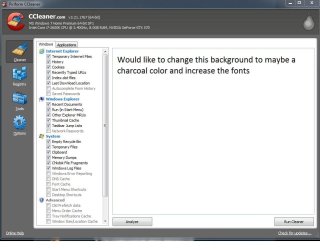
For quite sometime now, I've been looking for a way to customize the colors and font size, of the backgrounds within programs. For example, the web browser, is white, which really hurts my eyes. I understand I can increase the fonts and that is fine. I use the AVS products for converting VHS to DVD and I would like to change it's white background and small fonts. To be able to do this would make things nicer, as it stands now, it;s the cause of many headaches. Hopefully my attachment will make it more clear if I didn't explain well.
Thanks for the help
For quite sometime now, I've been looking for a way to customize the colors and font size, of the backgrounds within programs. For example, the web browser, is white, which really hurts my eyes. I understand I can increase the fonts and that is fine. I use the AVS products for converting VHS to DVD and I would like to change it's white background and small fonts. To be able to do this would make things nicer, as it stands now, it;s the cause of many headaches. Hopefully my attachment will make it more clear if I didn't explain well.
Thanks for the help
Attachments
My Computer
At a glance
Windows 7 Home Premium 64-biti7-2600kCorsair Vengence 8GBEVGA GTX 570 HD
- Computer type
- PC/Desktop
- OS
- Windows 7 Home Premium 64-bit
- CPU
- i7-2600k
- Motherboard
- ASUS P8P67 Deluxe
- Memory
- Corsair Vengence 8GB
- Graphics Card(s)
- EVGA GTX 570 HD
- Hard Drives
- 120 SSD
1 TB HDD
500 GB HDD
- PSU
- Corsair Gaming GS800
- Case
- HAF X
- Cooling
- Corsair H70


