Windows 7 Forums


Windows 7: How can i enable "Restart" in the ctrl+alt+del screen?

13 Sep 2012   #1

windows 7 prof 64bit
 
 
How can i enable "Restart" in the ctrl+alt+del screen?

If you press ctrl+alt+del you have options like "lock this computer", "log off", "show task manager" etc in the middle of the screen.
I would like to have the option "restart", too. i know, that i can get this option at this screen at the power-button but in our systems i have to disable the power-button to prevent that someone presses shut down. restart shoul be still available so i need a way to enable it in the described way.

i don´t want to have "restart" at any other way cause windows is completely closed for our users. they can only use the startet programs in full screen mode. they have no permissions to use the start-button or to see the desktop. only ctrl+alt+del is available to log out. therefore i need this "extraordinary" solution.


anyone has a hint?

the system is windows 7 prof 64bit.
My System SpecsSystem Spec

13 Sep 2012   #2

Windows 7 Home Premium 64 Bit SP 1


Hi PiTu, does it work?
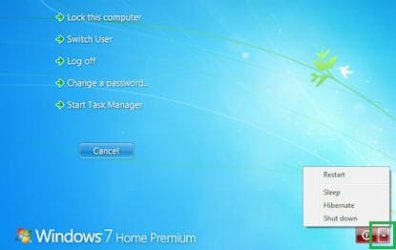
How can i enable "Restart" in the ctrl+alt+del screen?-windows-7-shutdown1.jpg

Click on the triangle, the option is there.
My System SpecsSystem Spec
13 Sep 2012   #3

windows 7 prof 64bit


Quote   Quote: Originally Posted by piTu View Post
i know, that i can get this option at this screen at the power-button but in our systems i have to disable the power-button to prevent that someone presses shut down.

hi, you have read that i´ve disabled the red power-button? this button is not available. therefore i need it displayed as a text between the 5 options in your screen.
My System SpecsSystem Spec
.


13 Sep 2012   #4

Windows 7 Home Premium 64 Bit SP 1


Sorry no more ideas

I asked the best person in this field for help, you may have to wait a bit.
My System SpecsSystem Spec
13 Sep 2012   #5

64-bit Windows 7 Ultimate SP1 & Windows 8 Enterprise
Texas


Hello piTu, and welcome to Seven Forums.

I'm assuming that you used the group policy setting in OPTION TWO to remove all shut down options like that. You might see if undoing that policy, then set the policy for "specific users" or "all users except administator" in step 1 of the same OPTION TWO to have the shut down option for you (administrator) and not other standard users.

Shut Down, Restart, Sleep, and Hibernate Commands - Add or Remove

Hope this helps,
Shawn
My System SpecsSystem Spec
14 Sep 2012   #6

windows 7 prof 64bit


thx for the wellcome .

sure, i´ve set this rule for "non-administrators".

but i´ve to allow the non-administrators to restart the system. but reboot should be not possible for them because the machines are in closed extra rooms and so they can´t start them again after shut down.


now i´ve implemented a button in the full-screen-programs to restart the system. it works but it´s not such a nice solution like my first idea .

maybe someone else has an idea how to bring restart as a text on the security screen.
My System SpecsSystem Spec
Reply

 How can i enable "Restart" in the ctrl+alt+del screen? problems?


Thread Tools


Similar help and support threads for: How can i enable "Restart" in the ctrl+alt+del screen?
Thread Forum
"Press Ctrl + Alt + Del to restart" error and Clean installation Erorr General Discussion
How do I move " press Ctrl+Alt+Del to log on " in login screen Customization
"A Disk Read Error Occured Press Ctrl+Alt+Del to restart" General Discussion
Change "CTRL+ALT+DELETE" wording to "CTRL+ALT+INSERT" Customization
Hard Drive, "a disk error occurred press ctrl+alt+del to restart " Hardware & Devices


All times are GMT -5. The time now is 06:19 AM.


Windows 7 Forums is an independent web site and has not been authorized,
sponsored, or otherwise approved by Microsoft Corporation.
"Windows 7" and related materials are trademarks of Microsoft Corp.
© Designer Media Ltd