Windows 7 Forums


Windows 7: Logon Screen User Picture Frame

03 Nov 2012   #1

Windows 7 Home Premium x64
 
 
Logon Screen User Picture Frame

Does anyone know if there is a way to change the user picture frame on the logon screen, similar to the way you would change it on the start menu?

My System SpecsSystem Spec

04 Nov 2012   #2

Windows 7, 64 bit


Oh wait... no. :/

The only way I know how to do it is by going to to Start> Control Panel> User Accounts and Family Safety> User Accounts> Change your picture

My System SpecsSystem Spec
04 Nov 2012   #3

Windows 7 Home Premium x64 SP1
Bay Area Peninsula


That will change the picture Reckless

Not sure of this changes the frame on the logon screen as well

Windows 7 User Picture Frame Changer : Change Your User Picture Frame With One Click | door2windows

A Guy
My System SpecsSystem Spec
.


04 Nov 2012   #4

Win 7 Pro x64
Council Bluffs, Iowa


They are in the authui.dll in C:\Windows\System32 and if you have 64 bit system it will also be in C:\Windows\SysWOW64 both need edited. Use copy's of the authui.dll to edit.
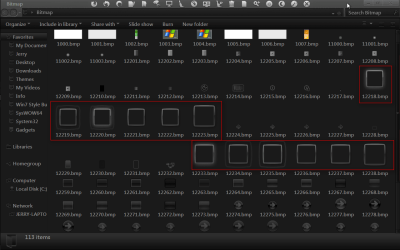
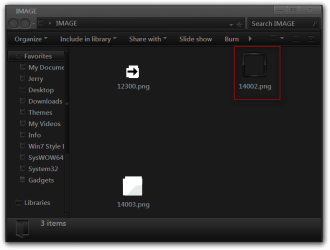
They are in a Bitmap folder look at screenshot for bitmap #s there is 1 .png in the Image folder to. I edited them all to make sure I got it.
You will need to use a resource hacker of some kind to export/import the bitmap and png images and a image editor.
Logon Screen User Picture Frame-bitmap.png

Logon Screen User Picture Frame-image.png

To properly change a system file you need to take ownership give yourself permission and rename the old file and then copy in the new one look at Post #6 of this thread will tell you how to do it Basic Networking Information

If you need help let me know.
Jerry
My System SpecsSystem Spec
04 Nov 2012   #5

Windows 7 Home Premium x64


Hm. Yea I've installed a different logon screen in general and took ownership of the .dll file and all that works fine, but the frame of the user picture stays as default, whereas the frame of the user picture in the start menu is actually still the way I customized it.
My System SpecsSystem Spec
05 Nov 2012   #6

Win 7 Pro x64
Council Bluffs, Iowa


Now I am confused do you want to change the picture frame on the logon screen or in the start menu?

Jerry
My System SpecsSystem Spec
05 Nov 2012   #7

Windows 7 Home Premium x64


I want to change the picture frame in the logon screen, becuase I want it to match the custom logon screen I installed.
My System SpecsSystem Spec
05 Nov 2012   #8

Win 7 Pro x64
Council Bluffs, Iowa


Did you edit all the images shown in post #4?

Jerry
My System SpecsSystem Spec
05 Nov 2012   #9

Win 7 Pro x64
Council Bluffs, Iowa


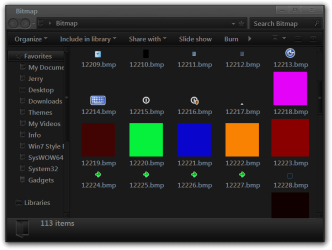
I did some testing and got this (look at screenshots for image #s) with 2 accounts I got dark red and orange (not seen when you hoover or bongo it turns to green and test turns to pink)
when you get to logon it's red.

Jerry
Logon Screen User Picture Frame-2.jpgLogon Screen User Picture Frame-3.jpgLogon Screen User Picture Frame-bitmap.png
My System SpecsSystem Spec
06 Nov 2012   #10

Windows 7 Home Premium x64


Ok Thanks Jerry I'll try the resource hacker.
My System SpecsSystem Spec
Reply

 Logon Screen User Picture Frame problems?


Thread Tools


Similar help and support threads for: Logon Screen User Picture Frame
Thread Forum
Logon screen user picture size Customization
need a logon screen picture frame Customization
Any way to remove user picture frame in log on screen? Customization
How to change Logon screen Picture frame (before logon) Customization
Windows 7 User Picture Frame Changer : Change Your User Picture Frame Customization


All times are GMT -5. The time now is 10:44 PM.


Seven Forums Android App Seven Forums IOS App Follow us on Facebook

Windows 7 Forums is an independent web site and has not been authorized,
sponsored, or otherwise approved by Microsoft Corporation.
"Windows 7" and related materials are trademarks of Microsoft Corp.
© Designer Media Ltd
  

1 2 3 4 5 6 7 8 9 10 11 12 13 14 15 16 17 18 19 20 21 22 23 24 25 26 27 28 29 30 31 32