Windows 7 Forums


Windows 7: Any way to disable jump list arrows from pinned items on start menu?

09 Nov 2012   #1

Windows 7 32-bit
 
 
Any way to disable jump list arrows from pinned items on start menu?

Hello,

I am looking to get rid of the jump lists from the pinned items in the Start menu completely. Already looked under "Taskbar and Start Menu Properties" and unchecked the "store and display recently..." boxes. However the jump list arrows still appear next to an icon. The jump lists are basically empty, it's just that I don't want them to appear at all.

I understand this is extraordinarily picky, but the whole jump list functionality seems like a way for the operating system to try to guess what you want instead of letting you pick out what you want.


I don't mind digging in the registry if that's what it takes.

Thanks!
My System SpecsSystem Spec

09 Nov 2012   #2

Win 7 Pro x64
Council Bluffs, Iowa


Welcome to the Seven Forums

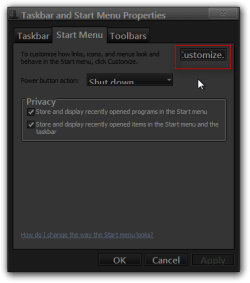
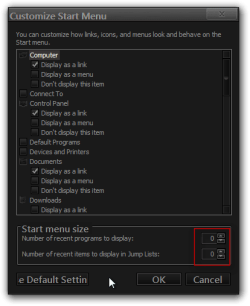
Go back into the Taskbar and Start menu properties and go to the Start menu tab and click on the Customize button in the next window that opens up in the lower right corner decrease the number of the bottom one to 0 that should do it.

Jerry

Any way to disable jump list arrows from pinned items on start menu?-taskbar-start-menu-properties.pngAny way to disable jump list arrows from pinned items on start menu?-customize-start-menu.png
My System SpecsSystem Spec
09 Nov 2012   #3

Windows 7 32-bit


Hello,

Unfortunately I don't believe that's what I'm looking for. Those items both already show zero, and are grayed out because I unchecked the "store and display recently..." boxes. The jump lists are empty, I want to get rid of the arrows completely.

Thanks!
My System SpecsSystem Spec
.


09 Nov 2012   #4

Win 7 Pro x64
Council Bluffs, Iowa


Have a look at this tutorial it should reset and clear the items Jump Lists - Reset and Clear All Items

This tutorial may be of some help Jump Lists - Change Number of Recent Items to Display
Or this one
Recent Items - Turn On or Off

Look at the bottom of each tutorial there are links to others that may be helpful.

Jerry
My System SpecsSystem Spec
31 Dec 2012   #5

7 64


Great question liati!

I find this feature very annoying as well!


I like having a working, dedicated "Recent Items" menu in the start menu, and even retaining the ability to have recent jump lists in the task bar, but I never use and do not like the application jump arrows in the start menu! They expand to take over my entire start menu (it is fairly compact).

Sure would be nice if there was a "disable start menu jump lists" option!
My System SpecsSystem Spec
Reply

 Any way to disable jump list arrows from pinned items on start menu? problems?


Thread Tools


Similar help and support threads for: Any way to disable jump list arrows from pinned items on start menu?
Thread Forum
No jump list for IE 9 in start menu General Discussion
Solved Start Menu problem (jump list for items don't appear) General Discussion
What items can be pinned to start menu? General Discussion
Start Menu Pinned items scroll General Discussion
Start menu pinned items General Discussion


All times are GMT -5. The time now is 05:29 PM.


Seven Forums Android App Seven Forums IOS App Follow us on Facebook

Windows 7 Forums is an independent web site and has not been authorized,
sponsored, or otherwise approved by Microsoft Corporation.
"Windows 7" and related materials are trademarks of Microsoft Corp.
© Designer Media Ltd
  

1 2 3 4 5 6 7 8 9 10 11 12 13 14 15 16 17 18 19 20 21 22 23 24 25 26 27 28 29 30 31 32