Windows 7 Forums


Windows 7: Hide "favorites" folder?

17 Dec 2012   #1

Microsoft Windows 7 Home Premium 64-bit SP1
Indiana
 
 
Hide "favorites" folder?

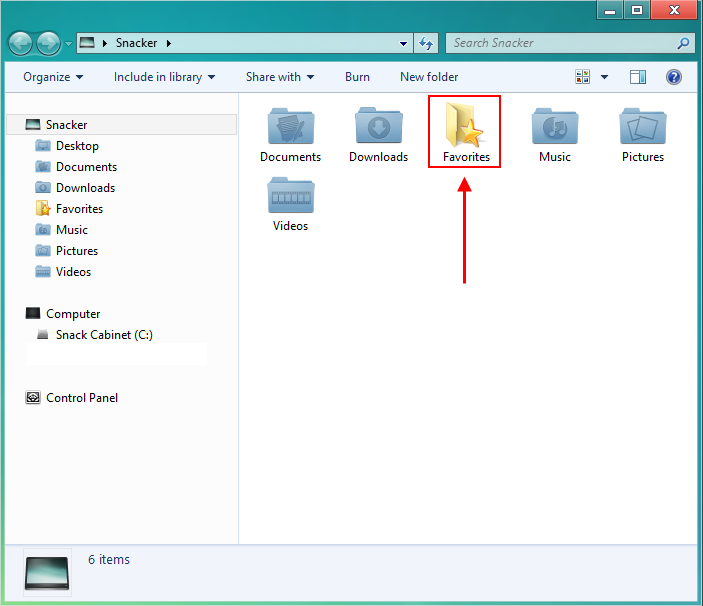
I hate that pesky little folder. I never use it and never will. I hate deleting it every time I restart my computer. I tried hiding the folder, but when I do hide it, it appears in the navigational pane. I don't want it there. Any way of getting rid of this completely without third-party software?


Last edited by SnackCabinet; 17 Dec 2012 at 06:15 AM..
My System SpecsSystem Spec

17 Dec 2012   #2

Win 7 Pro x64
Council Bluffs, Iowa


I am not sure if it will work but this tutorial using Option 2 shows how to move your user folders to a different drive but you could try to use it to move that folder to a different location on your drive it may or may not work User Folders - Change Default Location

This tutorial will show you how to remove it from the navigation pane Favorites - Add or Remove from Navigation Pane

Jerry
My System SpecsSystem Spec
17 Dec 2012   #3

Win 7 Pro x64
Council Bluffs, Iowa


Do not do it it does not work I just tried(moving the favorites folder).
Sorry
Jerry

Last edited by Bongo; 17 Dec 2012 at 12:08 PM..
My System SpecsSystem Spec
.


17 Dec 2012   #4

Windows 7 32 bit


Not sure if this will do it. But it's handy to have in the toolbox for Windows 7 and free
NavPane Customizer

It saves the settings from when you first install. So you can always get back changes. Better than registry editing.
My System SpecsSystem Spec
17 Dec 2012   #5

64-bit Windows 7 Ultimate SP1 & Windows 8 Enterprise
Texas


Hello CosmicPoptart,

You could hide the folder by using OPTION ONE in the tutorial below to set it's attribute to be hidden. This doesn't delete the folder, but only makes it hidden (invisible) until you either set to show hidden files, or unhide the folder.

File and Folder - Hide or Unhide

Hope this helps,
Shawn
My System SpecsSystem Spec
18 Dec 2012   #6

Microsoft Windows 7 Home Premium 64-bit SP1
Indiana


Quote   Quote: Originally Posted by Brink View Post
Hello CosmicPoptart,

You could hide the folder by using OPTION ONE in the tutorial below to set it's attribute to be hidden. This doesn't delete the folder, but only makes it hidden (invisible) until you either set to show hidden files, or unhide the folder.

File and Folder - Hide or Unhide

Hope this helps,
Shawn
I'd do this but the folder shows up in the Navigational pane still.
My System SpecsSystem Spec
18 Dec 2012   #7

64-bit Windows 7 Ultimate SP1 & Windows 8 Enterprise
Texas


You can use the tutorial below that Jerry posted above to remove Favorites from the Navigation Pane.

Favorites - Add or Remove from Navigation Pane
My System SpecsSystem Spec
18 Dec 2012   #8

Microsoft Windows 7 Home Premium 64-bit SP1
Indiana


Quote   Quote: Originally Posted by Brink View Post
You can use the tutorial below that Jerry posted above to remove Favorites from the Navigation Pane.

Favorites - Add or Remove from Navigation Pane
I didn't mean the favorites category.
I meant the folder.
Attached Thumbnails
Hide "favorites" folder?-12-18-2012-5-35-29-am.png  
My System SpecsSystem Spec
18 Dec 2012   #9

64-bit Windows 7 Ultimate SP1 & Windows 8 Enterprise
Texas


LOL, that's what I get for being up all night.

I don't think you can remove the Favorites folder from the user group in the navigation pane unless you uncheck the Show all folders option for the navigation pane.
My System SpecsSystem Spec
19 Dec 2012   #10

Microsoft Windows 7 Home Premium 64-bit SP1
Indiana


Quote   Quote: Originally Posted by Brink View Post
LOL, that's what I get for being up all night.

I don't think you can remove the Favorites folder from the user group in the navigation pane unless you uncheck the Show all folders option for the navigation pane.
Nah, that won't work... I don't know, I remember my Favorites folder disappearing for awhile (about two months), then all of sudden it's there again. You'd think Windows 7 being out for this long, someone would've figured out how to permanently remove the Favorites folder...
My System SpecsSystem Spec
Reply

 Hide "favorites" folder? problems?


Thread Tools


Similar help and support threads for: Hide "favorites" folder?
Thread Forum
My c:\windows folder has a couple of strange files: "Dõ„" and "@ù#" General Discussion
Solved Downloads" folder in the "Users" folder does not appear in Favorites General Discussion
Solved Hiding unused "removable storage" devices from "Computer" folder Customization
File "BOOTMGR" & folder "BOOT" appear on TWO partitions...why? General Discussion
File and Folder - Add "Hide" and "Unhide" to Context Menu Tutorials


All times are GMT -5. The time now is 08:04 PM.


Seven Forums Android App Seven Forums IOS App Follow us on Facebook

Windows 7 Forums is an independent web site and has not been authorized,
sponsored, or otherwise approved by Microsoft Corporation.
"Windows 7" and related materials are trademarks of Microsoft Corp.
© Designer Media Ltd
  

1 2 3 4 5 6 7 8 9 10 11 12 13 14 15 16 17 18 19 20 21 22 23 24 25 26 27 28 29 30 31 32