Windows 7 Forums


Windows 7: Change the notification area icons!

03 Sep 2011   #31

Win 7 Pro x64
Council Bluffs, Iowa


Quote   Quote: Originally Posted by CJW View Post
Made sure I have Full control of originals & renamed them pnidui.original.dll, took Full control of files in .zips you posted & copied them to the appropriate folders; rebooted & wala, icons have changed in both Notification area & when I customize icons. Didn't have to do the SFC / SCANNOW command.

2 questions:
Do you get the original network icon w/circle while 1st booting then it changes (from pic~1 to pic~2)?

When we open the Network and Sharing Center, can we change the house-looking icon using the same pnidui.dll?
That's good to hear.
And yes I get the "original network icon w/circle while 1st booting then it changes (from pic~1 to pic~2)" And yes the house is in that same .dll
I use Restorator 2007 easier then Resource Hacker but it's not free.
If you need more changed get me the icons and I will do it for you.
Jerry
Here is a screenshot of the icons in that .dll
Change the notification area icons!-region.png


My System SpecsSystem Spec

05 Sep 2011   #32
CJW

7 Pro. 64Bit w/SP1


The attached .rar has the icons I'd like to use.

I would like DOOM~1.ico used as the "waiting" icon before it changes to DOOM~3.ico & DOOM~4.ico used when there is no connection available (as a replacement of the original w/the red X on it).
I was also thinking of using one of the Smurf Houses to replace the house in the Network & Sharing Center.

Do you know which resources to change so I can try this?
Attached Files
File Type: rar Network Icons.rar (166.5 KB, 53 views)
My System SpecsSystem Spec
05 Sep 2011   #33

Win 7 Pro x64
Council Bluffs, Iowa


Quote   Quote: Originally Posted by CJW View Post
The attached .rar has the icons I'd like to use.

I would like DOOM~1.ico used as the "waiting" icon before it changes to DOOM~3.ico & DOOM~4.ico used when there is no connection available (as a replacement of the original w/the red X on it).
I was also thinking of using one of the Smurf Houses to replace the house in the Network & Sharing Center.

Do you know which resources to change so I can try this?
Will work on it later or Tuesday Holiday today
Jerry
My System SpecsSystem Spec
.


06 Sep 2011   #34

Win 7 Pro x64
Council Bluffs, Iowa


Quote   Quote: Originally Posted by CJW View Post
I was also thinking of using one of the Smurf Houses to replace the house in the Network & Sharing Center.
Here you go I made 1 set with each house now you can pick with 1 to use.
1house.rar
2house.rar


Quote   Quote: Originally Posted by CJW View Post
Do you know which resources to change so I can try this?
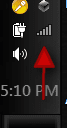
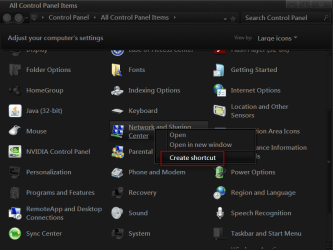
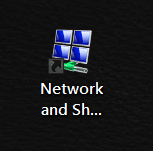
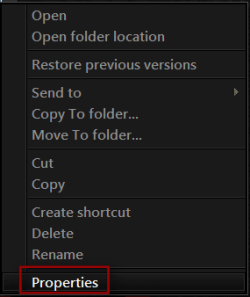
I use 2 ways
1 is to create a shortcut on the desktop right click on it go to properties then go to shortcut tab and click on change icon button and look where the icon is at. Like C\Windows\System32\netcenter.dll then with 64 bit you will look in both C\Windows\System32\netcenter.dll and C\Windows\SysWOW64\netcenter.dll sometimes there is only 1 in C\Windows\System32.
Change the notification area icons!-1.pngName:  2.png
Views: 424
Size:  15.6 KBChange the notification area icons!-3.pngChange the notification area icons!-4.pngChange the notification area icons!-5.png


2
I use Resource Spy a program you can get it if you buy WSB Ave's Windows7 Style Builder And then you can join there forum VistaStyleBuilder - Index
Resource Spy
Jerry
My System SpecsSystem Spec
07 Sep 2011   #35
CJW

7 Pro. 64Bit w/SP1


They both work perfectly, I like how you incorporated all the DOOM icons. Thank you for helping me w/this.

I'm going to do an edit for a friend; if going for a "default windows size", do I need to use an icon w/the dimensions 32x32 pixels & does the bit depth mater?
My System SpecsSystem Spec
07 Sep 2011   #36

Win 7 Pro x64
Council Bluffs, Iowa


Quote   Quote: Originally Posted by CJW View Post
They both work perfectly, I like how you incorporated all the DOOM icons. Thank you for helping me w/this.

I'm going to do an edit for a friend; if going for a "default windows size", do I need to use an icon w/the dimensions 32x32 pixels & does the bit depth mater?
Cool

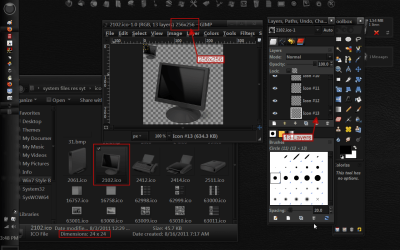
It depends on the icon the the screenshot icon #2102 in windows explorer shows 24x24 but opened in gimp it's really is 256x256 it's because it's a layered, so I would use a 256x256 image to replace it. You need to check the size.
Jerry
Change the notification area icons!-screen-1.png
My System SpecsSystem Spec
08 Sep 2011   #37
CJW

7 Pro. 64Bit w/SP1


Thanks for all the help, here's a pic of what I did .
Wish I could remember from what site I downloaded the monument icons.
Attached Thumbnails
Change the notification area icons!-network-icons.jpg  
My System SpecsSystem Spec
08 Sep 2011   #38

Win 7 Pro x64
Council Bluffs, Iowa


Good job and You're Welcome
Jerry
My System SpecsSystem Spec
15 Oct 2011   #39

64bit w7 ultimate


anybody have a full complete notifications area

overhaul pack ? preferably in nice shiny red with a 3d look , thanks in advance
My System SpecsSystem Spec
Reply

 Change the notification area icons! problems?


Thread Tools


Similar help and support threads for: Change the notification area icons!
Thread Forum
Notification Area Icons - Hide or Show System Icons and Notifications Tutorials
Solved Old Icons in Notification Area General Discussion
Missing icons in notification area General Discussion
Notification Area Icons getting more and more General Discussion
Notification area icons Customization


All times are GMT -5. The time now is 04:57 AM.


Seven Forums Android App Seven Forums IOS App Follow us on Facebook

Windows 7 Forums is an independent web site and has not been authorized,
sponsored, or otherwise approved by Microsoft Corporation.
"Windows 7" and related materials are trademarks of Microsoft Corp.
© Designer Media Ltd
  

1 2 3 4 5 6 7 8 9 10 11 12 13 14 15 16 17 18 19 20 21 22 23 24 25 26 27 28 29 30 31 32