solution does not work when using remote desktop
The solution provided by this link is great, but it appears to not fix the issue entirely. Specifically, when you remote desktop into a Windows 7 computer that has custom keyboard shortcuts assigned, once you have rdp'd into that computer, it loses all of the custom keyboard shortcuts until you logout, and then log back into the computer non-remotely (ie. at the machine itself).
I second the motion that Microsoft should fix the way custom keyboard shortcuts persist on all Windows 7 OS's.
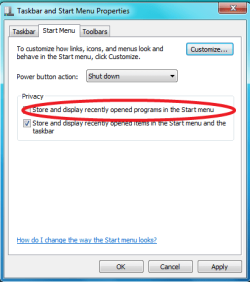
After dogging this same problem for hours it appears that in Windows 7 "Store and display recently opened programs in the Start menu" needs to be enable (checked) for shortcuts to persist across logoff/logon events.
Reference this post for more information
Windows 7 - Custom keyboard shortcut key not working properly [SOLVED] - [H]ard|Forum
Enabling this setting cleared the problems while all other suggested remedies did not.
The solution provided by this link is great, but it appears to not fix the issue entirely. Specifically, when you remote desktop into a Windows 7 computer that has custom keyboard shortcuts assigned, once you have rdp'd into that computer, it loses all of the custom keyboard shortcuts until you logout, and then log back into the computer non-remotely (ie. at the machine itself).
I second the motion that Microsoft should fix the way custom keyboard shortcuts persist on all Windows 7 OS's.
My Computer
At a glance
Windows 7 Enterprise x64
- OS
- Windows 7 Enterprise x64