Windows 7 Forums


Windows 7: Taskbar buttons - auto order

03 Dec 2009   #1

Windows 7 Ultimate x64 / XP Pro x32
 
 
Taskbar buttons - auto order

I'm going nuts trying to find a solution for this.
How can I have my taskbar buttons to open in the order they were opened and stay that way? (FYI buttons are un-grouped)


It's mainly my internet buttons/tabs at the bottom. Before Windows 7, they opened in the order I open them. Example: the last thing I opened be it IE, explorer, or an app should be the last button next to the clock. Right now I have 4 windows open and all the buttons/tabs at the bottom say the same thing. Windows 7 keeps arranging them then I have to look for the new order ...

I hope I have explained my situation enough ... Please help while I still have some hair not pulled out.
My System SpecsSystem Spec

03 Dec 2009   #2

Windows 7 Pro 64 SP1
East Bay Area, CA


Hey Mr Bear Welcome to Seven Forums,
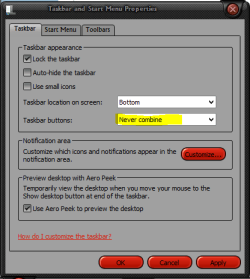
Do you have your taskbar properties set to "NEVER COMBINE" Like this,
Attached Thumbnails
Taskbar buttons - auto order-capture.png  
My System SpecsSystem Spec
03 Dec 2009   #3

Windows 7 Ultimate x64 / XP Pro x32


Yes, taskbar properties are set to "NEVER COMBINE".

Often I have many pages open at a time. Windows 7 will decide to give the buttons a new order as I open new windows then I will have to find the page I wanted to go back to. (they auto arrange so to speak) I'm old school. I believe in quick launch, classic start menu and no auto order/arrange...
My System SpecsSystem Spec
.


03 Dec 2009   #4

Windows 7 Ultimate x64 / XP Pro x32


Here's one case.
1) open IE
2) open second HD (in explorer)
3) open IE

The tab order should be 1-2-3 (XP/Vista style) but its 1-3-2 (Windows 7 style).

Seeing as I use multiple firefox profiles at the same time, at times it get confusing. It appears it might be some sort of "grouping" process.
My System SpecsSystem Spec
18 Dec 2009   #5

Windows 7


I've been scouring the internet for a solution to this too. I joined these forums just to ask, has anyone heard of a solution to this? It's driving me nuts.

Thanks!
My System SpecsSystem Spec
20 Jan 2010   #6

Win 7 64-bit


This problem is driving me nuts, too. I already set IE to not use tabs and disabled the taskbar's groupings, but whenever a new IE window is opened it pops into the taskbar in a random position. (At least there seems to be no logic to it to me. It isn't chronological nor alphabetical by window title.)

I'd be very eager to learn any way to get Windows 7 to stop messing with the order of my IE windows in the Windows 7 taskbar.

Another odd thing is that I've read that items in the taskbar can be reordered, but I can't reorder any of my IE instances that appear in the taskbar.

Craig in NJ
My System SpecsSystem Spec
19 Feb 2010   #7

Seven 7600 Ultimate | Vista 6200 Ultimate SP2
 
 
Found a Solution!

A guy named Ram Michael created the 7 Taskbar Tweaker that really works!

The project url http://board.rammichael.com/index.php?showtopic=29

[x]´s, Rafael Mussi @ Brazil

Overview:
"This programs enables you to tweak your Windows 7 taskbar.
Features:
- Show standard window menu on right click instead of jump list.
- Close or focus a window on middle click instead of running a new instance.
- Disable grouping of windows by file path or application id.
- Cycle through windows of a grouped button on left click instead of showing a thumbnails preview.
- Open with while dropping a file on a taskbar button instead of pinning.
- Disable thumbnail previews.

Tested on Windows 7 RTM 7600 Ultimate only.
Available for x86 and x64 systems."
My System SpecsSystem Spec
20 Feb 2010   #8

Windows 7 Ultimate x64 / XP Pro x32
 
 
It works !!

Just the tweak I was looking for .. Thanks !
My System SpecsSystem Spec
Reply

 Taskbar buttons - auto order problems?


Thread Tools


Similar help and support threads for: Taskbar buttons - auto order
Thread Forum
Solved Change order that buttons appear in the Start Menu?? Customization
Solved Buttons on Taskbar stretch to fill entire Taskbar Customization
unable to use arrow buttons in auto menu in samsung led monitorS22A300 Graphic Cards
Change Order of Grouped Buttons on Taskbar General Discussion
Auto arrange messes desktop icon order General Discussion


All times are GMT -5. The time now is 09:03 AM.


Seven Forums Android App Seven Forums IOS App Follow us on Facebook

Windows 7 Forums is an independent web site and has not been authorized,
sponsored, or otherwise approved by Microsoft Corporation.
"Windows 7" and related materials are trademarks of Microsoft Corp.
© Designer Media Ltd
  

1 2 3 4 5 6 7 8 9 10 11 12 13 14 15 16 17 18 19 20 21 22 23 24 25 26 27 28 29 30 31 32