
View Photoshop PSD thumbnails in Vista and Windows 7
ok guys.. i came here looking for just this.. and sadly, it wasnt here.. so i went on the hunt (via google lol) and i found it... and i did the heavy lifting already and attached the needed redist pkg and dll file so no need to go dl the links mentioned.. unless you want to i guess.. lol... nJoy!
UPDATED! [26July2010]
View Photoshop PSD thumbnails in Vista and Windows 7
Windows introduced a new imaging stack, called Windows Imaging Component (WIC), and uses it in Windows Explorer to create thumbnails for most image file formats. 3rd parties can write their own WIC codec to support proprietary image formats such as Nikon NEF or Canon CR2 raw files and Explorer is able to show thumbnails for those files when the corresponding codec is installed. Microsoft maintain a page containing links to existing codecs. Sadly, there is no publicly available codec for the Photoshop PSD format but the newly released Microsoft Expression Blend 3 design tool (which, by the way, is nothing short of amazing for WPF and Silverlight design) includes such a codec so installing Blend 3 automatically installs the PSD codec. For those who don’t have a need for Blend and don’t want to install it, here is a little hacking guide to extract the codec (a 256KB dll) and use it separately:
Get the codec and its dependencies:
Codec Installation:
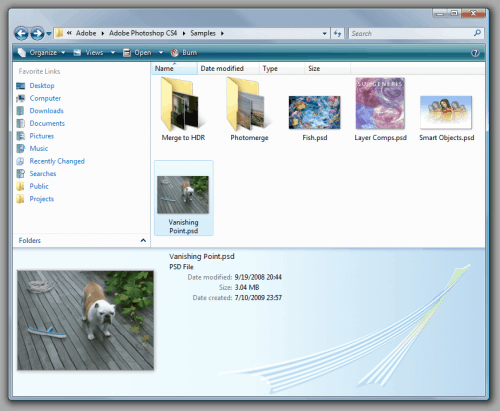
That’s it, Windows Vista Explorer should soon begin to display thumbnails for all PSD files that were saved from Photoshop with the “Maximum Compatibility” option. As a side effect, WIC-aware image viewers such as FastPictureViewer Professional (Fast Picture Viewer | A Fast 32 and 64-bit Image Viewer for Windows 7, Vista & XP.) automatically benefit from the codec installation and uses it to open and display the same PSD files with full fidelity.
files i attached:
Microsoft Visual C++ 2008 SP1 Redistributable Package (x86).exe
AND
PSDCodec.dll.zip
ok guys.. i came here looking for just this.. and sadly, it wasnt here.. so i went on the hunt (via google lol) and i found it... and i did the heavy lifting already and attached the needed redist pkg and dll file so no need to go dl the links mentioned.. unless you want to i guess.. lol... nJoy!
UPDATED! [26July2010]
- Confirmed, does not work with 64bit. Sorry for the late response on this one.
- Make sure you use quotes in step three of Codec Installation!
View Photoshop PSD thumbnails in Vista and Windows 7
Windows introduced a new imaging stack, called Windows Imaging Component (WIC), and uses it in Windows Explorer to create thumbnails for most image file formats. 3rd parties can write their own WIC codec to support proprietary image formats such as Nikon NEF or Canon CR2 raw files and Explorer is able to show thumbnails for those files when the corresponding codec is installed. Microsoft maintain a page containing links to existing codecs. Sadly, there is no publicly available codec for the Photoshop PSD format but the newly released Microsoft Expression Blend 3 design tool (which, by the way, is nothing short of amazing for WPF and Silverlight design) includes such a codec so installing Blend 3 automatically installs the PSD codec. For those who don’t have a need for Blend and don’t want to install it, here is a little hacking guide to extract the codec (a 256KB dll) and use it separately:
Get the codec and its dependencies:
- 1. Download Microsoft Expression Blend 3.0 (3.0.1927.0 7/20/2009) Trial: Link
- 2. Using 7-Zip, open ‘Blend_Trial_en.exe’ from step (1) and in the ‘Setup’ subfolder, open ‘BlImp.cab’ then extract ‘PSDCodec.dll’
- 3. Download the Visual C++ 2008 SP1 Redistributable Package (x86): Link
Codec Installation:
- 1. Install the VC++ Runtime by running vcredist_x86.exe from step (3) above.
- 2. Copy PSDCodec.dll from step (2) to some location on the harddisk, e.g. “C:\Program Files\PSDCodec”
- 3. Register the codec from an administrator’s command prompt by running the following command, (provided C: is the drive you installed Win to) exactly:
regsvr32 "C:\Program Files\PSDCodec\PSDCodec.dll"
(remember, quotes!)
That’s it, Windows Vista Explorer should soon begin to display thumbnails for all PSD files that were saved from Photoshop with the “Maximum Compatibility” option. As a side effect, WIC-aware image viewers such as FastPictureViewer Professional (Fast Picture Viewer | A Fast 32 and 64-bit Image Viewer for Windows 7, Vista & XP.) automatically benefit from the codec installation and uses it to open and display the same PSD files with full fidelity.
files i attached:
Microsoft Visual C++ 2008 SP1 Redistributable Package (x86).exe
AND
PSDCodec.dll.zip
Attachments
Last edited:
My Computer
At a glance
Windows 7 Ultimate x64Dual Core 2.6ghz4gbNvidia GeForce 9800gt
- OS
- Windows 7 Ultimate x64
- CPU
- Dual Core 2.6ghz
- Memory
- 4gb
- Graphics Card(s)
- Nvidia GeForce 9800gt
- Monitor(s) Displays
- 2x19" 1x40"
- Hard Drives
- 2x1tb, 2x500gb


 and clear easy to follow instructions! Of all things Microsoft had it sitting there! Perhaps there's some legality or fee structure that prevents use in Windows.

 , but the viewers are very good.


