Windows 7 Forums


Windows 7: Changing Desktop Icons Font Color, Ultimate

02 Jan 2010   #1

Windows 7
 
 
Changing Desktop Icons Font Color, Ultimate

Hey there,
I recently got the new windows 7 Ultimate
I'm Using DreamScene to change my Desktop Background Picture into a video,
it's a video in snow that repeats itself....
It's in snow so it is white, but now I can't see what is written under my desktop icons,
they are white....
So I tried the solution given here:
Changing the Font for Icon Text
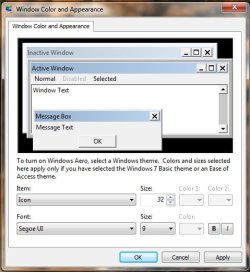
I used the tutorial, and got in here
but what do I do now? I cant change the font color....
help me please...
thanks in advance

Attached Thumbnails
Changing Desktop Icons Font Color, Ultimate-28txqgy.jpg  
My System SpecsSystem Spec

02 Jan 2010   #2

Win 7 Pro x64
Council Bluffs, Iowa


Quote   Quote: Originally Posted by yupp8 View Post
Hey there,
I recently got the new windows 7 Ultimate
I'm Using DreamScene to change my Desktop Background Picture into a video,
it's a video in snow that repeats itself....
It's in snow so it is white, but now I can't see what is written under my desktop icons,
they are white....
So I tried the solution given here:
Changing the Font for Icon Text
I used the tutorial, and got in here
but what do I do now? I cant change the font color....
help me please...
thanks in advance
Open the same window there but pick Desktop in items choose white in color 1 it should give you black text you will have to set your background again.
Hope it helps you.
My System SpecsSystem Spec
23 Jan 2010   #3

Windows 7
 
 
Black or White or Drop Shadows

Yes, it seems windows automatically uses a text color that contrasts the desktop color, even if the desktop color is covered with wallpaper.

And, the only colors it uses are Black or White.

Another option might be to turn on the drop shadows, sometimes this shows better on light-colored fancy wallpaper than the black, even if it is enlarged and set to bold (which you might want to do, regardless of what color you choose).

You can turn on/off drop shadows at: System Properties/Advanced/Performance Options/Use drop shadows for icon labels on the desktop.
My System SpecsSystem Spec
.


Reply

 Changing Desktop Icons Font Color, Ultimate problems?


Thread Tools


Similar help and support threads for: Changing Desktop Icons Font Color, Ultimate
Thread Forum
Desktop Icons - Enable or Disable Changing Tutorials
Solved No color in shortcut icons on desktop General Discussion
Font Color Change in Ultimate x64 Themes and Styles
Desktop font color General Discussion
Changing font colour on desktop Customization


All times are GMT -5. The time now is 07:32 AM.


Seven Forums Android App Seven Forums IOS App Follow us on Facebook

Windows 7 Forums is an independent web site and has not been authorized,
sponsored, or otherwise approved by Microsoft Corporation.
"Windows 7" and related materials are trademarks of Microsoft Corp.
© Designer Media Ltd
  

1 2 3 4 5 6 7 8 9 10 11 12 13 14 15 16 17 18 19 20 21 22 23 24 25 26 27 28 29 30 31 32