
Windows 7 Forums


Windows 7: I hope anyone can tell me this.....?

20 Jan 2010   #1

Windows 7 7600
 
 
I hope anyone can tell me this.....?

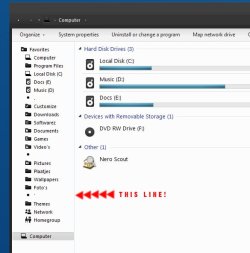
I am looking where i can change this image file, or where i can change the color. I have seen it in other colors but i never found out how.
I hope anyone knows cause i am getting annoyed by that little blue *****.

I hope anyone can tell me this.....?-desk1.jpg


Last edited by koffieJunk; 20 Jan 2010 at 04:50 AM.. Reason: Spelling
My System SpecsSystem Spec

20 Jan 2010   #2

windows 7 Premium
peterborough,Uk


Use gimp,it's free and is like a mini version of photoshop.Can do most common things,definitely what u want to do.If u just want to delete the bit u said,u can just use the eraser
If u upload to picassa or photobucket,u can edit ur pics as well or erase bits.
Remember to rep me with the scales(top right)if i helped.thanx
My System SpecsSystem Spec
20 Jan 2010   #3

Windows 7 32 bit build 7600


From the looks of your explorer window, the theme you are using is similar to mine except mine lacks that little blue line and has a few other differences. I'll just link you to it and if it suits you then good

Q-2.4 Theme - update1 by ~adrianodj25 on deviantART

My apologies it isn't a direct solution to your problem though.
My System SpecsSystem Spec
.


20 Jan 2010   #4

Windows 7 7600


Quote   Quote: Originally Posted by starfox444 View Post
From the looks of your explorer window, the theme you are using is similar to mine except mine lacks that little blue line and has a few other differences. I'll just link you to it and if it suits you then good

Q-2.4 Theme - update1 by ~adrianodj25 on deviantART

My apologies it isn't a direct solution to your problem though.
Thanks for the tip! It's a nice skin!
Still want to know where i can edit the blue line though. It is not the first skin that missed the coloring on that line.

Last edited by koffieJunk; 20 Jan 2010 at 08:33 AM.. Reason: Spelling
My System SpecsSystem Spec
20 Jan 2010   #5

Windows 7 7600


Quote   Quote: Originally Posted by rover3500 View Post
Use gimp,it's free and is like a mini version of photoshop.Can do most common things,definitely what u want to do.If u just want to delete the bit u said,u can just use the eraser
If u upload to picassa or photobucket,u can edit ur pics as well or erase bits.
Remember to rep me with the scales(top right)if i helped.thanx
Actually i want to know where i can find the image itself or where i can edit it. Not how.
Thanks anyway.
My System SpecsSystem Spec
Reply

 I hope anyone can tell me this.....? problems?


Thread Tools


Similar help and support threads for: I hope anyone can tell me this.....?
Thread Forum
Solved hope you all can help BSOD Help and Support
Is There Any Hope? Hardware & Devices
I hope somebody can help me General Discussion
Hi im new here hope you can help General Discussion


All times are GMT -5. The time now is 04:55 PM.


Seven Forums Android App Seven Forums IOS App Follow us on Facebook

Windows 7 Forums is an independent web site and has not been authorized,
sponsored, or otherwise approved by Microsoft Corporation.
"Windows 7" and related materials are trademarks of Microsoft Corp.
© Designer Media Ltd
  

1 2 3 4 5 6 7 8 9 10 11 12 13 14 15 16 17 18 19 20 21 22 23 24 25 26 27 28 29 30 31 32