Windows 7 Forums


Windows 7: Action Center notifications w no icon

25 Feb 2010   #1

Windows 7 Ultimate x64
 
 
Action Center notifications w no icon

Ok so I do want Action Center to notify me if something is wrong but in the meantime I would like it to stay hidden. Even though I chose "only show notifications" under the Notification Area settings, instead of hiding it completely it puts it under the little arrow pointing upwards that shows hidden icons.

In other words how do I get rid of the arrow and the icon. Its not really hidden if it just replaces itself with an arrow now is it...


thanks

My System SpecsSystem Spec

26 Feb 2010   #2

Windows 7 Ultimate 64Bit
USA


I have it set to hide icon and notifications. Only see it if I click the arrow.
Not sure if you can loose the flag and the arrow.

Brink ??
My System SpecsSystem Spec
26 Feb 2010   #3

Windows 7 Ultimate x64 SP1


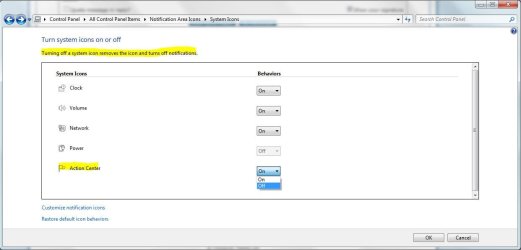
Can't have both. Either you turn it off, which turns off the notifications too, or hide it, which will be hidden with the little arrow, but still give you notifications.

Action Center notifications w no icon-capture.jpg
My System SpecsSystem Spec
.


Reply

 Action Center notifications w no icon problems?


Thread Tools


Similar help and support threads for: Action Center notifications w no icon
Thread Forum
Solved Unable to fix Action Center notifications after virus Win64/Sirefef.B System Security
Solved Action Center Flag System Icon cannot be turned on General Discussion
Solved Action Center icon isnt showing up in taskbar General Discussion
Disable Action Center notifications General Discussion
Windows 7 Icon Problems +Action Center General Discussion


All times are GMT -5. The time now is 11:18 AM.


Windows 7 Forums is an independent web site and has not been authorized,
sponsored, or otherwise approved by Microsoft Corporation.
"Windows 7" and related materials are trademarks of Microsoft Corp.
© Designer Media Ltd