
Windows 7 Forums Search
Welcome to Windows 7 Forums. Our forum is dedicated to helping you find solutions with any problems, errors or issues you are experiencing with Windows 7. The Windows 7 forum also covers news and updates and has an extensive Windows 7 tutorial section that covers a wide range of tips and tricks.


Windows 7 - Add buttons to Win7 folder toolbars like in XP?


03-30-2010   #1


Windows 7 Professional


Add buttons to Win7 folder toolbars like in XP?

I recently moved from XP to Windows 7 and I'm still getting used to it. I've done some basic customization (Thanks, Win 7 Forums!) but I've run into a problem. In WinXP I routinely added new buttons to the folder toolbar to provide easy 1-click access to "delete", "refresh", etc. See the image below, with the red areas highlighted to show new buttons added via the right-click/customize... menu.
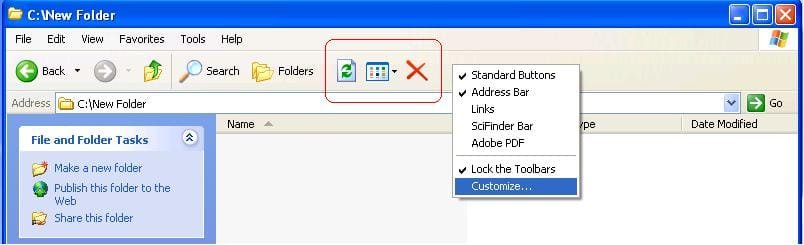
Add buttons to Win7 folder toolbars like in XP?-winxp-toolbar-customization.jpg

How would I do the same sort of thing in Windows 7? See the Windows 7 image below. I would like to add "delete", "refresh", etc. to either of the green-highlighted areas. Is this possible?

Add buttons to Win7 folder toolbars like in XP?-win7-toolbar-customization.jpg

Thanks,
Verne

My System SpecsSystem Spec
03-30-2010   #2


Windows 7 Home 64, Vista Ultimate 64


If you want to add buttons to the bottom area, read this thread: How to rearrange the items in toolbar of windows explor

If you want to add buttons to the top area, install Classic Shell: Welcome to Classic Shell
My System SpecsSystem Spec
03-30-2010   #3


windows 7 Home Premium 64 Bit SP 1


Quote   Quote: Originally Posted by Ivo View Post
If you want to add buttons to the bottom area, read this thread: How to rearrange the items in toolbar of windows explor

If you want to add buttons to the top area, install Classic Shell: Welcome to Classic Shell
HI Ivo , Nice links, man! Thanks a lot
My System SpecsSystem Spec
.


03-31-2010   #4


Windows 7 Professional


Thanks

Thanks ivo. I am a bit daunted by the first approach, but I have taken the second approach and installed portions of Classic Shell that suited me. I have the Delete button in place, along with a few others, via Classic Shell's extra toolbar, but I'm still considering how to get the Refresh button up there.

I appreciate the links!
My System SpecsSystem Spec
03-31-2010   #5


Windows 7 Home 64, Vista Ultimate 64


To add Refresh, you have to edit the Explorer.ini file.
Basicaly you need to add a new item in the ToolbarItems list and then describe it. For Command use "refresh". For the icon you will need to find a suitable icon. I can recommend "shell32.dll,16739".
Don't forget to remove the semi-colon from the ToolbarItems line. This post will get you started. SourceForge.net: Classic Shell: Topic: HOWTO: Customize the toolbar

BTW, why do you need a refresh button? It is right there on the right side of the address bar.
My System SpecsSystem Spec
03-31-2010   #6


Windows 7 Professional


Thanks

Thanks ivo. Getting the Classic Shell toolbar with the Delete button was a big help. Re: the refresh button to the side of the address bar, I know it's there but I'm a creature of habit! I'm deciding whether it's worth the effort to add it to the lower bar, or just get used to stretching that mouse hand a little further.

Thanks again for your assistance.
My System SpecsSystem Spec
Reply

Add buttons to Win7 folder toolbars like in XP? problems?


Thread Tools


Similar Threads for: Add buttons to Win7 folder toolbars like in XP?
Thread Forum
Start Menu User Folder Buttons - Open to Users Instead of Libraries Tutorials
Change Targets of Start Menu Folder Buttons? Customization
Folder Sharing Win7 to Win7 for 1 user only Network & Sharing
Vista to Win7 - HP Pavilion's useless Buttons-Fn Keys Hardware & Devices
Win7 taskbar buttons questions General Discussion


All times are GMT -5. The time now is 06:05 AM.


Windows 7 Forums is an independent web site and has not been authorized,
sponsored, or otherwise approved by Microsoft Corporation.
"Windows 7" and related materials are trademarks of Microsoft Corp.
© Designer Media Ltd
  

1 2 3 4 5 6 7 8 9 10 11 12 13 14 15 16 17 18 19 20 21 22 23 24 25 26 27 28 29 30