Windows 7 Forums Search
Welcome to Windows 7 Forums. Our forum is dedicated to helping you find solutions with any problems, errors or issues you are experiencing with Windows 7. The Windows 7 forum also covers news and updates and has an extensive Windows 7 tutorial section that covers a wide range of tips and tricks.


Windows 7 - Making folder names look neater

 
04-09-2010   #1


Windows 7 64-bit


Making folder names look neater

Hi,

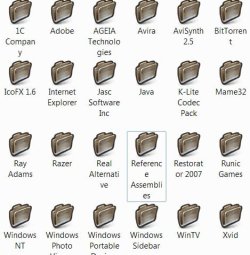
Is there any way to make the text for my folder names look a bit neater? At the moment it's all centred and words which don't fit on the line are moved down to the next line, such as the folder named "Reference Assemblies".

How can I make it either like XP, or just a bit neater? Can I make it just display two lines and then the "..." bit, or are there other ways?

Thanks

Attached Thumbnails
Making folder names look neater-image.jpg  
My System SpecsSystem Spec
04-09-2010   #2


windows 7 RTM


Try This:

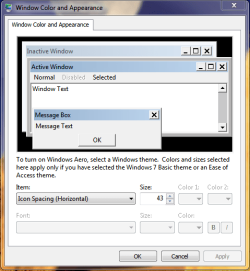
Click on the start orb. Than Enter " Metrics " into the search field
Click on " Change Windows Colors and Metrics "

Under " Item: " Select " Icon Spacing (Horizontal) " and change the
size of the desktop Icon display area.

Repeat this with " Icon Spacing (Vertical)

This will adjust the area which your icons take and thus
adjust the way the text is arranged.

You can also adjust the icon label itself by highlighting the text and
editing it.

Hope this helps
Richard
Attached Thumbnails
Making folder names look neater-capture.png  
My System SpecsSystem Spec
04-09-2010   #3


Windows 7 64-bit


Unfortunately, adjusting Icon spacing only affects the icons on the desktop, not the ones in explorer. Pity, though...
My System SpecsSystem Spec
.


04-09-2010   #4
whs


Vista and Windows7, sometimes Ubuntu and Fedora


For starters I would use the default folder icons. They are wider - up to 17 character spaces on my system.
My System SpecsSystem Spec
04-09-2010   #5


Windows 7 64-bit


Quote   Quote: Originally Posted by whs View Post
For starters I would use the default folder icons. They are wider - up to 17 character spaces on my system.
It still does it if I used the default icons, and I prefer my icons to those. Changing the font size makes a difference, but then if "Reference Assemblies" was a couple of characters longer it would revert back. It's more of a formatting thing than a size thing.
My System SpecsSystem Spec
Reply

 Making folder names look neater problems?


Thread Tools


Similar Threads for: Making folder names look neater
Thread Forum
Scrambled folder names, New Install General Discussion
Solved Folder and file names appear in color? General Discussion
Solved Folder names language specific? General Discussion
Solved Outlook 2010 Folder Names Etc Microsoft Office
Hide Folder Names in Libraries Customization


All times are GMT -5. The time now is 11:37 AM.


Windows 7 Forums is an independent web site and has not been authorized,
sponsored, or otherwise approved by Microsoft Corporation.
"Windows 7" and related materials are trademarks of Microsoft Corp.
© Designer Media Ltd
  

1 2 3 4 5 6 7 8 9 10 11 12 13 14 15 16 17 18 19 20 21 22 23 24 25 26 27 28 29 30