Windows 7 Forums Search
Welcome to Windows 7 Forums. Our forum is dedicated to helping you find solutions with any problems, errors or issues you are experiencing with Windows 7. The Windows 7 forum also covers news and updates and has an extensive Windows 7 tutorial section that covers a wide range of tips and tricks.


Windows 7 - Using subdirectories with Desktop Auto Switching

 
06-01-2010   #1


Windows 7 Pro 64bit


Using subdirectories with Desktop Auto Switching

I have a directory with many subdirectories of pictures I have taken over the years.

I want to use these pictures as Desktop Backgrounds using the auto-switcher.

It seems the Auto-switcher does not have an option for using subdirectories in this setup.

I found a hint that the "workaround" is to set up a library. However I have more than 50 directories of these pictures.

How is the 'right' way to set up a Desktop Background Autoswitcher with a large (>50) collection of directories with pictures?

My System SpecsSystem Spec
06-02-2010   #2


Mc Donald OS Version Beta


Fixed

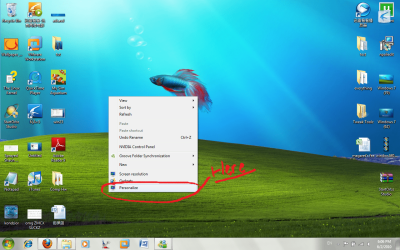
Using subdirectories with Desktop Auto Switching-tut1.pngAlright I will help!! xD + Rep if it works...
~~~~~~~~~~~~~~~~~~~~~~~~~~~~~~~~~~~~~~~~~

1. Get all the pictures that you have into one folder. (For example on ur desktop)

2. Now, open up personalize.
Click image for larger version

Name:	tut1.png
Views:	9
Size:	1.54 MB
ID:	76381

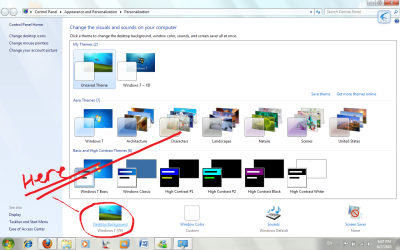
3. Click on Desktop Background

Using subdirectories with Desktop Auto Switching-tut2.png

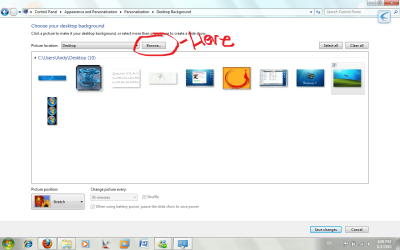
4. Select Browse
Using subdirectories with Desktop Auto Switching-tut3.png

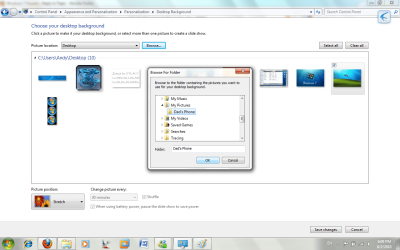
5. Select the folder where I told you to put everything in there.

Using subdirectories with Desktop Auto Switching-tut4.png

6. Wallah! All the pics should be automatically selected! Change the time interval it takes for the pictures to switch, and Click Save Changes...

~~~~~~~~~~~~~~~~~~~~~~~~~~~~~~~~~~~~~~~~~~~~~~~~~~~

Hope this helps!!!
My System SpecsSystem Spec
06-02-2010   #3


Windows 7 Pro 64bit


I'm not sure this quite answers the issue I proposed. I'll try to clarify.

All my pictures are in a directory structure broken out by date taken. I do not want to unroll or flatten this structure. I want to keep all my directories broken out by date taken.

So the suggestion to copy everything into a flat directory with no hirarchy is really not what I want to do.

At this point I downloaded an additional program to do what I want, but it seems like a total waste when this is built into Windows, except that Windows just doesn't seem to have a "include subdirectory" or similar option for this.

I'm hoping I'm just missing something.
My System SpecsSystem Spec
.


06-02-2010   #4


Win7 Ultimate x64 7600


My System SpecsSystem Spec
06-02-2010   #5


My System SpecsSystem Spec
06-02-2010   #6


Mc Donald OS Version Beta


Quote   Quote: Originally Posted by TheKat View Post
I'm not sure this quite answers the issue I proposed. I'll try to clarify.

All my pictures are in a directory structure broken out by date taken. I do not want to unroll or flatten this structure. I want to keep all my directories broken out by date taken.

So the suggestion to copy everything into a flat directory with no hirarchy is really not what I want to do.

At this point I downloaded an additional program to do what I want, but it seems like a total waste when this is built into Windows, except that Windows just doesn't seem to have a "include subdirectory" or similar option for this.

I'm hoping I'm just missing something.
O_O That means you need to use another program than. srry dude. Try some of the things people above me posted.
My System SpecsSystem Spec
Reply

 Using subdirectories with Desktop Auto Switching problems?


Thread Tools


Similar Threads for: Using subdirectories with Desktop Auto Switching
Thread Forum
Solved frequent switching between game & desktop Gaming
Windows auto switching General Discussion
Screen Dims when switching between applications / desktop General Discussion
No Remote Desktop, No User Switching Network & Sharing
Desktop Slideshow Theme stopped switching images Customization


All times are GMT -5. The time now is 12:06 PM.


Windows 7 Forums is an independent web site and has not been authorized,
sponsored, or otherwise approved by Microsoft Corporation.
"Windows 7" and related materials are trademarks of Microsoft Corp.
© Designer Media Ltd
  

1 2 3 4 5 6 7 8 9 10 11 12 13 14 15 16 17 18 19 20 21 22 23 24 25 26 27 28 29 30