Windows 7 Forums Search
Welcome to Windows 7 Forums. Our forum is dedicated to helping you find solutions with any problems, errors or issues you are experiencing with Windows 7. The Windows 7 forum also covers news and updates and has an extensive Windows 7 tutorial section that covers a wide range of tips and tricks.


Windows 7 - Intel Chipset Software Installation Utility 9.1.1.1011

 
05-23-2009   #1


Intel Chipset Software Installation Utility 9.1.1.1011

Download the recently released Intel Chipset Software Installation Utility 9.1.1.1011. This is for both x86 and x64 XP, Vista, 2000, and Windows 7. Drivers included are for the popular 945 and 965 series. These drivers are newer than what is available on Intel's website.

Code:
*  Product: Intel(R) Chipset Device Software
*  Release: Production Candidate
*  Version: 9.1.1.1011
*  Target Chipset#: Intel(R) 5 Series/3400 Series Chipset.
*        Also supports 5000/7000/5500/X58 Series Chipsets
*  Date: April 09 2009
Intel Chipset Software Installation Utility 9.1.1.1011

Source: Majorgeeks

My System SpecsSystem Spec
05-24-2009   #2


Windows 7 RC 64bit


it doesn't list Windows 7 in the readme (which doesn't mean it won't work I know). will try and see if it improves my hard drive performance.
edit1:
installed fine with an OK that they got installed. After reboot, WEI is still the same. Too bad, no surprise here . My index for my raptor is still pretty low at 5.8. From reading other posts MS scaled this down and I wonder what the maximum is for hard drives these days....

Last edited by DerAusgewanderte; 05-24-2009 at 10:15 AM..
My System SpecsSystem Spec
05-24-2009   #3


Windows 7 SP1 x64 build 7601.21701


there is also 9.1.1.1012 on stationdrivers that im using. (with IMSM 8.9.0.1015)

Code:
*  Product: Intel(R) Chipset Device Software
*  Release: Production Candidate
*  Version: 9.1.1.1012
*  Target Chipset#: Intel(R) 5 Series/3400 Series Chipset
*  Date: April 20 2009
My System SpecsSystem Spec
.


05-24-2009   #4


Windows 7 RC 64bit


cool, that one actually lists windows 7 in the description:
Windows 2000/XP/Vista/Windows 7 32/64bits/2003 server/2008 Server
Maybe that will work better with my X58 chip
My System SpecsSystem Spec
05-24-2009   #5


Windows Pro 64bit


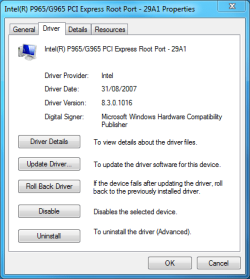
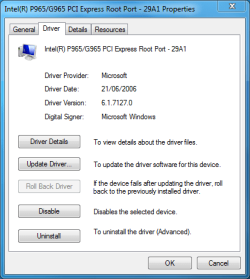
The setup.exe said it had installed successfully, however when i go to device manager it has not updated anything, so i have to manually install them one at a time, i always have to do it this way.
Attached Thumbnails
Intel Chipset Software Installation Utility 9.1.1.1011-before.png   Intel Chipset Software Installation Utility 9.1.1.1011-updated.png  

Last edited by Anthony; 05-24-2009 at 02:34 PM..
My System SpecsSystem Spec
05-24-2009   #6


Windows 7 RC 64bit


Quote   Quote: Originally Posted by Anthony View Post
The setup.exe said it had installed, successfully, however when i go to device manager it has not updated anything, so i have to manually install them one at a time, i always have to do it this way.
thanks for your post. I just checked mine and they didn't install either even though they said they did. will follow your advice and install them individually via update driver....

thanks
My System SpecsSystem Spec
05-24-2009   #7


Windows Pro 64bit


Quote   Quote: Originally Posted by DerAusgewanderte View Post
thanks for your post. I just checked mine and they didn't install either even though they said they did. will follow your advice and install them individually via update driver....

thanks
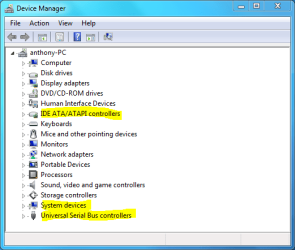
Your welcome, anything with Intel before it in device manager can be updated, usually in the -:

IDE ATA/ATAPI controllers
System devices
Universal serial bus controllers
Attached Thumbnails
Intel Chipset Software Installation Utility 9.1.1.1011-update.png  
My System SpecsSystem Spec
05-29-2009   #8


Windows 7 RC1 x64


Quote   Quote: Originally Posted by SoLoR View Post
there is also 9.1.1.1012 on stationdrivers that im using. (with IMSM 8.9.0.1015)

Code:
*  Product: Intel(R) Chipset Device Software
*  Release: Production Candidate
*  Version: 9.1.1.1012
*  Target Chipset#: Intel(R) 5 Series/3400 Series Chipset
*  Date: April 20 2009
Just installed 7 RC1 x64 today, brand new. I want to install 9.1.1.1012. With the previous Intel Chipset drivers you could install from the command line with the "-overall" flag at the end, and it should overwrite all old drivers to the new ones included in the 9.1.1.1012 package.

Has anyone tried this and confirmed it works?
My System SpecsSystem Spec
05-29-2009   #9


Windows 7 Home Premium x64 7600 [MSDN]


Is there a real benefit to installing these drivers? I have on a few of my builds and don't notice a real-world difference. I certainly don't have any (obvious) issues with them. Someone fill me in?
My System SpecsSystem Spec
05-29-2009   #10


Windows 7 SP1 x64 build 7601.21701


Quote   Quote: Originally Posted by Captain Zero View Post
Is there a real benefit to installing these drivers? I have on a few of my builds and don't notice a real-world difference. I certainly don't have any (obvious) issues with them. Someone fill me in?
nah i dont notice any difference as well, except that matrix storage manager. Im installing them from same reason, that im installing every Windows 7 build and that is "must have latest version"
My System SpecsSystem Spec
Reply

 Intel Chipset Software Installation Utility 9.1.1.1011 problems?


Thread Tools


Similar Threads for: Intel Chipset Software Installation Utility 9.1.1.1011
Thread Forum
Latest Intel® Chipset Device Software Drivers
Intel Chipset Installation For Utility Windows 7 X64 ? Drivers
Intel Chipset Software Installation Utility Benchmarks? Drivers
Released: Intel Chipset Software 9.1.1.1014 Drivers
Intel Chipset Software Installation 9.1.1.1014 WHQL Software


All times are GMT -5. The time now is 12:52 PM.


Windows 7 Forums is an independent web site and has not been authorized,
sponsored, or otherwise approved by Microsoft Corporation.
"Windows 7" and related materials are trademarks of Microsoft Corp.
© Designer Media Ltd
  

1 2 3 4 5 6 7 8 9 10 11 12 13 14 15 16 17 18 19 20 21 22 23 24 25 26 27 28 29 30